
DHTMLX Gantt - JavaScript Gantt Chart (Community Edition)
 ·
·  ·
·


Quick start | Build from source | Features | Community vs PRO | Frameworks | License | Links
DHTMLX Gantt Community Edition. Open-source JavaScript Gantt chart for project scheduling, timelines, task dependencies, and drag-and-drop editing.
It is a framework-agnostic component that works with plain JavaScript and integrates with React, Angular, Vue, and Svelte.
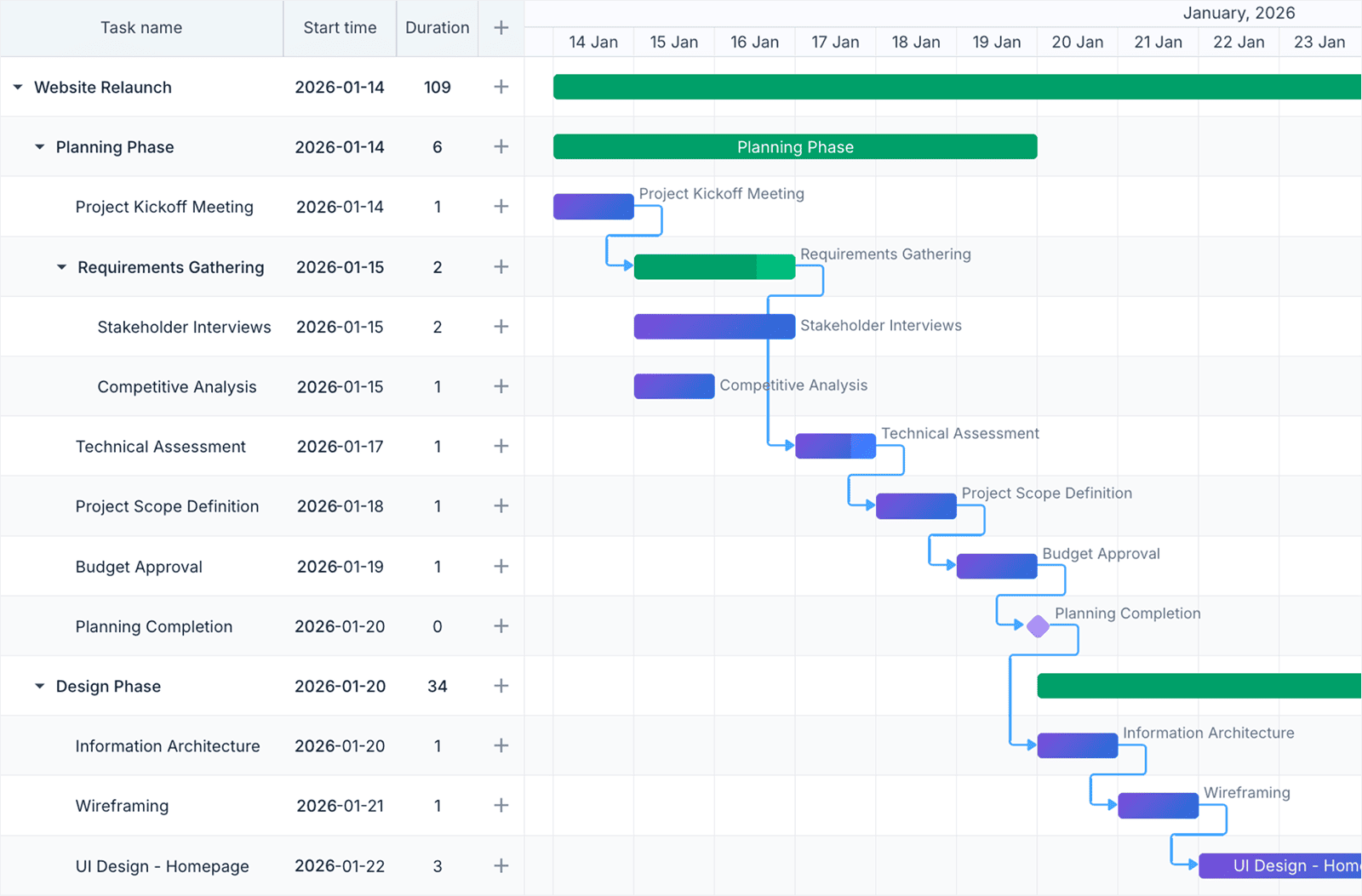
This is the Community Edition of DHTMLX Gantt - distributed as the dhtmlx-gantt npm package under the MIT License and shipped as readable source code you can fork, modify, and rebuild. For advanced project management capabilities such as auto-scheduling, critical path, and resource management, see the PRO edition.
Quick start
Install the package, import the script and styles, and initialize the chart in a container element.
Install
npm install dhtmlx-gantt
Import
With a module bundler (Vite, webpack, Rollup, …):
import { gantt } from "dhtmlx-gantt";
import "dhtmlx-gantt/codebase/dhtmlxgantt.css";
The side-effect import also registers a global gantt, so plain <script> tags work against the bundled files in codebase/:
<script src="codebase/dhtmlxgantt.js"></script>
<link rel="stylesheet" href="codebase/dhtmlxgantt.css">
Add a container
<div id="gantt_here" style="width: 100%; height: 600px;"></div>
Initialize
gantt.config.date_format = "%Y-%m-%d";

gantt.init("gantt_here");

gantt.parse({
    data: [
        { id: 1, text: "Website redesign", type: "project",    progress: 0.4, open: true },
        { id: 2, text: "Research",         start_date: "2026-06-01", duration: 4, parent: 1, progress: 1 },
        { id: 3, text: "Wireframes",       start_date: "2026-06-05", duration: 6, parent: 1, progress: 0.6 },
        { id: 4, text: "Visual design",    start_date: "2026-06-11", duration: 8, parent: 1, progress: 0.2 },
        { id: 5, text: "Launch",           start_date: "2026-06-19", type: "milestone", parent: 1 }
    ],
    links: [
        { id: 1, source: 2, target: 3, type: "0" },  // finish-to-start
        { id: 2, source: 3, target: 4, type: "0" },
        { id: 3, source: 4, target: 5, type: "0" }
    ]
});
See a live demo · or run the bundled gallery with npm run start and open /samples/.
Build from source
Unlike a compiled-only distribution, the Community Edition ships its TypeScript/JavaScript sources and LESS styles, so you can read, change, and rebuild the library.
git clone https://github.com/DHTMLX/gantt.git
cd gantt
npm install

npm run build     # builds codebase/dhtmlxgantt.js (+ es module, css, d.ts)
npm run start     # dev mode: watch build + samples server at http://localhost:5173
npm run test      # builds, then loads every sample and fails on console errors
npm run lint      # eslint over src/
codebase/ is build output (generated, not committed). After npm run build you can serve the files from codebase/ directly via <script> tags, exactly like the npm package.
Repository layout
src/        library sources (TypeScript + JavaScript, LESS styles)
samples/    runnable demos (npm run start, then open /samples/)
scripts/    build, dev server, and test runner scripts
codebase/   build output (generated, not committed)
Testing
npm run test                 # smoke test: builds, then loads every sample
npm run test 05_lightbox     # smoke just one samples folder
npm run lint                 # eslint over src/
npm run test is a smoke pass: it loads every built sample headless and fails if any page throws or logs a console.error. It runs the build first; pass --no-build to skip it (e.g. in CI, where the build is a separate step).
Basic usage
Configuring the grid and time scale
// Configure grid columns
gantt.config.columns = [
    { name: "text",       label: "Task",  tree: true, width: 220 },
    { name: "start_date", label: "Start", align: "center", width: 90 },
    { name: "duration",   label: "Days",  align: "center", width: 60 },
    { name: "add",        label: "",      width: 44 }   // add-task button column
];

// Set the time scale unit and step
gantt.config.scale_unit = "week";
gantt.config.date_scale = "%M %d";

// Highlight weekends on the timeline
gantt.templates.scale_cell_class = function (date) {
    if (date.getDay() === 0 || date.getDay() === 6) return "weekend";
};

gantt.init("gantt_here");
Enabling plugins
Activate optional extensions before calling gantt.init():
gantt.plugins({
    tooltip:             true,   // hover tooltips on task bars
    quick_info:          true,   // touch-friendly task popup
    fullscreen:          true,   // fullscreen toggle
    keyboard_navigation: true,   // arrow-key navigation
    drag_timeline:       true,   // drag to scroll the timeline
    click_drag:          true    // draw new tasks by dragging on the timeline
});

gantt.init("gantt_here");
Multiple chart instances
Render several independent Gantt charts on one page with the Gantt factory:
import { Gantt } from "dhtmlx-gantt";

var chartA = Gantt.getGanttInstance();
var chartB = Gantt.getGanttInstance();

chartA.init("gantt_a");
chartB.init("gantt_b");
The default gantt export is itself an instance created this way, so existing single-chart code keeps working unchanged.
Reacting to changes
gantt.attachEvent("onAfterTaskUpdate", function (id, task) {
    fetch("/api/tasks/" + id, {
        method: "PUT",
        headers: { "Content-Type": "application/json" },
        body: JSON.stringify(task)
    });
});

gantt.attachEvent("onAfterLinkAdd", function (id, link) {
    fetch("/api/links", {
        method: "POST",
        body: JSON.stringify(link)
    });
});
For two-way sync with a REST backend, use the bundled dataProcessor - see Backend integration.
Features
The Community Edition covers the everyday Gantt feature set, including projects (summary tasks) and milestones:
- Task grid - any number of configurable columns, a tree column, and inline cell editing
- Projects / summary tasks and milestones - task types with type-aware rendering and lightbox
- Zoomable time scale - single or dual scale; configurable unit (hour … year) and step
- Four dependency types - finish-to-start, start-to-start, finish-to-finish, start-to-finish, with lag and drag-to-create links
- Drag-and-drop scheduling - move task bars to reschedule; resize bars to change duration
- Progress indicators - completion shown as a filled bar segment, editable in the lightbox
- Lightbox task editor - configurable modal dialog; add your own controls
- Smart rendering - only visible rows/columns are drawn, for large datasets
- Multiple chart instances - render several independent Gantts on one page via the
Ganttfactory - Templates - override any rendered element (bars, grid cells, scale cells, tooltips)
- Plugins - tooltips, quick info, keyboard navigation, fullscreen, drag-timeline, click-drag
- Grid column resizing and a column-configuration API
- Data loading/saving - JSON/XML parsing and serialization, REST
dataProcessor - Export - to PDF, PNG, Excel, iCal, and MS Project via the DHTMLX online export service
- Skins - Material, Terrace, Meadow, Broadway, Skyblue, and more
- 32 locales, WAI-ARIA accessibility, touch support, CSP-compliant mode
- Event system - 100+ events covering interactions and lifecycle hooks
- TypeScript - bundled type definitions
Note:
codebase/dhtmlxgantt.d.tsdescribes the full product API, so it lists some PRO-only methods that are not present in this edition.
Community vs PRO
This edition is intended for schedule visualization and manual editing. Production project-management features - auto-scheduling, critical path, resource planning - are part of the commercial PRO edition.
| Feature | Community (MIT) | PRO |
|---|---|---|
| Task grid, columns, tree, inline editing | ✓ | ✓ |
| Zoomable single/dual time scale | ✓ | ✓ |
| Projects / summary tasks, milestones | ✓ | ✓ |
| Four dependency types (FS/SS/FF/SF) + lag | ✓ | ✓ |
| Drag-and-drop scheduling & bar resize | ✓ | ✓ |
| Progress, lightbox editor, templates | ✓ | ✓ |
| Smart rendering for large datasets | ✓ | ✓ |
| Multiple chart instances per page | ✓ | ✓ |
| Tooltips, quick info, keyboard nav, fullscreen | ✓ | ✓ |
| Drag-timeline, click-drag, grid column resize | ✓ | ✓ |
| Skins, 32 locales, accessibility, touch | ✓ | ✓ |
| JSON/XML loading, REST dataProcessor | ✓ | ✓ |
| Export to PDF/PNG/Excel/iCal/MS Project | ✓ | ✓ |
| Auto-scheduling | ✗ | ✓ |
| Critical path & slack | ✗ | ✓ |
| Resource management (assignments, histogram, grouping by resource) | ✗ | ✓ |
| Baselines & deadlines | ✗ | ✓ |
| Constraints | ✗ | ✓ |
| Split tasks & rollups | ✗ | ✓ |
| WBS codes | ✗ | ✓ |
| Grouping | ✗ | ✓ |
| Dynamic (on-demand) loading | ✗ | ✓ |
| Undo / redo | ✗ | ✓ |
| Multi-task selection & drag | ✗ | ✓ |
| Timeline markers / today line | ✗ | ✓ |
| Unscheduled tasks & new-task placeholder | ✗ | ✓ |
| Working-time calendars (setWorkTime, custom work calendars) | ✗ | ✓ |
Need advanced project management features?
The DHTMLX Gantt PRO edition adds auto-scheduling, critical path calculation, resource management (assignments, histograms, and grouping by resource), working-time calendars, baselines and deadlines, constraints, split tasks, WBS, and dynamic data loading - capabilities designed for production project-management applications.
Framework integration
DHTMLX Gantt works with popular front-end frameworks. The PRO edition provides ready-made components (ReactGantt, VueGantt, AngularGantt); the Community Edition integrates via the standard wrapper patterns documented below.
- React integration guide
- Angular integration guide
- Vue.js integration guide
- Svelte integration guide
- Salesforce integration guide
Backend integration
The bundled dataProcessor provides two-way data sync between the chart and a REST API:
License
This Community Edition of DHTMLX Gantt is licensed under the MIT License - see LICENSE.md.
You are free to use, copy, modify, merge, publish, distribute, sublicense, and sell copies of this software in any project, including closed-source and commercial applications, subject only to the MIT License terms. It is distributed in the hope that it will be useful, but WITHOUT ANY WARRANTY; without even the implied warranty of MERCHANTABILITY or FITNESS FOR A PARTICULAR PURPOSE.
Copyright © 2026 XB Software Ltd.
Documentation and resources
The full product documentation applies to this edition within the feature scope above.
- Product page - overview, screenshots, and key features
- Documentation - getting-started guides, configuration, and tutorials
- API reference - config, templates, events, and methods
- Live demos and samples - interactive examples for each feature
- Community forum - Q&A and discussions
AI-assisted development
Building with an AI coding assistant (Claude Code, Cursor, Codex…)? Two free helpers cover the dhtmlx-gantt package:
- DHTMLX MCP Server - connects your assistant to up-to-date DHTMLX documentation and API reference.
- Agent Skills - teach the assistant correct integration patterns and known pitfalls.
Useful links
If this project helps you, please ⭐ the GitHub repository.