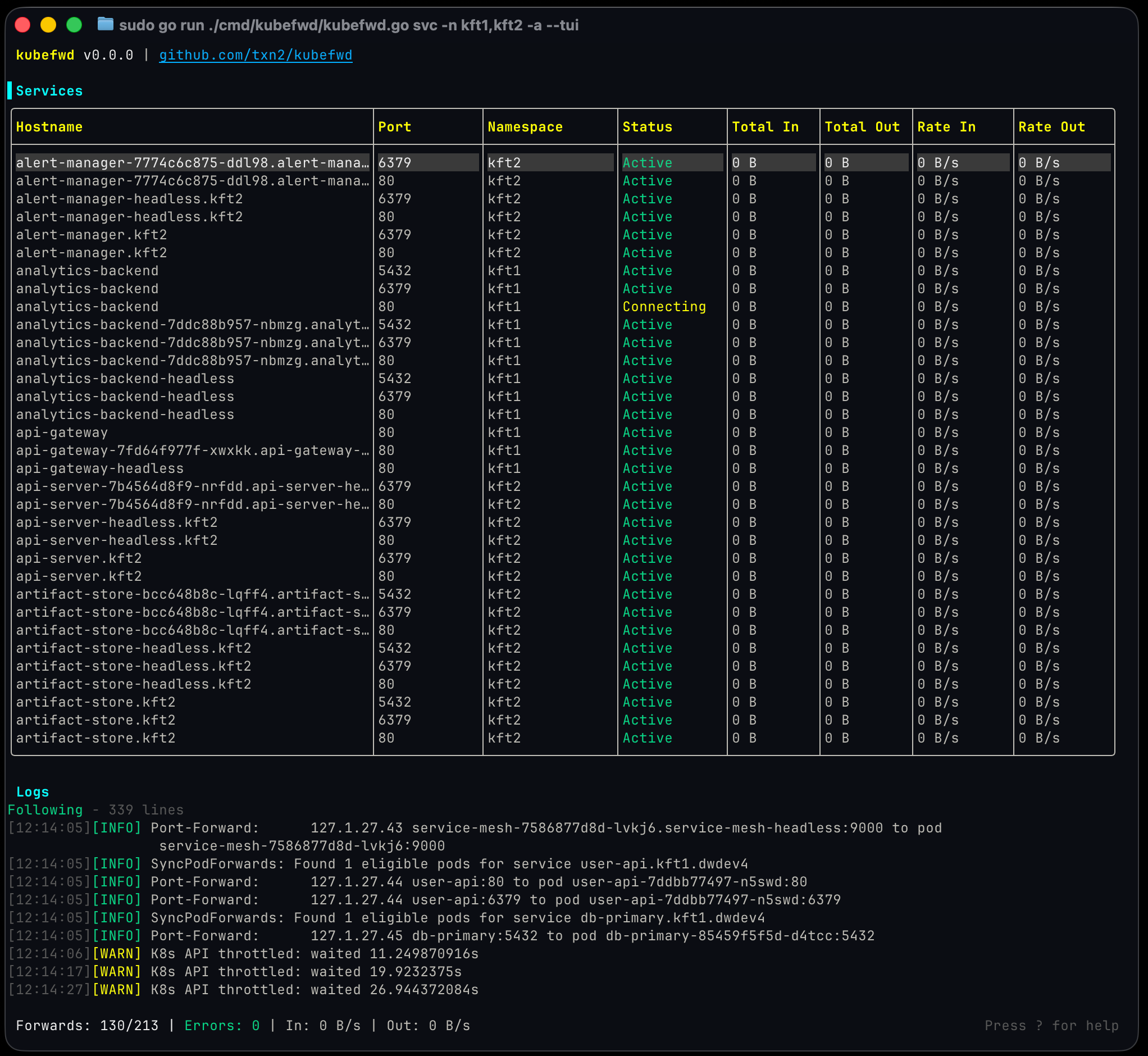
Kubernetes port forwarding for local development.
NOTE: Accepting pull requests for bug fixes, tests, and documentation only.

kubefwd (Kube Forward)

Read Kubernetes Port Forwarding for Local Development for background and a detailed guide to kubefwd. Follow Craig Johnston on Twitter for project updates.
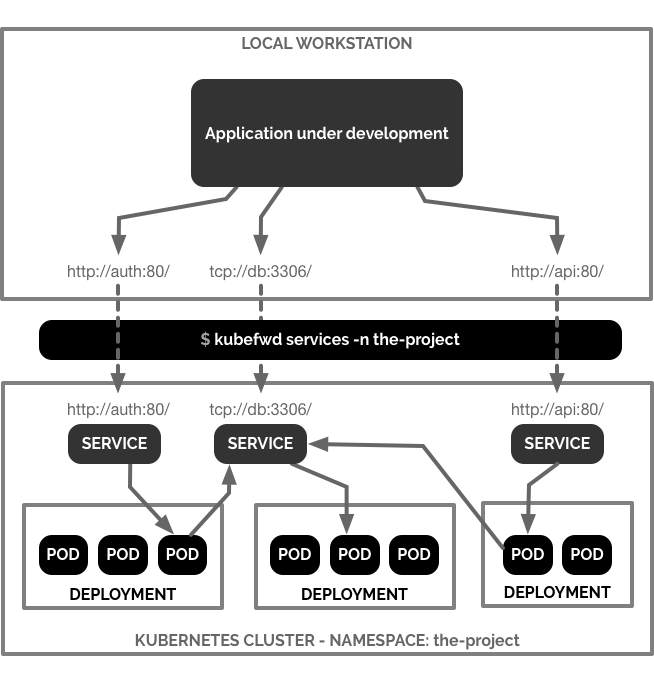
kubefwd is a command line utility built to port forward multiple services within one or more namespaces on one or more Kubernetes clusters. kubefwd uses the same port exposed by the service and forwards it from a loopback IP address on your local workstation. kubefwd temporarily adds domain entries to your /etc/hosts file with the service names it forwards.
Key Differentiator: Unlike kubectl port-forward, kubefwd assigns each service its own unique IP address (127.x.x.x), allowing multiple services to use the same port simultaneously without conflicts. This enables you to run multiple databases on port 3306 or multiple web services on port 80, just as they would in the cluster.
When working on our local workstation, my team and I often build applications that access services through their service names and ports within a Kubernetes namespace. kubefwd allows us to develop locally with services available as they would be in the cluster.

Quick Start
# macOS
brew install txn2/tap/kubefwd
# Linux (download from releases page)
# https://github.com/txn2/kubefwd/releases
# Windows
scoop install kubefwd
# Run kubefwd (requires sudo for /etc/hosts and network interface management)
sudo -E kubefwd svc -n <your-namespace>
Press Ctrl-C to stop forwarding and restore your hosts file.
Supported Platforms
- macOS (tested on Intel and Apple Silicon)
- Linux (tested on various distributions and Docker containers)
- Windows (via Scoop package manager or Docker)
Installation
macOS Install / Update
kubefwd assumes you have kubectl installed and configured with access to a Kubernetes cluster. kubefwd uses the kubectl current context. The kubectl configuration is not used. However, its configuration is needed to access a Kubernetes cluster.
Ensure you have a context by running:
kubectl config current-context
If you are running MacOS and use homebrew you can install kubefwd directly from the txn2 tap:
brew install txn2/tap/kubefwd
To upgrade:
brew upgrade kubefwd
Linux Install / Update
Download pre-built binaries from the releases page:
.debpackages for Debian/Ubuntu.rpmpackages for RHEL/CentOS/Fedora.tar.gzarchives for any Linux distribution
Example for Debian/Ubuntu:
# Download the latest .deb file from releases page
sudo dpkg -i kubefwd_*.deb
Windows Install / Update
Using Scoop:
scoop install kubefwd
To upgrade:
scoop update kubefwd
Docker
Forward all services from the namespace the-project to a Docker container named the-project:
docker run -it --rm --privileged --name the-project \
-v "$(echo $HOME)/.kube/":/root/.kube/ \
txn2/kubefwd services -n the-project
Execute a curl call to an Elasticsearch service in your Kubernetes cluster:
docker exec the-project curl -s elasticsearch:9200
Key Features
- Bulk Port Forwarding: Forward all services in a namespace with a single command
- Unique IP per Service: Each service gets its own 127.x.x.x IP address, eliminating port conflicts
- Automatic /etc/hosts Management: Service hostnames automatically added and removed
- Headless Service Support: Forwards all pods for headless services
- Dynamic Service Discovery: Automatically starts/stops forwarding as services are created/deleted
- Pod Lifecycle Monitoring: Detects pod changes and maintains forwarding
- Label & Field Selectors: Filter which services to forward
- Multiple Namespace Support: Forward services from multiple namespaces simultaneously
- Port Mapping: Remap service ports to different local ports
- IP Reservation: Configure specific IP addresses for services
Contribute
Fork kubefwd and build a custom version.
Pull Request Policy: We are accepting pull requests for:
- Bug fixes
- Tests and test improvements
- Stability and compatibility enhancements
- Documentation improvements
Note: We are not accepting new feature requests at this time.
Usage
Important: kubefwd requires sudo (root access) to modify your /etc/hosts file and create network interfaces. Use sudo -E to preserve your environment variables, especially KUBECONFIG.
Basic Usage
Forward all services in a namespace:
sudo -E kubefwd svc -n the-project
Kubefwd finds the first Pod associated with each Kubernetes service in the namespace and port forwards it based on the Service spec to a local IP address and port. Service hostnames are added to your /etc/hosts file pointing to the local IP.
How it works:
- Normal Services: Forwards the first available pod using the service name
- Headless Services: Forwards all pods (first pod accessible via service name, others via pod-name.service-name)
- Service Monitoring: Automatically starts/stops forwarding when services are created/deleted
- Pod Monitoring: Automatically restarts forwarding when pods are deleted or rescheduled
Advanced Usage
Filter services with label selectors:
sudo -E kubefwd svc -n the-project -l system=wx
Forward a single service using field selector:
sudo -E kubefwd svc -n the-project -f metadata.name=my-service
Forward multiple services using the in clause:
sudo -E kubefwd svc -n the-project -l "app in (app1, app2)"
Forward services from multiple namespaces:
sudo -E kubefwd svc -n default -n the-project -n another-namespace
Forward all services from all namespaces:
sudo -E kubefwd svc --all-namespaces
Use custom domain suffix:
sudo -E kubefwd svc -n the-project -d internal.example.com
Port mapping (map service port to different local port):
sudo -E kubefwd svc -n the-project -m 80:8080 -m 443:1443
Use IP reservation configuration:
sudo -E kubefwd svc -n the-project -z path/to/conf.yml
Reserve specific IP for a service:
sudo -E kubefwd svc -n the-project -r my-service.the-project:127.3.3.1
Enable verbose logging for debugging:
sudo -E kubefwd svc -n the-project -v
Help
$ kubefwd svc --help
INFO[00:00:48] _ _ __ _
INFO[00:00:48] | | ___ _| |__ ___ / _|_ ____| |
INFO[00:00:48] | |/ / | | | '_ \ / _ \ |_\ \ /\ / / _ |
INFO[00:00:48] | <| |_| | |_) | __/ _|\ V V / (_| |
INFO[00:00:48] |_|\_\\__,_|_.__/ \___|_| \_/\_/ \__,_|
INFO[00:00:48]
INFO[00:00:48] Version 0.0.0
INFO[00:00:48] https://github.com/txn2/kubefwd
INFO[00:00:48]
Forward multiple Kubernetes services from one or more namespaces. Filter services with selector.
Usage:
kubefwd services [flags]
Aliases:
services, svcs, svc
Examples:
kubefwd svc -n the-project
kubefwd svc -n the-project -l app=wx,component=api
kubefwd svc -n default -l "app in (ws, api)"
kubefwd svc -n default -n the-project
kubefwd svc -n default -d internal.example.com
kubefwd svc -n the-project -x prod-cluster
kubefwd svc -n the-project -m 80:8080 -m 443:1443
kubefwd svc -n the-project -z path/to/conf.yml
kubefwd svc -n the-project -r svc.ns:127.3.3.1
kubefwd svc --all-namespaces
Flags:
-A, --all-namespaces Enable --all-namespaces option like kubectl.
-x, --context strings specify a context to override the current context
-d, --domain string Append a pseudo domain name to generated host names.
-f, --field-selector string Field selector to filter on; supports '=', '==', and '!=' (e.g. -f metadata.name=service-name).
-z, --fwd-conf string Define an IP reservation configuration
-h, --help help for services
-c, --kubeconfig string absolute path to a kubectl config file
-m, --mapping strings Specify a port mapping. Specify multiple mapping by duplicating this argument.
-n, --namespace strings Specify a namespace. Specify multiple namespaces by duplicating this argument.
-r, --reserve strings Specify an IP reservation. Specify multiple reservations by duplicating this argument.
-l, --selector string Selector (label query) to filter on; supports '=', '==', and '!=' (e.g. -l key1=value1,key2=value2).
-v, --verbose Verbose output.
Troubleshooting
Permission Errors
Always use sudo -E to run kubefwd. The -E flag preserves your environment variables, especially KUBECONFIG:
sudo -E kubefwd svc -n the-project
Connection Refused Errors
If you see errors like connection refused or localhost:8080, ensure:
kubectlis properly configured- You can connect to your cluster:
kubectl get nodes - Your KUBECONFIG is preserved with the
-Eflag
Stale /etc/hosts Entries
If kubefwd exits unexpectedly, your /etc/hosts file might contain stale entries. kubefwd backs up your original hosts file to ~/hosts.original. You can restore it:
sudo cp ~/hosts.original /etc/hosts
Services Not Appearing
Check that:
- Services have pod selectors (services without selectors are not supported)
- Pods are in Running or Pending state
- You have RBAC permissions to list/get/watch pods and services
- Use verbose mode (
-v) to see detailed logs
Port Conflicts
If you encounter port conflicts, use IP reservations to assign specific IPs to services:
sudo -E kubefwd svc -n the-project -r service1:127.2.2.1 -r service2:127.2.2.2
Or create a configuration file (see example.fwdconf.yml).
Known Limitations
- UDP Protocol: Not supported due to Kubernetes API limitations
- Services Without Selectors: Services backed by manually created Endpoints are not supported
- Manual Pod Restart Required: If pods restart due to deployments or crashes, you may need to restart kubefwd
Getting Help
- Documentation: See CLAUDE.md for detailed architecture and development guide
- Issues: Report bugs or issues on GitHub Issues
- Blog Post: Read the detailed guide at Kubernetes Port Forwarding for Local Development
License
Apache License 2.0
Sponsor
Open source utility by Craig Johnston, imti blog and sponsored by Deasil Works, Inc.
Please check out my book Advanced Platform Development with Kubernetes: Enabling Data Management, the Internet of Things, Blockchain, and Machine Learning.
Source code from the book Advanced Platform Development with Kubernetes: Enabling Data Management, the Internet of Things, Blockchain, and Machine Learning by Craig Johnston (@cjimti) ISBN 978-1-4842-5610-7 Apress; 1st ed. edition (September, 2020)
Read my blog post Advanced Platform Development with Kubernetes for more info and background on the book.
Follow me on Twitter: @cjimti (Craig Johnston)