
Java Stream API Virtual-Threads-enabled Parallel Collectors
Overcoming limitations of standard Parallel Streams





Parallel Collectors is a toolkit that eases parallel collection processing in Java using the Stream API without the limitations imposed by standard Parallel Streams.
list.stream()
  .collect(parallel(i -> blockingOp(i), toList()))
    .orTimeout(1000, MILLISECONDS)
    .thenAcceptAsync(System.out::println, executor)
    .thenRun(() -> System.out.println("Finished!"));
They are:
- lightweight, defaulting to Virtual Threads (an alternative to Project Reactor for scenarios where a lighter solution is preferred)
- powerful (the combined power of Stream API and
CompletableFutures, allowing for timeout specification, composition with otherCompletableFutures, and asynchronous processing) - configurable (flexibility with customizable
Executors and parallelism levels) - non-blocking (eliminates the need to block the calling thread while awaiting results)
- short-circuiting (if one of the operations raises an exception, the remaining tasks will get interrupted)
- non-invasive (they are just custom implementations of
Collectorinterface, no magic inside, zero-dependencies, no Stream API internals hacking) - versatile (enables easy integration with existing Stream API
Collectors)
Used by
- Jenkins JUnit Plugin — the official Jenkins plugin for publishing JUnit test results
- LinkedIn Avro Util — LinkedIn's utilities for working across multiple Apache Avro versions
Maven Dependencies
JDK 21+:
<dependency>
    <groupId>com.pivovarit</groupId>
    <artifactId>parallel-collectors</artifactId>
    <version>4.0.0</version>
</dependency>
JDK 8+:
<dependency>
    <groupId>com.pivovarit</groupId>
    <artifactId>parallel-collectors</artifactId>
    <version>2.6.1</version>
</dependency>
Gradle
JDK 21+:
implementation 'com.pivovarit:parallel-collectors:4.0.0'
JDK 8+:
implementation 'com.pivovarit:parallel-collectors:2.6.1'
Philosophy
Parallel Collectors are intentionally unopinionated, leaving responsibility to users for:
- Proper configuration of provided
Executors and their lifecycle management - Choosing appropriate parallelism levels
- Ensuring the tool is applied in the right context
Review the API documentation before deploying in production.
Why This Exists?
The goal is to use the Stream API without inheriting the limitations of parallel streams, especially for I/O-heavy or structured workloads.
Java's built-in parallelization story is geared toward CPU-bound workloads - parallelStream() runs everything on the shared ForkJoinPool, which makes it a poor fit for blocking I/O, remote calls, database access, or anything that can stall a worker thread. Once that pool is saturated, everything else using it slows down as well.
This library fills that gap. It keeps the Stream API model but replaces the execution strategy:
- user-provided executors instead of the common pool
- virtual-thread defaults for low-overhead concurrency
- classification and batching for further scheduling fine-tuning
CompletableFutureintegration so you can work asynchronously and apply timeouts, callbacks, or composition naturally
Basic API
The main entry point is the com.pivovarit.collectors.ParallelCollectors class - which follows the convention established by java.util.stream.Collectors and features static factory methods returning custom java.util.stream.Collector implementations spiced up with parallel processing capabilities.
By default, collectors use Virtual Threads, but you can optionally provide a custom Executor instance for more control. When using a custom Executor, you are responsible for its lifecycle management.
All parallel collectors are one-off and must not be reused.
Important: parallel(mapper) returns CompletableFuture<Stream<R>>, not CompletableFuture<List<R>>. If you want a List, pass a downstream collector explicitly: parallel(mapper, toList()). The same applies to parallelBy.
Choosing the Right Collector
flowchart TD

A[Are you ok blocking the caller thread while waiting for processing to finish?] -->|No| B[Use ParallelCollectors.parallel]
A -->|Yes| C{Does the order of elements matter?}

C -->|Yes| D["Use ParallelCollectors.parallelToStream with c -> c.ordered()"]
C -->|No| E[Use ParallelCollectors.parallelToStream]
ParallelCollectors.parallel family returns CompletableFuture while ParallelCollectors.parallelToStream family returns Stream.
Additionally, you can customize:
- a custom
Executor(defaults to Virtual Threads) - a custom parallelism level
- batching via the
batching()configurer option - grouping by key via
parallelBy(...)/parallelToStreamBy(...)methods - ordered streaming via the
ordered()configurer option (streaming collectors only) - a custom downstream
Collector(ParallelCollectors.parallelonly) - executor decoration via
executorDecorator()to wrap the resolved executor - task decoration via
taskDecorator()to wrap each individual task
All configuration is done via the CollectingConfigurer (for parallel/parallelBy) or StreamingConfigurer (for parallelToStream/parallelToStreamBy) passed as a Consumer:
list.stream()
  .collect(parallel(i -> foo(i), c -> c
    .executor(executor)
    .parallelism(4)
    .batching(),
  toList()));
Batching Collectors
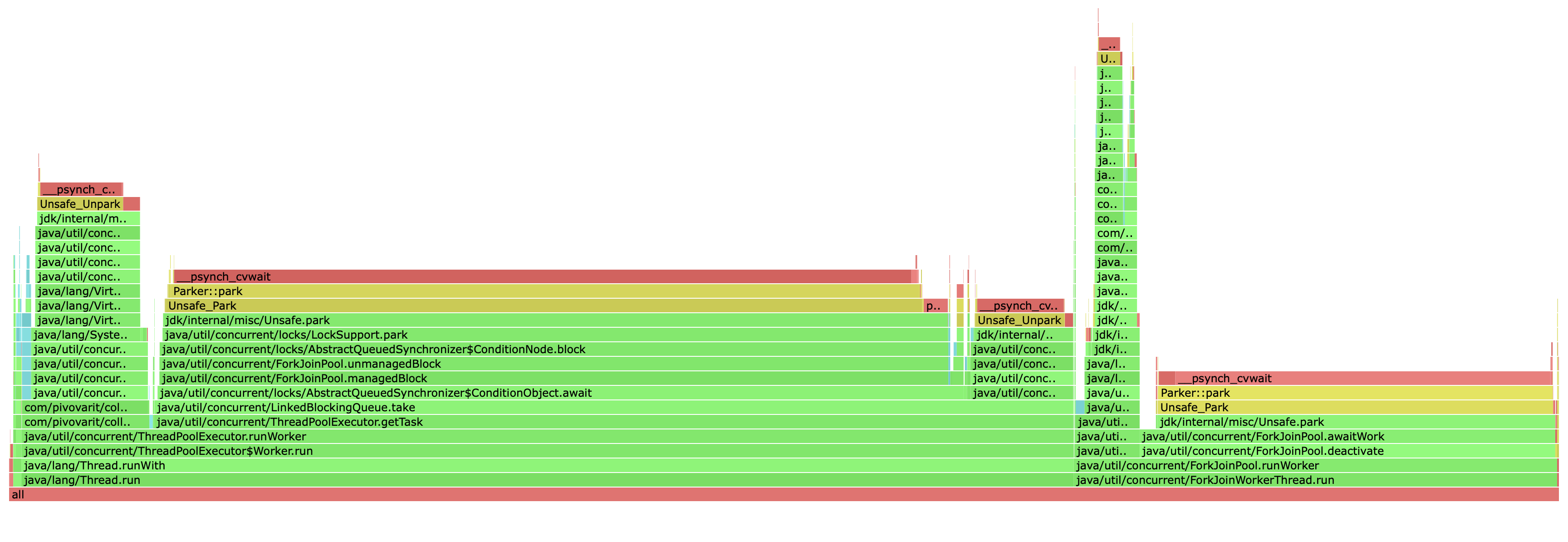
When you use non-batching parallel collectors, every input element is turned into an individual task submitted to an ExecutorService. If you have 1000 elements, you end up submitting 1000 tasks.
Even if you only have two threads processing them, both threads hammer the same task queue, repeatedly competing for the next piece of work. That competition creates contention, and overall overhead.
This behaviour resembles a primitive form of work-stealing, where each worker repeatedly tries to grab the next available task. Work-stealing is great in scenarios where task durations vary significantly, since it keeps faster workers busy, but it's not free.
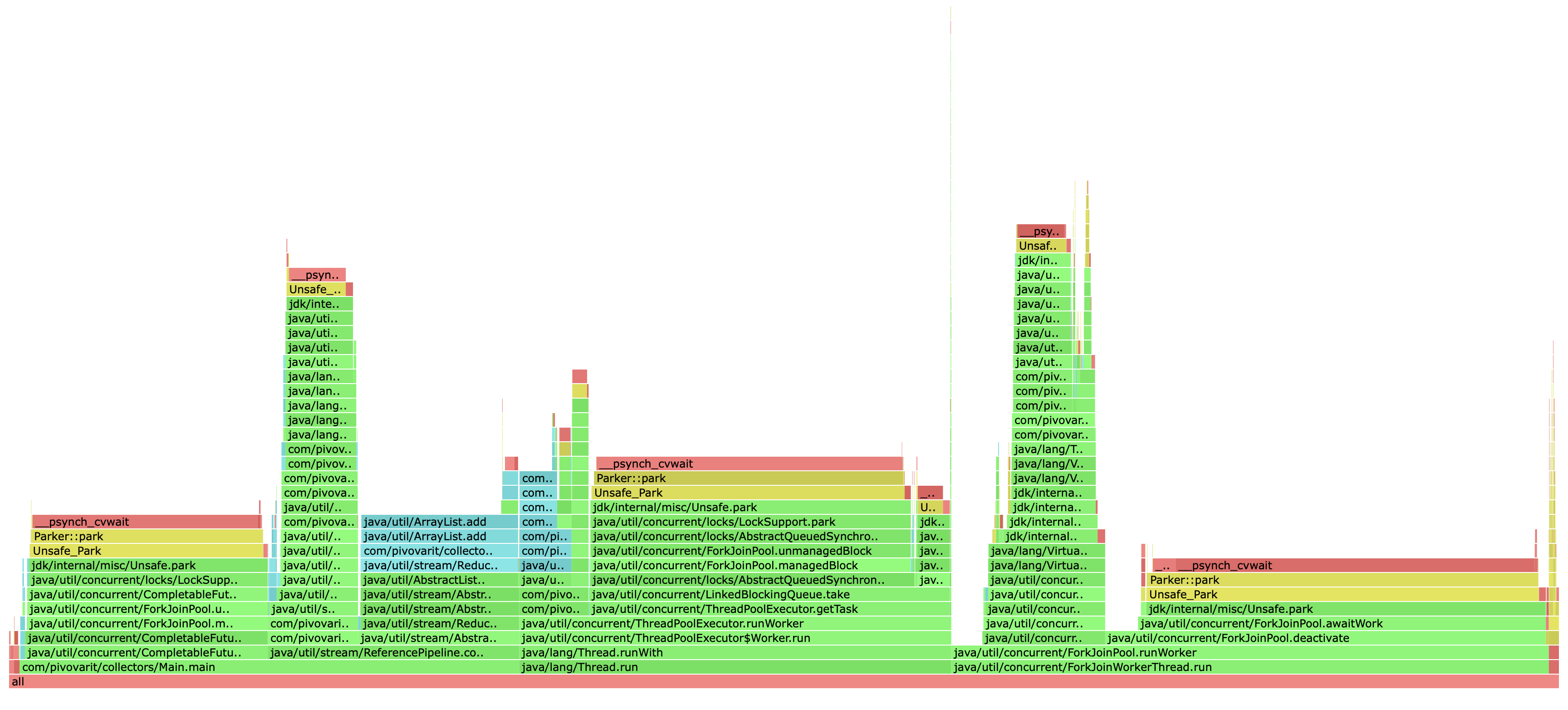
However, if the processing time for all subtasks is similar, it might be better to distribute tasks in batches to avoid excessive contention.
Without batching:
Thread 1: [] [] [] [] [] [] [] [] [] [] [] ... (500 tiny tasks)
Thread 2: [] [] [] [] [] [] [] [] [] [] [] ... (500 tiny tasks)
With batching:
Thread 1: [--------------------------------------------------] (1 large task)
Thread 2: [--------------------------------------------------] (1 large task)
The difference in performance for lightweight tasks can be enormous:
Benchmark                              Mode  Cnt      Score     Error  Units
BatchedVsNonBatchedBenchmark.batch    thrpt    5  41558.548 ± 959.057  ops/s
BatchedVsNonBatchedBenchmark.normal   thrpt    5    254.869 ±   5.667  ops/s
Batching can be enabled via the batching() configurer option:
list.stream()
  .collect(parallel(i -> foo(i), c -> c.parallelism(4).batching(), toList()));
Normal
Batched
Grouping Collectors
The parallelBy(...) and parallelToStreamBy(...) methods allow you to classify input elements by a key and process each group in parallel. Each group is guaranteed to be processed on a single thread, and results are returned as Group<K, R> entries:
CompletableFuture<Stream<Group<String, String>>> result = tasks.stream()
  .collect(parallelBy(Task::groupId, t -> compute(t)));

CompletableFuture<List<Group<String, String>>> result = tasks.stream()
  .collect(parallelBy(Task::groupId, t -> compute(t), toList()));
The Group<K, V> record provides key() and values() accessors, plus a map() method for transforming values while preserving the grouping key.
Decorators
Two decorator options let you add cross-cutting behavior without replacing the executor:
executorDecorator(UnaryOperator<Executor>) wraps the resolved executor (the virtual-thread default or a custom one) and returns a replacement. It is invoked once per collector, before any tasks are submitted. This is a natural fit for intercepting every execute() call, for example to plug in a monitoring layer.
The returned executor must not drop or discard tasks — doing so will cause the collector to wait indefinitely for results that will never arrive.
list.stream()
  .collect(parallel(i -> foo(i), c -> c
    .executorDecorator(exec -> task -> {
        metrics.incrementAndGet();
        exec.execute(task);
    }),
  toList()));
taskDecorator(UnaryOperator<Runnable>) wraps each individual task before it is handed to the executor. Unlike the executor decorator, it runs on the worker thread and is re-applied for every element. This makes it the right tool for propagating thread-local context (MDC, OpenTelemetry spans, SecurityContext) into worker threads:
var snapshot = MDC.getCopyOfContextMap();

list.stream()
  .collect(parallel(i -> foo(i), c -> c
    .taskDecorator(task -> () -> {
        MDC.setContextMap(snapshot);
        try {
            task.run();
        } finally {
            MDC.clear();
        }
    }),
  toList()));
Both decorators can be combined and each may be specified at most once per configurer.
Leveraging CompletableFuture
Parallel Collectors expose results wrapped in CompletableFuture instances, which provides great flexibility and the possibility of working with them in a non-blocking fashion:
CompletableFuture<List<String>> result = list.stream()
  .collect(parallel(i -> foo(i), toList()));
This makes it possible to conveniently apply callbacks and compose with other CompletableFutures:
list.stream()
  .collect(parallel(i -> foo(i), toSet()))
  .thenAcceptAsync(System.out::println, otherExecutor)
  .thenRun(() -> System.out.println("Finished!"));
Or just join() if you just want to block the calling thread and wait for the result:
List<String> result = list.stream()
  .collect(parallel(i -> foo(i), toList()))
  .join();
What's more, since JDK9, you can even provide your own timeout easily.
Examples
1. Apply i -> foo(i) in parallel using Virtual Threads and collect to List
CompletableFuture<List<String>> result = list.stream()
  .collect(parallel(i -> foo(i), toList()));
2. Apply i -> foo(i) in parallel on a custom Executor with max parallelism of 4 and collect to Set
Executor executor = ...

CompletableFuture<Set<String>> result = list.stream()
  .collect(parallel(i -> foo(i), c -> c
    .executor(executor)
    .parallelism(4),
  toSet()));
3. Apply i -> foo(i) in parallel with batching and collect to LinkedList
CompletableFuture<List<String>> result = list.stream()
  .collect(parallel(i -> foo(i), c -> c.parallelism(4).batching(),
    toCollection(LinkedList::new)));
4. Apply i -> foo(i) in parallel and stream results in completion order
list.stream()
  .collect(parallelToStream(i -> foo(i)))
  .forEach(i -> ...);
5. Apply i -> foo(i) in parallel and stream results in the original order
list.stream()
  .collect(parallelToStream(i -> foo(i), c -> c.ordered()))
  .forEach(i -> ...);
6. Classify and process elements in parallel by group
CompletableFuture<Stream<Group<String, String>>> result = tasks.stream()
  .collect(parallelBy(Task::groupId, t -> compute(t)));
7. Apply i -> foo(i) in parallel with full configuration
Executor executor = ...

CompletableFuture<List<String>> result = list.stream()
  .collect(parallel(i -> foo(i), c -> c
    .executor(executor)
    .parallelism(64)
    .batching(),
  toList()));
8. Propagate MDC context into worker threads via taskDecorator
var snapshot = MDC.getCopyOfContextMap();

CompletableFuture<List<String>> result = list.stream()
  .collect(parallel(i -> foo(i), c -> c
    .taskDecorator(task -> () -> {
        MDC.setContextMap(snapshot);
        try {
            task.run();
        } finally {
            MDC.clear();
        }
    }),
  toList()));
9. Instrument every task submission via executorDecorator
var submitted = new AtomicInteger();

CompletableFuture<List<String>> result = list.stream()
  .collect(parallel(i -> foo(i), c -> c
    .executorDecorator(exec -> task -> {
        submitted.incrementAndGet();
        exec.execute(task);
    }),
  toList()));
Rationale
Stream API is a great tool for collection processing, especially if you need to parallelize the execution of CPU-intensive tasks, for example:
public static void parallelSetAll(int[] array, IntUnaryOperator generator) {
    Objects.requireNonNull(generator);
    IntStream.range(0, array.length).parallel().forEach(i -> { array[i] = generator.applyAsInt(i); });
}
However, Parallel Streams execute tasks on a shared ForkJoinPool instance.
Unfortunately, it's not the best choice for running blocking operations even when using ManagedBlocker - as explained here by Tagir Valeev - this could easily lead to the saturation of the common pool, and to a performance degradation of everything that uses it.
For example:
List<String> result = list.parallelStream()
  .map(i -> foo(i)) // runs implicitly on ForkJoinPool.commonPool()
  .toList();
To avoid such problems, the solution is to isolate blocking tasks and run them on a separate thread pool... but there's a catch.
Sadly, Streams can only run parallel computations on the common ForkJoinPool, which effectively restricts their applicability to CPU-bound jobs.
However, there's a trick that allows running parallel Streams in a custom FJP instance... but it's not considered reliable (and can still induce oversubscription issues while competing with the common pool for resources)
Note, however, that this technique of submitting a task to a fork-join pool to run the parallel stream in that pool is an implementation "trick" and is not guaranteed to work. Indeed, the threads or thread pool that is used for the execution of parallel streams is unspecified. By default, the common fork-join pool is used, but in different environments, different thread pools might end up being used.
Says Stuart Marks on StackOverflow.
Not even mentioning that this approach was seriously flawed before JDK-10 - if a Stream was targeted towards another pool, splitting would still need to adhere to the parallelism of the common pool and not the one of the targeted pool [JDK8190974].
Dependencies
None - the library is implemented using core Java libraries.
Limitations
-
Upstream
Streamis always evaluated as a whole, even if the following operation is short-circuiting. This means that none of these should be used to work with infinite streams. The design of theCollectorAPI imposes this limitation. -
Never use Parallel Collectors with
Executors withRejectedExecutionHandlerthat discards tasks - this might result in a deadlock.
Good Practices
- Consider providing reasonable timeouts for
CompletableFutures in order to not block for unreasonably long in case when something bad happens (how-to) - Name your thread pools - it makes debugging easier
- Limit the size of a working queue of your thread pool (source)
- Limit the level of parallelism (source)
- A no-longer-used
ExecutorServiceshould be shut down to allow reclamation of its resources - Keep in mind that
CompletableFuture#then(Apply|Combine|Consume|Run|Accept)might be executed by the calling thread. If this is not suitable, useCompletableFuture#then(Apply|Combine|Consume|Run|Accept)Asyncinstead, and provide a custom Executor instance.
Words of Caution
While Parallel Collectors and Virtual Threads make parallelization easy, it doesn't always mean it's the best choice. Platform threads are resource-intensive, and parallelism comes with a cost.
Before opting for parallel processing, consider addressing the root cause through alternatives like DB-level JOIN statements, batching, data reorganization, or... simply selecting a more suitable API method.
See CHANGELOG.MD for a complete version history.