useQueryState takes one required argument: the key to use in the query string.
Like React.useState, it returns an array with the value present in the query
string as a string (or null if none was found), and a state updater function.
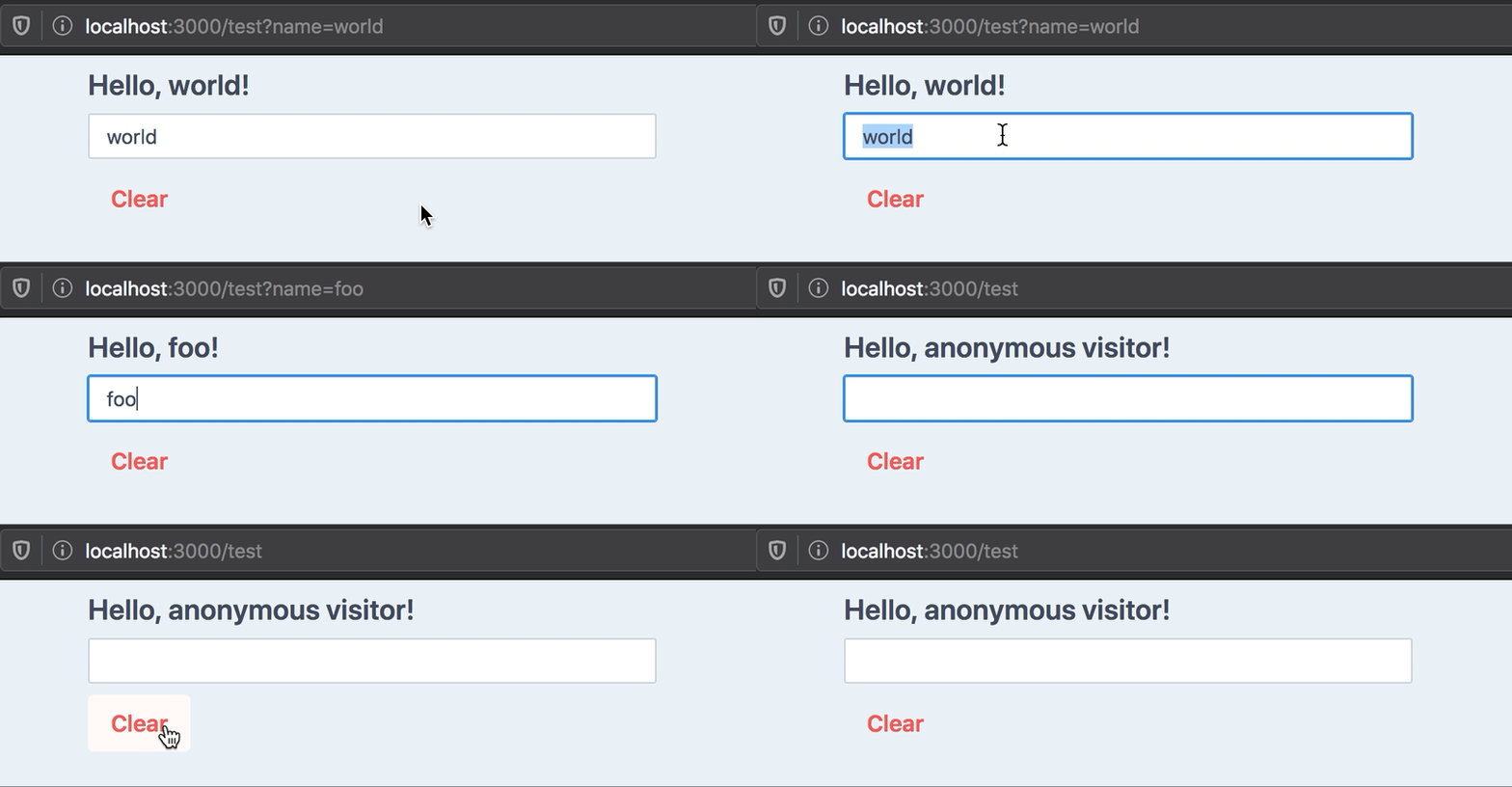
Example outputs for our hello world example:
URL
name value
Notes
/
null
No name key in URL
/?name=
''
Empty string
/?name=foo
'foo'
/?name=2
'2'
Always returns a string by default, see Parsing below
Parsing
If your state type is not a string, you must pass a parsing function in the
second argument object.
We provide parsers for common and more advanced object types:
import { parseAsString, parseAsInteger, parseAsFloat, parseAsBoolean, parseAsTimestamp, parseAsIsoDateTime, parseAsArrayOf, parseAsJson, parseAsStringEnum, parseAsStringLiteral, parseAsNumberLiteral} from 'nuqs'useQueryState('tag') // defaults to stringuseQueryState('count', parseAsInteger)useQueryState('brightness', parseAsFloat)useQueryState('darkMode', parseAsBoolean)useQueryState('after', parseAsTimestamp) // state is a DateuseQueryState('date', parseAsIsoDateTime) // state is a DateuseQueryState('array', parseAsArrayOf(parseAsInteger)) // state is number[]useQueryState('json', parseAsJson<Point>()) // state is a Point// Enums (string-based only)enum Direction { up = 'UP', down = 'DOWN', left = 'LEFT', right = 'RIGHT'}const [direction, setDirection] = useQueryState( 'direction', parseAsStringEnum<Direction>(Object.values(Direction)) // pass a list of allowed values .withDefault(Direction.up))// Literals (string-based only)const colors = ['red', 'green', 'blue'] as constconst [color, setColor] = useQueryState( 'color', parseAsStringLiteral(colors) // pass a readonly list of allowed values .withDefault('red'))// Literals (number-based only)const diceSides = [1, 2, 3, 4, 5, 6] as constconst [side, setSide] = useQueryState( 'side', parseAsNumberLiteral(diceSides) // pass a readonly list of allowed values .withDefault(4))
You may pass a custom set of parse and serialize functions:
import { useQueryState } from 'nuqs'export default () => { const [hex, setHex] = useQueryState('hex', { // TypeScript will automatically infer it's a number // based on what `parse` returns. parse: (query: string) => parseInt(query, 16), serialize: value => value.toString(16) })}
Default value
When the query string is not present in the URL, the default behaviour is to
return null as state.
It can make state updating and UI rendering tedious. Take this example of a simple counter stored in the URL:
You can specify a default value to be returned in this case:
const [count, setCount] = useQueryState('count', parseAsInteger.withDefault(0))const increment = () => setCount(c => c + 1) // c will never be nullconst decrement = () => setCount(c => c - 1) // c will never be nullconst clearCount = () => setCount(null) // Remove query from the URL
Note: the default value is internal to React, it will not be written to the
URL.
Setting the state to null will remove the key in the query string and set the
state to the default value.
Options
History
By default, state updates are done by replacing the current history entry with
the updated query when state changes.
You can see this as a sort of git squash, where all state-changing
operations are merged into a single history value.
You can also opt-in to push a new history item for each state change,
per key, which will let you use the Back button to navigate state
updates:
// Default: replace current history with new stateuseQueryState('foo', { history: 'replace' })// Append state changes to history:useQueryState('foo', { history: 'push' })
Any other value for the history option will fallback to the default.
You can also override the history mode when calling the state updater function:
const [query, setQuery] = useQueryState('q', { history: 'push' })// This overrides the hook declaration setting:setQuery(null, { history: 'replace' })
Shallow
Note: this feature only applies to Next.js
By default, query state updates are done in a client-first manner: there are
no network calls to the server.
This is equivalent to the shallow option of the Next.js pages router set to true,
or going through the experimental windowHistorySupport
flag in the app router.
To opt-in to query updates notifying the server (to re-run getServerSideProps
in the pages router and re-render Server Components on the app router),
you can set shallow to false:
const [state, setState] = useQueryState('foo', { shallow: false })// You can also pass the option on calls to setState:setState('bar', { shallow: false })
Throttling URL updates
Because of browsers rate-limiting the History API, internal updates to the
URL are queued and throttled to a default of 50ms, which seems to satisfy
most browsers even when sending high-frequency query updates, like binding
to a text input or a slider.
Safari's rate limits are much stricter and would require a throttle of around 340ms.
If you end up needing a longer time between updates, you can specify it in the
options:
useQueryState('foo', { // Send updates to the server maximum once every second shallow: false, throttleMs: 1000})// You can also pass the option on calls to setState:setState('bar', { throttleMs: 1000 })
Note: the state returned by the hook is always updated instantly, to keep UI responsive.
Only changes to the URL, and server requests when using shallow: false, are throttled.
If multiple hooks set different throttle values on the same event loop tick,
the highest value will be used. Also, values lower than 50ms will be ignored,
to avoid rate-limiting issues. Read more.
Transitions
When combined with shallow: false, you can use the useTransition hook to get
loading states while the server is re-rendering server components with the
updated URL.
Pass in the startTransition function from useTransition to the options
to enable this behaviour:
'use client'import React from 'react'import { useQueryState, parseAsString } from 'nuqs'function ClientComponent({ data }) { // 1. Provide your own useTransition hook: const [isLoading, startTransition] = React.useTransition() const [query, setQuery] = useQueryState( 'query', // 2. Pass the `startTransition` as an option: parseAsString.withOptions({ startTransition, shallow: false // opt-in to notify the server (Next.js only) }) ) // 3. `isLoading` will be true while the server is re-rendering // and streaming RSC payloads, when the query is updated via `setQuery`. // Indicate loading state if (isLoading) return <div>Loading...</div> // Normal rendering with data return <div>{/*...*/}</div>}
Configuring parsers, default value & options
You can use a builder pattern to facilitate specifying all of those things:
If you wish to know when the URL has been updated, and what it contains, you can
await the Promise returned by the state updater function, which gives you the
updated URLSearchParameters object:
const randomCoordinates = React.useCallback(() => { setLat(42) return setLng(12)}, [])randomCoordinates().then((search: URLSearchParams) => { search.get('lat') // 42 search.get('lng') // 12, has been queued and batch-updated})
Implementation details (Promise caching)
The returned Promise is cached until the next flush to the URL occurs,
so all calls to a setState (of any hook) in the same event loop tick will
return the same Promise reference.
Due to throttling of calls to the Web History API, the Promise may be cached
for several ticks. Batched updates will be merged and flushed once to the URL.
This means not every setState will reflect to the URL, if another one comes
overriding it before flush occurs.
The returned React state will reflect all set values instantly,
to keep UI responsive.
useQueryStates
For query keys that should always move together, you can use useQueryStates
with an object containing each key's type:
import { useQueryStates, parseAsFloat } from 'nuqs'const [coordinates, setCoordinates] = useQueryStates( { lat: parseAsFloat.withDefault(45.18), lng: parseAsFloat.withDefault(5.72) }, { history: 'push' })const { lat, lng } = coordinates// Set all (or a subset of) the keys in one go:const search = await setCoordinates({ lat: Math.random() * 180 - 90, lng: Math.random() * 360 - 180})
Loaders
To parse search params as a one-off operation, you can use a loader function:
import { createLoader } from 'nuqs' // or 'nuqs/server'const searchParams = { q: parseAsString, page: parseAsInteger.withDefault(1)}const loadSearchParams = createLoader(searchParams)const { q, page } = loadSearchParams('?q=hello&page=2')
It accepts various types of inputs (strings, URL, URLSearchParams, Request, Promises, etc.). Read more
See the server-side parsing demo
for a live example showing how to reuse parser configurations between
client and server code.
Accessing searchParams in Server Components
If you wish to access the searchParams in a deeply nested Server Component
(ie: not in the Page component), you can use createSearchParamsCache
to do so in a type-safe manner.
Note: parsers don't validate your data. If you expect positive integers
or JSON-encoded objects of a particular shape, you'll need to feed the result
of the parser to a schema validation library, like Zod.
// searchParams.tsimport { createSearchParamsCache, parseAsInteger, parseAsString} from 'nuqs/server'// Note: import from 'nuqs/server' to avoid the "use client" directiveexport const searchParamsCache = createSearchParamsCache({ // List your search param keys and associated parsers here: q: parseAsString.withDefault(''), maxResults: parseAsInteger.withDefault(10)})// page.tsximport { searchParamsCache } from './searchParams'export default function Page({ searchParams}: { searchParams: Record<string, string | string[] | undefined>}) { // ⚠️ Don't forget to call `parse` here. // You can access type-safe values from the returned object: const { q: query } = searchParamsCache.parse(searchParams) return ( <div> <h1>Search Results for {query}</h1> <Results /> </div> )}function Results() { // Access type-safe search params in children server components: const maxResults = searchParamsCache.get('maxResults') return <span>Showing up to {maxResults} results</span>}
The cache will only be valid for the current page render
(see React's cache function).
Note: the cache only works for server components, but you may share your
parser declaration with useQueryStates for type-safety in client components:
// searchParams.tsimport { parseAsFloat, createSearchParamsCache } from 'nuqs/server'export const coordinatesParsers = { lat: parseAsFloat.withDefault(45.18), lng: parseAsFloat.withDefault(5.72)}export const coordinatesCache = createSearchParamsCache(coordinatesParsers)// page.tsximport { coordinatesCache } from './searchParams'import { Server } from './server'import { Client } from './client'export default async function Page({ searchParams }) { await coordinatesCache.parse(searchParams) return ( <> <Server /> <Suspense> <Client /> </Suspense> </> )}// server.tsximport { coordinatesCache } from './searchParams'export function Server() { const { lat, lng } = coordinatesCache.all() // or access keys individually: const lat = coordinatesCache.get('lat') const lng = coordinatesCache.get('lng') return ( <span> Latitude: {lat} - Longitude: {lng} </span> )}// client.tsx// prettier-ignore;'use client'import { useQueryStates } from 'nuqs'import { coordinatesParsers } from './searchParams'export function Client() { const [{ lat, lng }, setCoordinates] = useQueryStates(coordinatesParsers) // ...}
Serializer helper
To populate <Link> components with state values, you can use the createSerializer
helper.
Pass it an object describing your search params, and it will give you a function
to call with values, that generates a query string serialized as the hooks would do.
Example:
import { createSerializer, parseAsInteger, parseAsIsoDateTime, parseAsString, parseAsStringLiteral} from 'nuqs/server'const searchParams = { search: parseAsString, limit: parseAsInteger, from: parseAsIsoDateTime, to: parseAsIsoDateTime, sortBy: parseAsStringLiteral(['asc', 'desc'])}// Create a serializer function by passing the description of the search params to acceptconst serialize = createSerializer(searchParams)// Then later, pass it some values (a subset) and render them to a query stringserialize({ search: 'foo bar', limit: 10, from: new Date('2024-01-01'), // here, we omit `to`, which won't be added sortBy: null // null values are also not rendered})// ?search=foo+bar&limit=10&from=2024-01-01T00:00:00.000Z
Base parameter
The returned serialize function can take a base parameter over which to
append/amend the search params:
To access the underlying type returned by a parser, you can use the
inferParserType type helper:
import { parseAsInteger, type inferParserType } from 'nuqs' // or 'nuqs/server'const intNullable = parseAsIntegerconst intNonNull = parseAsInteger.withDefault(0)inferParserType<typeof intNullable> // number | nullinferParserType<typeof intNonNull> // number
For an object describing parsers (that you'd pass to createSearchParamsCache
or to useQueryStates, inferParserType will
return the type of the object with the parsers replaced by their inferred types:
import { parseAsBoolean, parseAsInteger, type inferParserType } from 'nuqs' // or 'nuqs/server'const parsers = { a: parseAsInteger, b: parseAsBoolean.withDefault(false)}inferParserType<typeof parsers>// { a: number | null, b: boolean }
Testing
Since nuqs v2, you can use a testing adapter to unit-test components using
useQueryState and useQueryStates in isolation, without needing to mock
your framework or router.
Here's an example using Testing Library and Vitest:
import { render, screen } from '@testing-library/react'import userEvent from '@testing-library/user-event'import { withNuqsTestingAdapter, type OnUrlUpdateFunction} from 'nuqs/adapters/testing'import { describe, expect, it, vi } from 'vitest'import { CounterButton } from './counter-button'it('should increment the count when clicked', async () => { const user = userEvent.setup() const onUrlUpdate = vi.fn<OnUrlUpdateFunction>() render(<CounterButton />, { // Setup the test by passing initial search params / querystring, // and give it a function to call on URL updates wrapper: withNuqsTestingAdapter({ searchParams: '?count=42', onUrlUpdate }) }) // Initial state assertions: there's a clickable button displaying the count const button = screen.getByRole('button') expect(button).toHaveTextContent('count is 42') // Act await user.click(button) // Assert changes in the state and in the (mocked) URL expect(button).toHaveTextContent('count is 43') expect(onUrlUpdate).toHaveBeenCalledOnce() const event = onUrlUpdate.mock.calls[0]![0]! expect(event.queryString).toBe('?count=43') expect(event.searchParams.get('count')).toBe('43') expect(event.options.history).toBe('push')})
Start by importing the nuqs/debug entry point once in your app. This keeps the
log messages out of your bundles unless you opt in. In frameworks with separate
client and server bundles, import it in each runtime where you want logs. Then
set the debug item in localStorage to nuqs, and reload the page.
// Once in your app:import 'nuqs/debug'
// In your devtools:localStorage.setItem('debug', 'nuqs')
Note: unlike the debug package, this will not work with wildcards, but
you can combine it: localStorage.setItem('debug', '*,nuqs')
Log lines are prefixed with [nuq+ …] for hook-level messages, and
[nuqs <subsystem>] for internal subsystems (throttle & debounce queues,
adapters), along with other internal debug logs — see
packages/nuqs/src/lib/debug-messages.ts for the full catalog.
User timings markers are also recorded, for advanced performance analysis using
your browser's devtools.
Providing debug logs when opening an issue
is always appreciated. 🙏
SEO
If your page uses query strings for local-only state, you should add a
canonical URL to your page, to tell SEO crawlers to ignore the query string
and index the page without it.
In the app router, this is done via the metadata object:
import type { Metadata } from 'next'export const metadata: Metadata = { alternates: { canonical: '/url/path/without/querystring' }}
If however the query string is defining what content the page is displaying
(eg: YouTube's watch URLs, like https://www.youtube.com/watch?v=dQw4w9WgXcQ),
your canonical URL should contain relevant query strings, and you can still
use your parsers to read it, and to serialize the canonical URL:
If your serializer loses precision or doesn't accurately represent
the underlying state value, you will lose this precision when
reloading the page or restoring state from the URL (eg: on navigation).





 (spring 2025 cohort)