

A lightweight dynamic thread pool based on configuration centers, with built-in monitoring & alerting, middleware thread pool management, and SPI extensibility



🌐 中文 | English
Website: https://dynamictp.cn 🔥
Pain Points
Have you encountered these issues when using ThreadPoolExecutor?
You created a
ThreadPoolExecutor, but have no idea what values to set for the core parameters.You set parameters based on experience, only to find after deployment that they need adjustment — requiring code changes and redeployment.
Thread pools are a black box to developers. You can't monitor their behavior until something breaks.
If so, DynamicTp may be the solution.
ThreadPoolExecutor provides set/get methods and extension points for its core parameters, enabling runtime dynamic modification.
👉 ThreadPoolExecutor dynamic methods (click to expand)
// --- Set ---
public void setCorePoolSize(int corePoolSize);                    // core pool size
public void setMaximumPoolSize(int maximumPoolSize);              // max pool size
public void setKeepAliveTime(long time, TimeUnit unit);           // thread idle keep-alive time
public void setThreadFactory(ThreadFactory threadFactory);        // thread factory
public void setRejectedExecutionHandler(RejectedExecutionHandler handler); // rejection policy
public void allowCoreThreadTimeOut(boolean value);                // allow core threads to time out

// --- Get ---
public int getCorePoolSize();
public int getMaximumPoolSize();
public long getKeepAliveTime(TimeUnit unit);
public BlockingQueue<Runnable> getQueue();                        // task queue
public RejectedExecutionHandler getRejectedExecutionHandler();
public boolean allowsCoreThreadTimeOut();

// --- Extension hooks ---
protected void beforeExecute(Thread t, Runnable r);               // before task execution
protected void afterExecute(Runnable r, Throwable t);             // after task execution
Most modern internet projects adopt microservice architecture with a service governance stack. The distributed configuration center plays a key role — enabling real-time configuration changes with instant effect.
So, can we combine a configuration center to dynamically adjust thread pool parameters at runtime?
Absolutely. Configuration centers are highly available, relieving concerns about config push failures and reducing the effort of building a dynamic thread pool solution from scratch.
Background summary:
-
Ubiquity: Thread pools are a fundamental tool used by 90%+ of Java developers to improve system performance.
-
Uncertainty: Projects often contain many thread pools — some IO-intensive, some CPU-intensive — and optimal core parameters are hard to determine upfront, requiring runtime tuning.
-
Lack of visibility: Thread pool metrics are invisible during operation. A monitoring & alerting mechanism is needed to detect issues before and during incidents.
-
High availability: Configuration changes must be reliably pushed to clients. Leveraging an existing configuration center greatly improves system availability.
Features
Based on the above analysis, we extended ThreadPoolExecutor with the following goals:
Dynamic parameter modification at runtime, taking effect instantly.
Real-time monitoring of thread pool status with alerting, pushing notifications to office platforms.
Periodic metric collection, integrated with visualization platforms like Grafana for dashboards.
Thread pool management for commonly used third-party middleware.
Latest version features: ✅
-
Zero code intrusion: All configuration lives in the configuration center. At startup, thread pools are created from config and registered in the Spring container — inject and use directly, zero impact on business code.
-
Lightweight & simple: Get started in 3 minutes with just 4 steps. Simply add the dependency, configure, annotate, and inject.
-
Notifications & alerting: Multiple alert dimensions (config change, thread activity, queue capacity, rejection, task execution/wait timeout). Supports WeCom, DingTalk, Feishu, Email, and extensible via SPI.
-
Monitoring: 20+ metrics (pool, queue, task, TPS, TPxx) collected via MicroMeter, JsonLog, JMX, or Spring Boot Endpoint. Extensible via SPI.
-
Task enhancement: Powerful task wrapping (stronger than Spring's built-in). Implement
TaskWrapperinterface for MDC, TTL, trace context propagation (e.g., MdcTaskWrapper, TtlTaskWrapper, OpenTelemetryWrapper). -
Multi configuration center support: Nacos, Apollo, Zookeeper, Consul, Etcd, Polaris, ServiceComb. Extensible via SPI.
-
Middleware thread pool management: Integrated with Tomcat, Jetty, Undertow, Dubbo, RocketMQ, Hystrix, gRPC, Motan, OkHttp3, Brpc, Tars, SofaRPC, RabbitMQ, Liteflow, Thrift (dynamic tuning, monitoring, alerting).
-
Multiple pool modes:
DtpExecutor(enhanced),EagerDtpExecutor(IO-intensive),ScheduledDtpExecutor(scheduled),OrderedDtpExecutor(ordered). Choose based on your scenario. -
Compatibility: Standard JUC thread pools and Spring
ThreadPoolTaskExecutorcan be managed by adding@DynamicTpon the@Beandefinition. -
Graceful shutdown: Leverages Spring lifecycle management to shut down thread pools gracefully, processing as many queued tasks as possible before shutdown.
-
Highly extensible: Core features expose SPI interfaces for custom implementations (config center, config parsing, alerting, metrics collection, task wrapping, rejection policies, etc.).
-
Battle-tested at scale: Inspired by Meituan's thread pool practice, with mature production experience at Meituan.
Architecture
The framework is divided into the following modules:
Configuration change listener
Thread pool management
Monitoring
Notification & alerting
Third-party middleware thread pool management
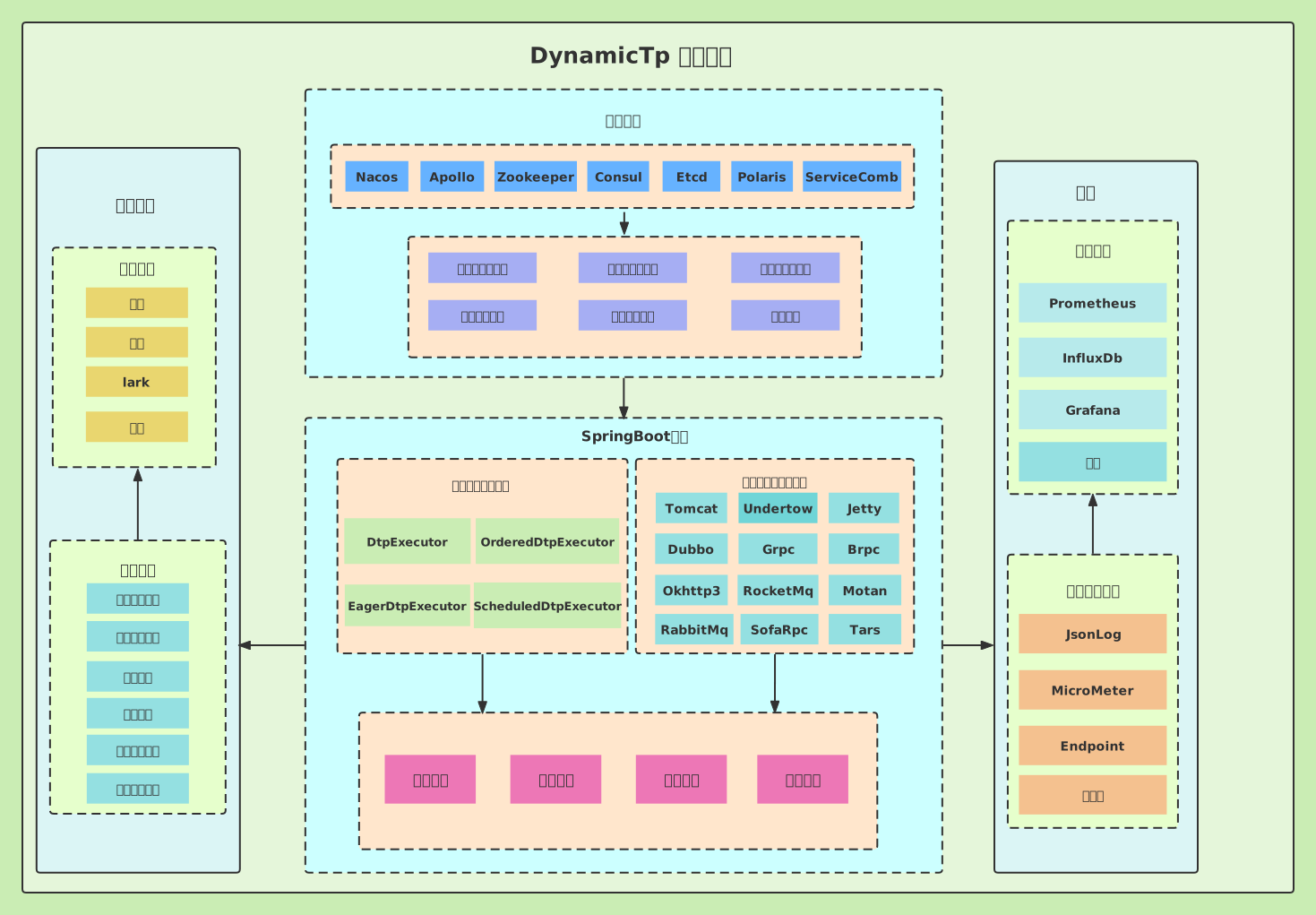
See the official documentation for details: Architecture
Quick Start
Add the dependency for your configuration center (see official docs).
Configure thread pool instances in your configuration center (see official docs).
Add
@EnableDynamicTpannotation to your application class.Inject via
@Resource/@Autowired, or retrieve withDtpRegistry.getExecutor("name").
For detailed examples, see the example module and the official documentation.
Alerting
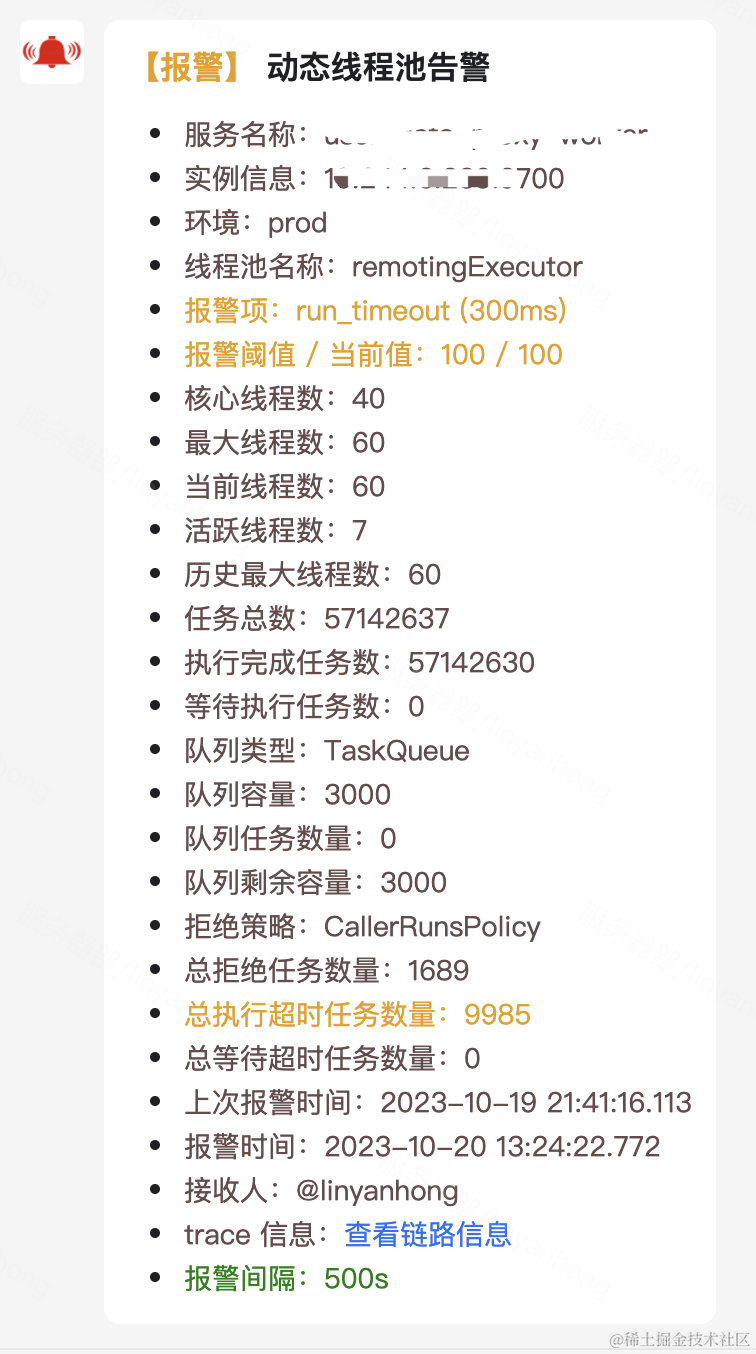
- Alert notifications are pushed when thresholds are triggered (thread activity, queue capacity, rejection, task wait/execution timeout), with highlighted fields.
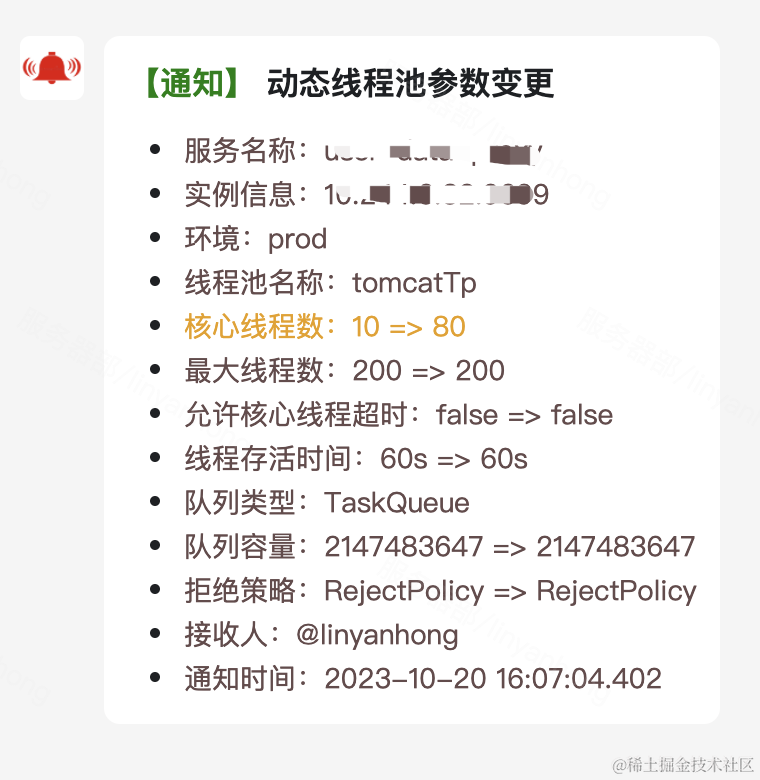
- Configuration change notifications are pushed with highlighted changed fields.
Monitoring
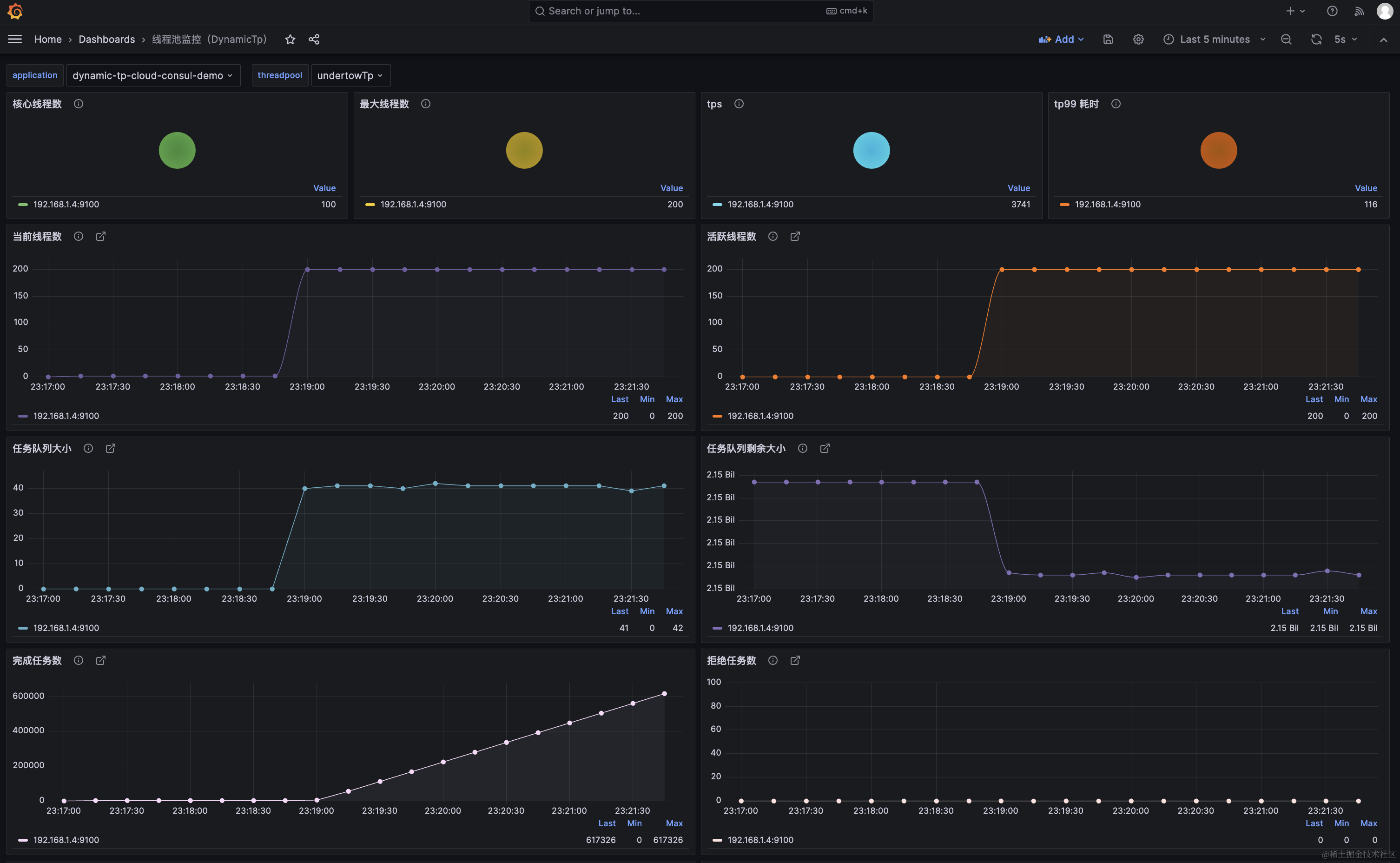
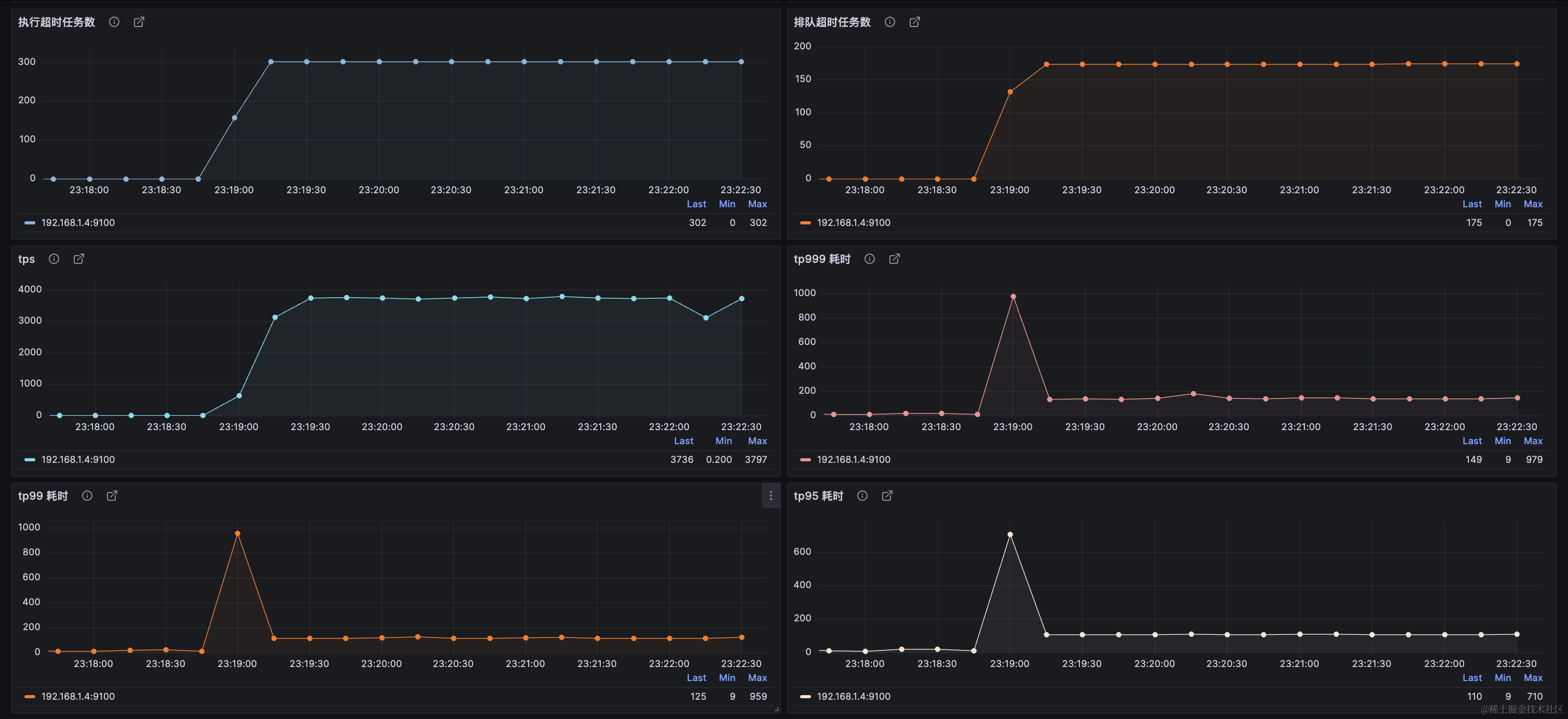
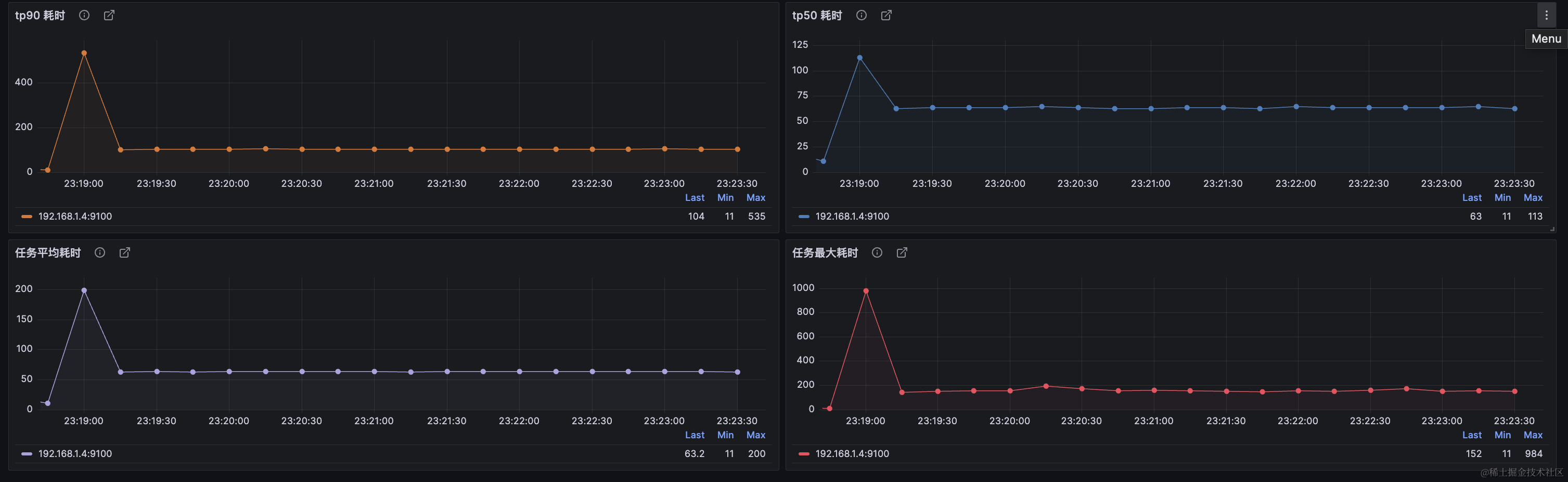
Four metric collection modes are available, configured via collectorTypes (default: Micrometer):
Logging: Metrics output as JSON to a dedicated log file.
Internal_logging: Metrics output as JSON to the application log.
Micrometer: Uses the Micrometer facade to collect metrics into storage platforms (Prometheus, InfluxDB, etc.).
Endpoint: Exposes a Spring Boot Endpoint for real-time metric retrieval via HTTP.
📖 See the official documentation for details: Alerting | Monitoring
Star History
Repository
- GitHub: https://github.com/dromara/dynamic-tp
- Gitee: https://gitee.com/dromara/dynamic-tp
- GitCode: https://gitcode.com/dromara/dynamic-tp
Contact
If you find this project helpful, please give us a star — your support drives us forward!
For questions, ideas, or suggestions, join our community to chat with 1700+ members.
Follow the WeChat public account and add my personal WeChat (note: dynamic-tp) to join the group.

To help the project grow, please register here: User Registration
Sponsors
- Easysearch: Enterprise-grade distributed search database.

Related Projects
- HertzBeat: An easy-to-use, real-time monitoring and alerting system with powerful custom monitoring capabilities, no Agent required.