

gptme
/ʤiː piː tiː miː/
what does it stand for?
Getting Started • Downloads • Website • Documentation







📜 A personal AI agent that runs anywhere a terminal runs — your laptop,
ssh sessions, tmux, headless servers, CI pipelines.
Provider-agnostic, local-first, and unconstrained: ships with shell, Python, web,
vision, and everything else an agent needs.
A great coding agent, but general-purpose enough to assist in all kinds of knowledge-work.
Free and open-source. Works with Anthropic, OpenAI, Google, xAI, DeepSeek, OpenRouter,
or fully local via llama.cpp — your data, your models, your terminal.
A capable alternative to Claude Code,
Codex, Cursor, and Warp — one of the first agent CLIs (Spring 2023), still in very
active development.
📚 Table of Contents
📢 News
- 2026-07 - v0.32.1: Desktop app for Linux (AppImage), macOS, and Windows with auto-updates — download here; gptme.ai cloud service
- 2026-01 - gptme-agent-template v0.4: Bob has run extensively as an autonomous agent, autonomous run loops, enhanced context generation
- 2025-12 - v0.31.0: Background jobs, form tool, cost tracking, content-addressable storage
- 2025-11 - v0.30.0: Plugin system, context compression, subagent planner mode
- 2025-10 - v0.29.0: Lessons system for contextual guidance, MCP discovery & dynamic loading, token awareness; Bob begins autonomous runs with GitHub monitoring
- 2025-08 - v0.28.0: MCP support, morph tool for fast edits, auto-commit, redesigned server API
- 2025-03 - v0.27.0: Pre-commit integration, macOS computer use, Claude 3.7 Sonnet, DeepSeek R1, local TTS with Kokoro
- 2025-01 - gptme-contrib created: community plugins including Twitter/X, Discord bot, email tools, consortium (multi-agent)
- 2024-12 - gptme-agent-template v0.3: Template for persistent agents
- 2024-11 - Ecosystem expansion: gptme-webui, gptme-rag, gptme.vim, Bob created (first autonomous agent)
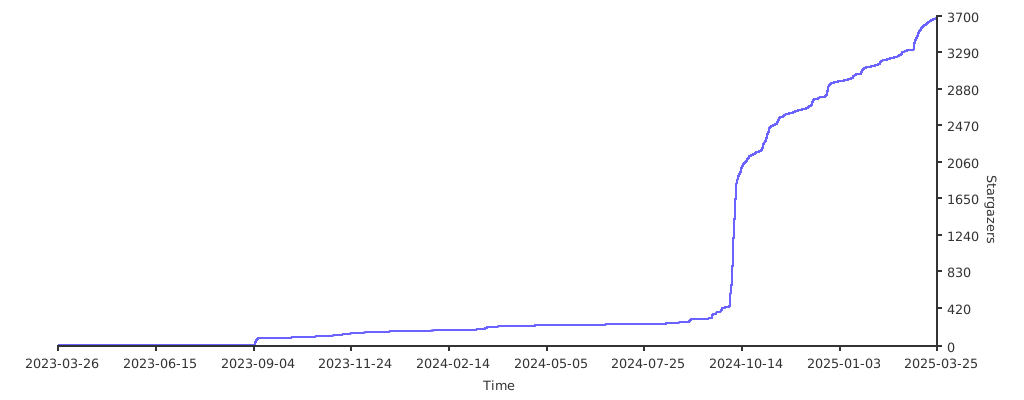
- 2024-10 - First viral tweet bringing widespread attention
- 2024-08 - Show HN, Anthropic Claude support, tmux tool
- 2023-09 - Initial public release on HN, Reddit, Twitter
- 2023-03 - Initial commit - one of the first agent CLIs
For more history, see the Timeline and Changelog.
🎥 Demos
[!NOTE] The screencasts below are from 2023. gptme has evolved a lot since then! For up-to-date examples and screenshots, see the Documentation. We're working on automated demo generation: #1554.
| Fibonacci | Snake with curses |
|---|---|
Steps
|
Steps
|
| Mandelbrot with curses | Answer question from URL |
Steps
|
Steps
|
| Terminal UI | Web UI |
Features
|
Features
|
You can find more Demos and Examples in the documentation.
🌟 Features
- 💻 Code execution
- 🧩 Read, write, and change files
- Makes incremental changes with the patch tool.
- 🌐 Search and browse the web
- Can use a browser via Playwright with the browser tool.
- 👀 Vision
- Can see images referenced in prompts, screenshots of your desktop, and web pages.
- 🔄 Self-correcting
- Output is fed back to the assistant, allowing it to respond and self-correct.
- 📚 Lessons system
- Contextual guidance and best practices automatically included when relevant.
- Keyword, tool, and pattern-based matching.
- Adapts to interactive vs autonomous modes.
- Extend with your own lessons and skills.
- 🤖 Support for many LLM providers
- Anthropic (Claude), OpenAI (GPT), Google (Gemini), xAI (Grok), DeepSeek, and more.
- Use OpenRouter for access to 100+ models, or serve locally with
llama.cpp. - Pick the right model per task — fast/cheap for triage, powerful for coding.
- 🌐 Web UI and REST API
- Modern gptme-webui bundled with
gptme-serverand hosted at chat.gptme.org. - Server with REST API.
- Standalone executable builds available with PyInstaller.
- Modern gptme-webui bundled with
- 💻 Computer use (see #216)
- Give the assistant access to a full desktop, allowing it to interact with GUI applications.
- 🧠 Code intelligence
- Structural code understanding with gptme-codegraph: call graphs, symbol extraction, and impact analysis powered by Tree-sitter. Nine MCP tools for codebase navigation.
- 🔊 Tool sounds — pleasant notification sounds for different tool operations.
- Enable with
GPTME_TOOL_SOUNDS=true.
- Enable with
🛠 Tools
gptme equips the AI with a rich set of built-in tools:
| Tool | Description |
|---|---|
shell |
Execute shell commands directly in your terminal |
ipython |
Run Python code with access to your installed libraries |
read |
Read files and directories |
save / append |
Create or update files |
patch / morph |
Make incremental edits to existing files |
browser |
Search and navigate the web via Playwright |
vision |
Process and analyze images |
screenshot |
Capture screenshots of your desktop |
rag |
Retrieve context from local files (Retrieval Augmented Generation) |
gh |
Interact with GitHub via the GitHub CLI |
tmux |
Run long-lived commands in persistent terminal sessions |
computer |
Full desktop access for GUI interactions |
subagent |
Spawn sub-agents for parallel or isolated tasks |
chats |
Reference and search past conversations |
Use /tools during a conversation to see all available tools and their status.
🔌 Extensibility: Plugins, Skills & Lessons
gptme has a layered extensibility system that lets you tailor it to your workflow:
Plugins — extend gptme with custom tools, hooks, and commands via Python packages:
# gptme.toml
[plugins]
paths = ["~/.config/gptme/plugins", "./plugins"]
enabled = ["my_plugin"]
Skills — lightweight workflow bundles (Anthropic format) that auto-load when mentioned by name. Great for packaging reusable instructions and helper scripts without writing Python.
Lessons — contextual guidance that auto-injects into conversations based on keywords, tools, and patterns. Write your own to capture team best-practices or domain knowledge.
Hooks — run custom code at key lifecycle events (before/after tool calls, on conversation start, etc.) without a full plugin.
gptme-contrib — community-contributed plugins, packages, scripts, and lessons:
| Plugin / Package | Description |
|---|---|
| gptme-codegraph | Structural code retrieval with tree-sitter: 9 MCP tools for parse, call graph, blast/impact analysis |
| gptme-consortium | Multi-model consensus decision-making |
| gptme-imagen | Multi-provider image generation |
| gptme-lsp | Language Server Protocol integration |
| gptme-ace | ACE-inspired context optimization |
| gptme-gupp | Work state persistence across sessions |
🔗 Integrations: MCP & ACP
MCP (Model Context Protocol) — use any MCP server as a tool source:
pipx install gptme # MCP support included by default
gptme can discover and dynamically load MCP servers, giving the agent access to databases, APIs, file systems, and any other MCP-compatible tool. See the MCP docs for server configuration.
ACP (Agent Client Protocol) — use gptme as a coding agent directly from your editor:
pipx install 'gptme[acp]'
This makes gptme available as a drop-in coding agent in Zed and JetBrains IDEs. Your editor sends requests, gptme executes with its full toolset (shell, browser, files, etc.) and streams results back.
🤖 Autonomous Agents
gptme is designed to run not just interactively but as a persistent autonomous agent — an AI that runs continuously, remembers everything, and gets better over time. The gptme-agent-template provides a complete scaffold:
- Persistent workspace — git-tracked "brain" with journal, tasks, knowledge base, and lessons
- Run loops — scheduled (systemd/launchd) or event-driven autonomous operation
- Task management — structured task queue with YAML metadata and GTD-style workflows
- Meta-learning — lessons system captures behavioral patterns and improves over time
- Multi-agent coordination — file leases, message bus, and work claiming for concurrent agents
- External integrations — GitHub, email, Discord, Twitter, RSS, and more
# Create and run your own agent
gptme-agent create ~/my-agent --name MyAgent
gptme-agent install   # runs on a schedule
gptme-agent status    # check on it
Bob is the reference implementation — a production autonomous agent that's been running continuously since late 2024. Bob opens PRs, reviews code, fixes CI, manages his own task queue, maintains a growing set of behavioral lessons, posts on Twitter, responds on Discord, and writes blog posts.
Multiple specialized agents can run in parallel — e.g. Bob (engineering) and Alice (personal assistant & orchestration) — coordinating through shared infrastructure.
See the Autonomous Agents docs for the full guide.
🛡 Guardrails
Persistent agents need guardrails around the full loop, not just tool permissions:
- Input guardrails — structured task selectors in the agent workspace keep work focused and reduce thrashing on notifications or ambiguous work. Bob uses a CASCADE-style selector for this layer.
- Pre-action guardrails — lessons inject situational guidance before the agent acts.
- Output guardrails — hooks and pre-commit checks validate file changes before control returns to the user.
This stack is simple and composable: selectors improve work choice, lessons steer behavior, and checks verify the result. You can add evals on top later, but the baseline guardrail loop already exists.
🛠 Use Cases
- 🖥 Development: Write and run code faster with AI assistance.
- 🎯 Shell Expert: Get the right command using natural language (no more memorizing flags!).
- 📊 Data Analysis: Process and analyze data directly in your terminal.
- 🎓 Interactive Learning: Experiment with new technologies or codebases hands-on.
- 🤖 Agents & Tools: Build long-running autonomous agents for real work.
- 🔬 Research: Automate literature review, data collection, and analysis pipelines.
🛠 Developer Perks
- ⭐ One of the first agent CLIs created (Spring 2023) that is still in active development.
- 🧰 Easy to extend
- 🧪 Extensive testing, high coverage.
- 🧹 Clean codebase, checked and formatted with
mypy,ruff, andpyupgrade. - 🤖 GitHub Bot to request changes from comments! (see #16)
- Operates in this repo! (see #18 for example)
- Runs entirely in GitHub Actions.
- 📊 Evaluation suite for testing capabilities of different models.
- 📝 gptme.vim for easy integration with vim.
🚧 In Progress
- 🖥 gptme-tauri — desktop app for Linux, macOS, and Windows with auto-updates (download)
- ☁️ gptme.ai — managed cloud service for running gptme agents (early access; still self-hostable by running
gptme-server+gptme-webuiyourself) - 🌳 Tree-based conversation structure (see #17)
- 📜 RAG to automatically include context from local files (see #59)
- 🏆 Advanced evals for testing frontier capabilities
🚀 Getting Started
Prerequisites
- Python 3.10 or newer
- Credentials for at least one LLM provider:
- OpenRouter can be configured interactively with
/account setup openrouterinside gptme, using browser OAuth onboarding. - You can also set API keys manually for Anthropic
(
ANTHROPIC_API_KEY), OpenAI (OPENAI_API_KEY), OpenRouter (OPENROUTER_API_KEY), and other providers. - Local models via
llama.cppneed no key — see providers docs.
- OpenRouter can be configured interactively with
Installation
For full setup instructions, see the Getting Started guide.
# With pipx (recommended, requires Python 3.10+)
pipx install gptme

# With uv
uv tool install gptme

# With optional extras
pipx install 'gptme[browser]'  # Playwright for web browsing
pipx install 'gptme[all]'      # Everything

# Latest from git with all extras
uv tool install 'git+https://github.com/gptme/gptme.git[all]'
Quick Start
gptme
You'll be greeted with a prompt. Type your request and gptme will respond, using tools as needed.
Example Commands
# Create a particle effect visualization
gptme 'write an impressive and colorful particle effect using three.js to particles.html'

# Generate visual art
gptme 'render mandelbrot set to mandelbrot.png'

# Get configuration suggestions
gptme 'suggest improvements to my vimrc'

# Process media files
gptme 'convert to h265 and adjust the volume' video.mp4

# Code assistance from git diffs
git diff | gptme 'complete the TODOs in this diff'

# Fix failing tests
make test | gptme 'fix the failing tests'

# Auto-approve tool confirmations (user can still watch and interrupt)
gptme -y 'run the test suite and fix any failing tests'

# Fully non-interactive/autonomous mode (no user interaction possible, safe for scripts/CI)
gptme -n 'run the test suite and fix any failing tests'

# Machine-readable automation output (JSONL on stdout)
gptme --non-interactive --output-format json 'summarize the current git diff'
For more, see the Getting Started guide and the Examples in the documentation.
⚙️ Configuration
Create ~/.config/gptme/config.toml:
[user]
name = "User"
about = "I am a curious human programmer."
response_preference = "Don't explain basic concepts"

[prompt]
# Additional files to always include as context
# files = ["~/notes/llm-tips.md"]

[env]
# Set your default model
# MODEL = "anthropic/claude-sonnet-4-20250514"
# MODEL = "openai/gpt-4o"
For all options, see the configuration docs.
🛠 Usage
$ gptme --help
Usage: gptme [OPTIONS] [PROMPTS]...

  gptme is a chat-CLI for LLMs, empowering them with tools to run shell
  commands, execute code, read and manipulate files, and more.

  If PROMPTS are provided, a new conversation will be started with it. PROMPTS
  can be chained with the '-' separator.

  The interface provides user commands that can be used to interact with the
  system.

  Available commands:
    /undo         Undo the last action
    /log          Show the conversation log
    /edit         Edit the conversation in your editor
    /rename       Rename the conversation
    /fork         Create a copy of the conversation
    /summarize    Summarize the conversation
    /replay       Replay tool operations
    /export       Export conversation as HTML
    /model        Show or switch the current model
    /models       List available models
    /tokens       Show token usage and costs
    /context      Show context token breakdown
    /tools        Show available tools
    /commit       Ask assistant to git commit
    /compact      Compact the conversation
    /impersonate  Impersonate the assistant
    /restart      Restart gptme process
    /setup        Setup gptme
    /help         Show this help message
    /exit         Exit the program

  See docs for all commands: https://gptme.org/docs/commands.html

  Keyboard shortcuts:
    Ctrl+X Ctrl+E  Edit prompt in your editor
    Ctrl+J         Insert a new line without executing the prompt

Options:
  --name TEXT            Name of conversation. Defaults to generating a random
                         name.
  -m, --model TEXT       Model to use, e.g. openai/gpt-5, anthropic/claude-
                         sonnet-4-20250514. If only provider given then a
                         default is used.
  -w, --workspace TEXT   Path to workspace directory. Pass '@log' to create a
                         workspace in the log directory.
  --agent-path TEXT      Path to agent workspace directory.
  -r, --resume           Load most recent conversation.
  -y, --no-confirm       Skip all confirmation prompts.
  -n, --non-interactive  Non-interactive mode. Implies --no-confirm.
  --output-format [text|json]
                         Output format for non-interactive mode. 'json'
                         emits one JSON object per line on stdout.
  --system TEXT          System prompt. Options: 'full', 'short', or something
                         custom.
  -t, --tools TEXT       Tools to allow as comma-separated list. Available:
                         append, browser, chats, choice, computer, gh,
                         ipython, morph, patch, rag, read, save, screenshot,
                         shell, subagent, tmux, vision.
  --tool-format TEXT     Tool format to use. Options: markdown, xml, tool
  --no-stream            Don't stream responses
  --show-hidden          Show hidden system messages.
  -v, --verbose          Show verbose output.
  --version              Show version and configuration information
  --help                 Show this message and exit.
Pair --non-interactive with --output-format json when stdout needs to
be machine-readable, for example in CI or a supervising process. Use
--resume to continue an existing automated conversation or pick up queued
follow-up prompts without passing a new prompt.
🌍 Ecosystem
gptme is more than a CLI — it's a platform with a growing ecosystem:
| Project | Description |
|---|---|
| gptme-webui | Modern React web interface, available at chat.gptme.org |
| gptme-contrib | Community plugins, packages, scripts, and lessons |
| gptme-codegraph | Structural code retrieval with tree-sitter (9 MCP tools for code graph analysis) |
| gptme-agent-template | Template for building persistent autonomous agents |
| gptme-rag | RAG integration for semantic search over local files |
| gptme.vim | Vim plugin for in-editor gptme integration |
| gptme-tauri | Desktop app for Linux, macOS, and Windows (download) |
| gptme.ai | Managed cloud service (early access) |
Community agents powered by gptme:
- Bob — autonomous AI agent, running continuously since late 2024, contributes to open source and manages his own tasks
- Alice — personal assistant & agent orchestrator, forked from the same architecture
💬 Community
- Discord — ask questions, share what you've built, discuss features
- GitHub Discussions — longer-form conversation and ideas
- X/Twitter — updates and announcements
Contributions welcome! See the contributing guide.
📊 Stats
⭐ Stargazers over time
📈 Download Stats
🔗 Links
❓ FAQ
What is gptme?
gptme is a personal AI agent that runs anywhere a terminal runs — your laptop, SSH sessions, tmux, headless servers, CI pipelines. It's provider-agnostic, local-first, and unconstrained: ships with shell, Python, web, vision, and everything else an agent needs. Pronounced /ʤiː piː tiː miː/ like "GPT-ME".
How does gptme compare to other AI coding assistants?
| Feature | gptme | Claude Code | Cursor | Warp |
|---|---|---|---|---|
| Environment | Any terminal | Terminal | IDE | Terminal |
| Autonomy | Autonomous agents | One-shot | IDE-assisted | Terminal AI |
| Multi-agent | ✅ Concurrent agents | ❌ | ❌ | ❌ |
| Local-first | ✅ Full support | ❌ API required | ❌ API required | ❌ API required |
| Provider support | ✅ 100+ models (OpenRouter/local) | Anthropic/Bedrock/Vertex | Anthropic/OpenAI/Google | OpenAI (built-in) |
| MCP Support | ✅ Built-in | ✅ Built-in | ❌ | ❌ |
| Plugin System | ✅ Full plugins | ❌ | ✅ Extensions | ❌ |
| Web Browsing | ✅ Playwright | ❌ | ❌ | ❌ |
| Vision | ✅ Screenshots/Images | ✅ | ✅ | ❌ |
| Self-hosting | ✅ Full control | ❌ | ❌ | ❌ |
How do I install gptme?
Prerequisites: Python 3.10+
Installation:
pip install gptme
# or
pipx install gptme
First Run:
gptme
What AI providers does gptme support?
gptme supports multiple AI providers:
| Provider | Setup | Features |
|---|---|---|
| Anthropic | ANTHROPIC_API_KEY |
Claude models |
| OpenAI | OPENAI_API_KEY |
GPT models |
GEMINI_API_KEY |
Gemini models | |
| xAI | XAI_API_KEY |
Grok models |
| DeepSeek | DEEPSEEK_API_KEY |
DeepSeek models |
| OpenRouter | OPENROUTER_API_KEY |
Multi-provider gateway |
| llama.cpp | Local server | OpenAI-compatible local models |
How do I use local models?
Use llama.cpp for fully local operation:
- Start llama.cpp server:
llama-server --model ./models/llama-3.gguf --port 8080
- Configure gptme:
export OPENAI_BASE_URL=http://localhost:8080/v1
gptme -m local/<model-name>
What tools does gptme have?
gptme ships with comprehensive tools:
- shell: Execute commands in terminal
- python: Run Python code
- patch: Make incremental file edits
- browser: Browse web via Playwright
- vision: Process images/screenshots
- tmux: Manage tmux sessions
- morph: Fast file transformations
- form: Interactive forms
- mcp: MCP tool discovery and use
How does the MCP integration work?
gptme has built-in MCP support:
- MCP Discovery: Automatically discovers MCP servers
- Dynamic Loading: Loads MCP tools on demand
- Tool Integration: MCP tools work like native tools
Example MCP servers supported:
- gptme-codegraph — structural code graph analysis with tree-sitter (9 tools)
- GitHub MCP
- Puppeteer MCP
- SQLite MCP
- Custom MCP servers
What is the Lessons system?
The Lessons system provides contextual guidance and best practices that are automatically included when relevant:
- Project-specific lessons: Custom guidance for your project
- Best practices: Coding patterns and conventions
- Context injection: Automatic context based on situation
How do I create autonomous agents?
Use gptme-agent-template for persistent autonomous agents:
- Clone template:
git clone https://github.com/gptme/gptme-agent-template
- Configure agent:
# config.yaml
name: "MyAgent"
role: "Code reviewer"
schedule: "hourly"
- Run:
python agent.py
See Bob for an example autonomous agent that has been running continuously since late 2024.
What is the plugin system?
gptme has a full plugin system:
- Skills: Custom tools and capabilities
- Hooks: Pre/post execution hooks
- Integrations: External service connectors
- Community plugins: gptme-contrib repository
Example plugins:
- Twitter/X bot
- Discord bot
- Email tools
- Consortium (multi-agent)
How do I use gptme in CI/CD?
gptme runs in CI pipelines:
# GitHub Actions
- name: Run gptme
  run: |
    pip install gptme
    gptme --non-interactive "Review PR and suggest improvements"
What are the use cases?
gptme is general-purpose but excels at:
- Coding: Write, refactor, debug code
- Research: Web browsing, data collection
- Automation: File management, CI tasks
- Documentation: Generate docs, summaries
- Testing: Write tests, run tests, fix failures
- DevOps: Server management, deployment
How do I configure gptme?
Configuration via environment variables:
# Provider selection
export GPTME_MODEL=anthropic/claude-sonnet-4-6

# API keys
export ANTHROPIC_API_KEY=your-key

# Logging level
export GPTME_LOG_LEVEL=INFO
How do I handle errors?
gptme is self-correcting:
- Output feeds back to assistant
- Automatic retry on errors
- User intervention when needed
Where can I find more resources?
- Website: gptme.org
- Documentation: docs.gptme.org
- Examples: Examples
- Downloads: Downloads
- Discord: Discord Community
- Twitter: @gptmeorg
Happy Terminal Agent Building! 🤖