

Unsloth is the first desktop app to run and train models.
Features • Quickstart • Notebooks • Documentation
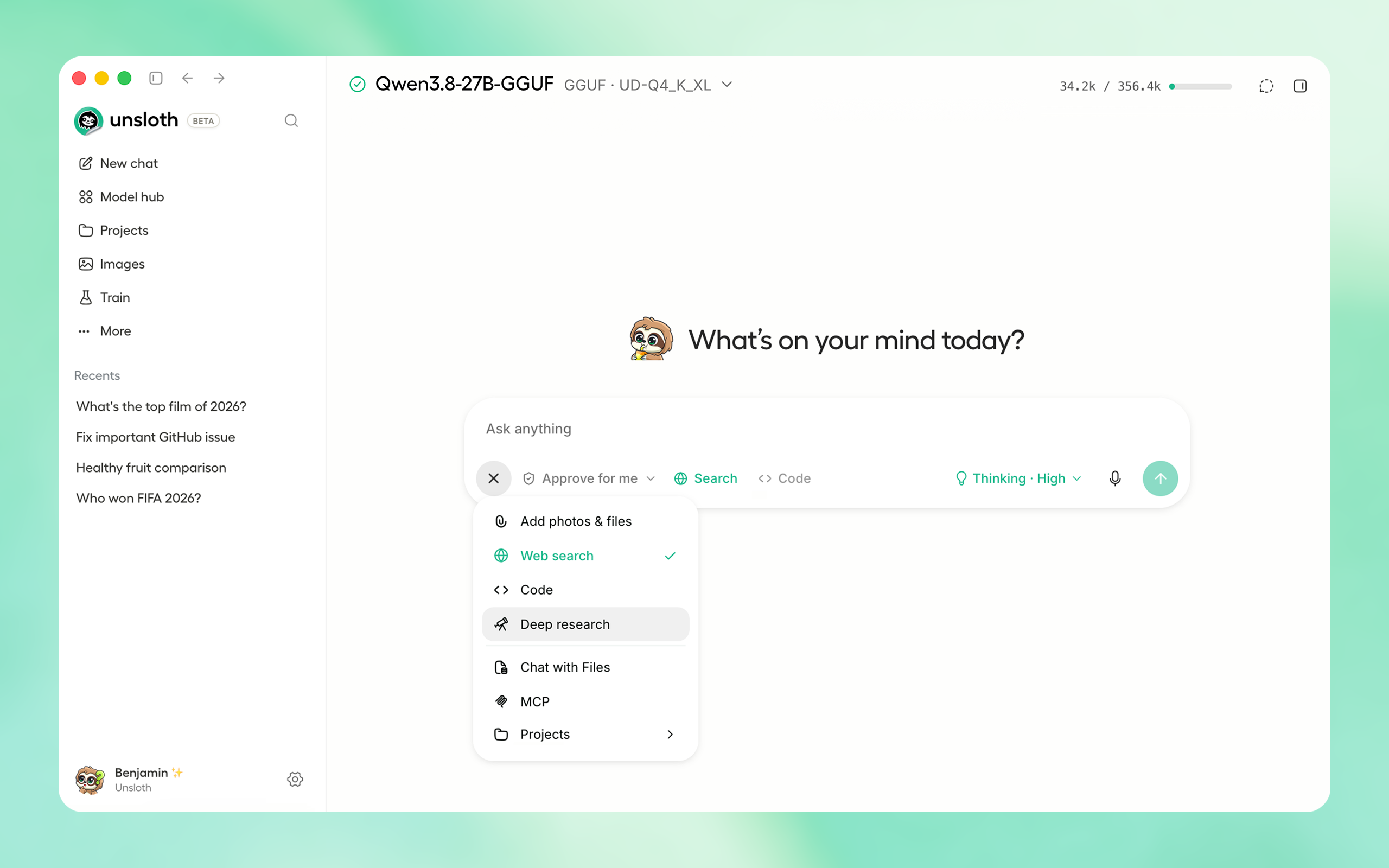
⚡ Get started
Download the native Unsloth Desktop app for your operating system:
| Platform | Link |
| Windows | Download |
| macOS | Download |
| Linux x64 / Ubuntu (deb) | Download |
| Linux ARM64 / Ubuntu 24.04+ (deb) | Download |
| Linux x64 (AppImage) | Download |
Download from Unsloth or GitHub Releases.
Or if you prefer to install manually:
macOS, Linux, WSL:
curl -fsSL https://unsloth.ai/install.sh | sh
Windows:
irm https://unsloth.ai/install.ps1 | iex
Docker
The Unsloth Docker image unsloth/unsloth is available on Docker. Read guide.
Community:
⭐ Features
Unsloth works on Windows, Linux, WSL and macOS. We support Multi GPU setups, NVIDIA, AMD, Intel GPUs, CPUs and the Vulkan backend.
Run & Build with AI
- Run and train LLMs, MLX, GGUF, diffusion, embedding, audio models: Qwen3.8, GLM-5.3-Flash, Kimi K3, Qwen-Image-2.1, MiniMax-H3, DeepSeek-V4, Gemma 4.
- Agents & Tools: Use local models with Claude Code, Codex, and MCP, including tool calling and code execution.
- Search & RAG: Use private and unlimited web search, deep research, auto-compaction (rolling context window) and RAG.
- Image and video: Run and train image and video diffusion or multimodal models
- Remote & LAN: Access your local models from any device on LAN or remotely through secure Cloudflare HTTPS.
- Connect: Serve models through an OpenAI compatible API. Also connect your ChatGPT/Codex subscription and cloud providers
Train & Deploy
- Fine-tuning: Train LLMs, diffusion, TTS, and embedding models 2× faster with 70% less VRAM with no accuracy loss
- Complete support: Supports reinforcement learning, LoRA, QLoRA, full fine tuning, pretraining, RL, GRPO, DPO, and FP8.
- Export & Deploy: Export or Deploy models with including GGUF, NVFP4, FP8 and more formats.
- Datasets: Build datasets from PDFs, CSVs, DOCX files, and more with Data Recipes.
🚀 Unsloth Start
Unsloth Start connects Claude Code, Codex and other agents to local models with one command.
unsloth start claude --model unsloth/Qwen3.8-27B-GGUF:UD-Q4_K_XL
| Agent | Command |
|---|---|
| Claude Code | unsloth start claude |
| OpenAI Codex | unsloth start codex |
| DeepSeek Harness | unsloth start dsh |
| Hermes Agent | unsloth start hermes |
| OpenCode | unsloth start opencode |
| OpenClaw | unsloth start openclaw |
📥 Install
Unsloth can be used in three ways: Unsloth Desktop, the desktop app; Unsloth Studio, the web UI; or Unsloth Core, the code based version.
Unsloth Desktop (recommended)
| Platform | Link |
| Windows | Download |
| macOS | Download |
| Linux x64 / Ubuntu (deb) | Download |
| Linux ARM64 / Ubuntu 24.04+ (deb) | Download |
| Linux x64 (AppImage) | Download |
| Windows ARM64 | Download |
Unsloth Studio (web UI)
macOS, Linux, WSL:
curl -fsSL https://unsloth.ai/install.sh | sh
Windows:
irm https://unsloth.ai/install.ps1 | iex
Launch
unsloth studio
HTTP Secure Deployment
unsloth studio --secure
Docker
Use our Docker image unsloth/unsloth. On Linux, set up GPU access once with curl -fsSL https://raw.githubusercontent.com/unslothai/unsloth/main/docker/install_nvidia_toolkit.sh -o install_nvidia_toolkit.sh && sudo -E bash install_nvidia_toolkit.sh (Windows: Docker Desktop with WSL 2).
Linux / WSL (Bash):
# use  -e UNSLOTH_STUDIO_SECURE=1  instead of -p 8000:8000 for a public Cloudflare HTTPS link
docker run -d --name unsloth --gpus all --ipc=host \
  -p 8000:8000 -p 8888:8888 \
  -v "$PWD":/workspace/host \
  -v "$HOME/.cache/huggingface":/workspace/.cache/huggingface \
  -v unsloth-studio:/opt/unsloth-studio \
  unsloth/unsloth && docker logs -f unsloth
See Docker docs for more information. For cloud hosting / global serving, add -e UNSLOTH_STUDIO_SECURE=1, drop -p 8000:8000 and bind JupyterLab to -p 127.0.0.1:8888:8888, or bind both to 127.0.0.1 and use an SSH tunnel. Tags (unsloth/unsloth:core for notebooks only), GPU support and options: Docker Hub.
On AMD there is a separate image, unsloth/unsloth-rocm, with the run command and the supported cards on its Docker Hub page.
Remote HTTPS & LAN Access
Server-side tools are on by default - so be careful! Keep your password safe, or use --disable-tools when exposing Unsloth.
Global HTTPS Access: Creates a free Cloudflare link that serves Unsloth - you can access the link globally (even on your phone!)
unsloth studio --secure
-H 0.0.0.0 and different ports also work:
unsloth studio -H 0.0.0.0 -p 8888
LAN Access (home network): Settings > API keys > LAN access
Password management & headless starts
Exposing Unsloth (--secure, --cloudflare, or a non-loopback -H) asks once at the terminal for a new admin password. Ctrl+C there aborts the launch rather than exposing the auto-generated one; set a password non-interactively instead, or use -H 127.0.0.1 to stay off the network.
Headless starts:
UNSLOTH_STUDIO_PASSWORD='your-strong-password' unsloth studio --secure # via env var
Reset your password:
unsloth studio reset-password
Developer, Nightly, Uninstall
To see developer, nightly and uninstallation etc. instructions, see advanced installation.
Unsloth Core (code-based)
Linux, WSL:
curl -LsSf https://astral.sh/uv/install.sh | sh
uv venv unsloth_env --python 3.13
source unsloth_env/bin/activate
uv pip install unsloth --torch-backend=auto
Windows:
winget install -e --id Python.Python.3.13
winget install --id=astral-sh.uv  -e
uv venv unsloth_env --python 3.13
.\unsloth_env\Scripts\activate
uv pip install unsloth --torch-backend=auto
AMD, Intel, DGX Spark, Blackwell:
See our Blackwell guide and DGX Spark guide.
To install Unsloth on AMD and Intel GPUs, follow our AMD Guide and Intel Guide.
📒 Free Notebooks
Train for free with our notebooks. Read our guide. Add dataset, run, then deploy your trained model.
| Model | Free Notebooks | Performance | Memory use |
|---|---|---|---|
| Unsloth Studio | ▶️ Start for free | ||
| Gemma 4 (E2B) | ▶️ Start for free | 1.5x faster | 50% less |
| Qwen3.5 (4B) | ▶️ Start for free | 1.5x faster | 60% less |
| gpt-oss (20B) | ▶️ Start for free | 2x faster | 70% less |
| Qwen3.5 GSPO | ▶️ Start for free | 2x faster | 70% less |
| gpt-oss (20B): GRPO | ▶️ Start for free | 2x faster | 80% less |
| Qwen3: Advanced GRPO | ▶️ Start for free | 2x faster | 70% less |
| embeddinggemma (300M) | ▶️ Start for free | 2x faster | 20% less |
| Llama 3.1 (8B) Alpaca | ▶️ Start for free | 2x faster | 70% less |
| Llama 3.2 Conversational | ▶️ Start for free | 2x faster | 70% less |
| Orpheus-TTS (3B) | ▶️ Start for free | 1.5x faster | 50% less |
- See all our notebooks for: Kaggle, GRPO, TTS, embedding & Vision
- See all our models and all our notebooks
- See detailed documentation for Unsloth here
🦥 Unsloth News
- AMD training: Train, run RL, chat and deploy on AMD GPUs across Windows, WSL and Linux. Guide
- Local models for any agent: Use
unsloth startwith Claude Code, Codex, Hermes, OpenCode, OpenClaw, DeepSeek Harness and more through Unsloth's OpenAI- and Anthropic-compatible APIs. Guide - GLM-5.2: Run Z.ai's 744B-parameter, 1M-context open model locally with Unsloth Dynamic GGUFs. Guide
- DeepSeek-V4: Run DeepSeek-V4-Flash locally with corrected multi-turn and tool-calling behavior. Guide
- Gemma 4: Run and train Gemma 4 text, image and audio models with QAT, MTP, GGUF and MLX support. Guide
- MCP servers: Connect local models to files, apps, databases and external tools through Model Context Protocol. Guide
- New models: Qwen-AgentWorld, Ornith, Kimi K2.7 Code and MiniMax M3
More News
- Connections: Mix local models with API providers (OpenAI, Anthropic) or servers (vLLM, Ollama) in the same interface. Guide
- Introducing Unsloth Studio: our new web UI for running and training LLMs. Blog
- DiffusionGemma: Run and fine-tune Google's diffusion language model with 1.8x faster inference in Unsloth Studio. Guide
- Qwen3.6: Run and train Qwen3.6 with MTP for 1.4-2.2x faster inference and NVFP4 quants for supported GPUs. Guide
- Train MoE LLMs 12x faster with 35% less VRAM - DeepSeek, GLM, Qwen and gpt-oss. Blog
- Embedding models: Unsloth now supports ~1.8-3.3x faster embedding fine-tuning. Blog • Notebooks
- New 7x longer context RL vs. all other setups, via our new batching algorithms. Blog
- New RoPE & MLP Triton Kernels & Padding Free + Packing: 3x faster training & 30% less VRAM. Blog
- 500K Context: Training a 20B model with >500K context is now possible on an 80GB GPU. Blog
- FP8 & Vision RL: You can now do FP8 & VLM GRPO on consumer GPUs. FP8 Blog • Vision RL
📥 Advanced Installation
The below advanced instructions are for Unsloth Studio. For Unsloth Core advanced installation, view our docs.
Developer / Nightly / Experimental installs: macOS, Linux, WSL:
The developer install builds from the main branch, which is the latest (nightly) source.
git clone https://github.com/unslothai/unsloth
cd unsloth
./install.sh --local
unsloth studio -p 8888
To install into an isolated location, set UNSLOTH_STUDIO_HOME:
UNSLOTH_STUDIO_HOME="$PWD/.studio" ./install.sh --local
UNSLOTH_STUDIO_HOME="$PWD/.studio" unsloth studio -p 8888
Then to update:
cd unsloth && git pull
./install.sh --local
unsloth studio -p 8888
Developer / Nightly / Experimental installs: Windows PowerShell:
The developer install builds from the main branch, which is the latest (nightly) source.
git clone https://github.com/unslothai/unsloth.git
cd unsloth
Set-ExecutionPolicy -Scope Process -ExecutionPolicy RemoteSigned
.\install.ps1 --local
unsloth studio -p 8888
To install into an isolated location, set UNSLOTH_STUDIO_HOME:
$env:UNSLOTH_STUDIO_HOME="$PWD\.studio"; .\install.ps1 --local
$env:UNSLOTH_STUDIO_HOME="$PWD\.studio"; unsloth studio -p 8888
Then to update:
cd unsloth; git pull
.\install.ps1 --local
unsloth studio -p 8888
Advanced launch options
Skip PyTorch (GGUF-only mode):
curl -fsSL https://unsloth.ai/install.sh | UNSLOTH_NO_TORCH=1 sh
$env:UNSLOTH_NO_TORCH=1; irm https://unsloth.ai/install.ps1 | iex
Skip the post-install prompt that starts Unsloth (useful for automated installs):
curl -fsSL https://unsloth.ai/install.sh | UNSLOTH_SKIP_AUTOSTART=1 sh
$env:UNSLOTH_SKIP_AUTOSTART=1; irm https://unsloth.ai/install.ps1 | iex
Keep the install-time package cache under the Unsloth Studio directory instead of reusing an existing uv cache. Downloads are slower the first time, and an explicit UV_CACHE_DIR still wins over this:
curl -fsSL https://unsloth.ai/install.sh | UNSLOTH_ISOLATE_UV_CACHE=1 sh
$env:UNSLOTH_ISOLATE_UV_CACHE=1; irm https://unsloth.ai/install.ps1 | iex
For a local run the flag is --isolated-uv-cache:
./install.sh --local --isolated-uv-cache
.\install.ps1 --local --isolated-uv-cache
Discard the previous environment immediately when reinstalling, instead of keeping a copy until the new one works. A reinstall normally holds both at once, so it needs room for two; this needs room for one, at the cost of not being able to undo a failed install:
curl -fsSL https://unsloth.ai/install.sh | UNSLOTH_INSTALL_NO_ROLLBACK=1 sh
$env:UNSLOTH_INSTALL_NO_ROLLBACK=1; irm https://unsloth.ai/install.ps1 | iex
For a local run the flag is --no-rollback:
./install.sh --local --no-rollback
.\install.ps1 --local --no-rollback
Pinning the Python version:
curl -fsSL https://unsloth.ai/install.sh | UNSLOTH_PYTHON=3.12 sh
$env:UNSLOTH_PYTHON='3.12'; irm https://unsloth.ai/install.ps1 | iex
Install to a custom location with UNSLOTH_STUDIO_HOME:
curl -fsSL https://unsloth.ai/install.sh | UNSLOTH_STUDIO_HOME=/abs/path sh
$env:UNSLOTH_STUDIO_HOME='C:\path'; irm https://unsloth.ai/install.ps1 | iex
Point the frontend build at a corporate npm mirror/proxy with UNSLOTH_NPM_REGISTRY:
UNSLOTH_NPM_REGISTRY=https://artifactory.example.com/api/npm/npm/ ./install.sh --local
$env:UNSLOTH_NPM_REGISTRY='https://artifactory.example.com/api/npm/npm/'; .\install.ps1 --local
Cap Unsloth's native CPU thread pools on high-core hosts: UNSLOTH_CPU_THREADS=8 unsloth studio -p 8888.
Vulkan, custom llama.cpp backends:
You can force the backend during installation:
export UNSLOTH_LLAMA_CPP_BACKEND=vulkan   # or cpu, cuda, rocm, auto
curl -fsSL https://unsloth.ai/install.sh | sh
$env:UNSLOTH_LLAMA_CPP_BACKEND="vulkan"   # or cpu, cuda, rocm, auto
irm https://unsloth.ai/install.ps1 | iex
Uninstall
MacOS, WSL, Linux: curl -fsSL https://raw.githubusercontent.com/unslothai/unsloth/main/scripts/uninstall.sh | sh
Windows (PowerShell): irm https://raw.githubusercontent.com/unslothai/unsloth/main/scripts/uninstall.ps1 | iex
For more info, see our docs.
Deleting model files
You can delete old model files either from the bin icon in model search or by removing the relevant cached model folder from the default Hugging Face cache directory. By default, HF uses:
MacOS, Linux, WSL: ~/.cache/huggingface/hub/
Windows: %USERPROFILE%\.cache\huggingface\hub\
💚 Community and Links
| Type | Links |
|---|---|
 Discord Discord |
Join Discord server |
 r/unsloth Reddit r/unsloth Reddit |
Join Reddit community |
| 📚 Documentation & Wiki | Read Our Docs |
_logo_late_2025.svg) Twitter (aka X) Twitter (aka X) |
Follow us on X |
| 🔮 Our Models | Unsloth Catalog |
| ✍️ Blog | Read our Blogs |
Citation
You can cite the Unsloth repo as follows:
@software{unsloth,
  author = {Daniel Han, Michael Han and Unsloth team},
  title = {Unsloth},
  url = {https://github.com/unslothai/unsloth},
  year = {2023}
}
If you trained a model with 🦥Unsloth, you can use this cool sticker! 
License
Unsloth uses a dual-licensing model of Apache 2.0 and AGPL-3.0. The core Unsloth package remains licensed under Apache 2.0, while certain optional components, such as the Unsloth Studio UI are licensed under the open-source license AGPL-3.0.
This structure helps support ongoing Unsloth development while keeping the project open source and enabling the broader ecosystem to continue growing.
Thank You to
- The llama.cpp library that lets users run and save models with Unsloth
- The Hugging Face team and their libraries: transformers and TRL
- The Pytorch and Torch AO team for their contributions
- NVIDIA for their NeMo DataDesigner library and their contributions
- And of course for every single person who has contributed or has used Unsloth!