

Supports IJKPlayer, Media3(EXOPlayer2), MediaPlayer, AliPlayer, implementing a multi-functional video player. (Please read the following instructions carefully, most questions can be answered below).
* HarmonyOS version openharmony-tpc/GSYVideoPlayer
If cloning is too slow or images are not visible, you can try to synchronize from the following addresses
- GitCode https://gitcode.com/ZuoYueLiang/GSYVideoPlayer
- Gitee:https://gitee.com/CarGuo/GSYVideoPlayer
| Type | Function |
|---|---|
| Cache | Play while caching, using AndroidVideoCache; Media3(ExoPlayer) uses SimpleCache. |
| Protocols | h263\4\5, Https, concat, rtsp, hls, rtmp, crypto, mpeg, etc. (ijk mode format support) |
| Filters | Simple filters (mosaic, black and white, color filter, Gaussian, blur, etc. more than 20 kinds), animation, (watermark, multi-screen playback, etc.). |
| Frame images | Video first frame, video frame screenshots, composed player screenshots including UI, and video to gif function. |
| Playback | List playback, continuous list playback, gravity rotation and manual rotation, video's own rotation attribute, fast and slow playback, network video loading speed. |
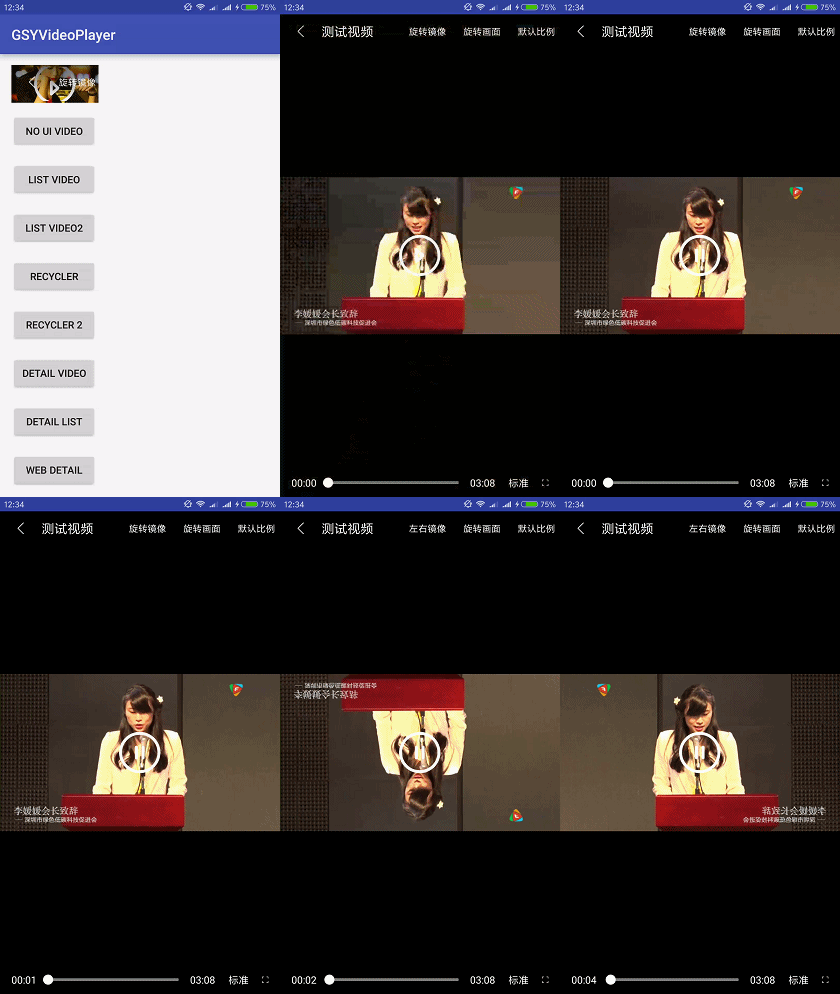
| Screen | Adjust display ratio: default, 16:9, 4:3, fill; rotate screen angle during playback (0,90,180,270); mirror rotation. |
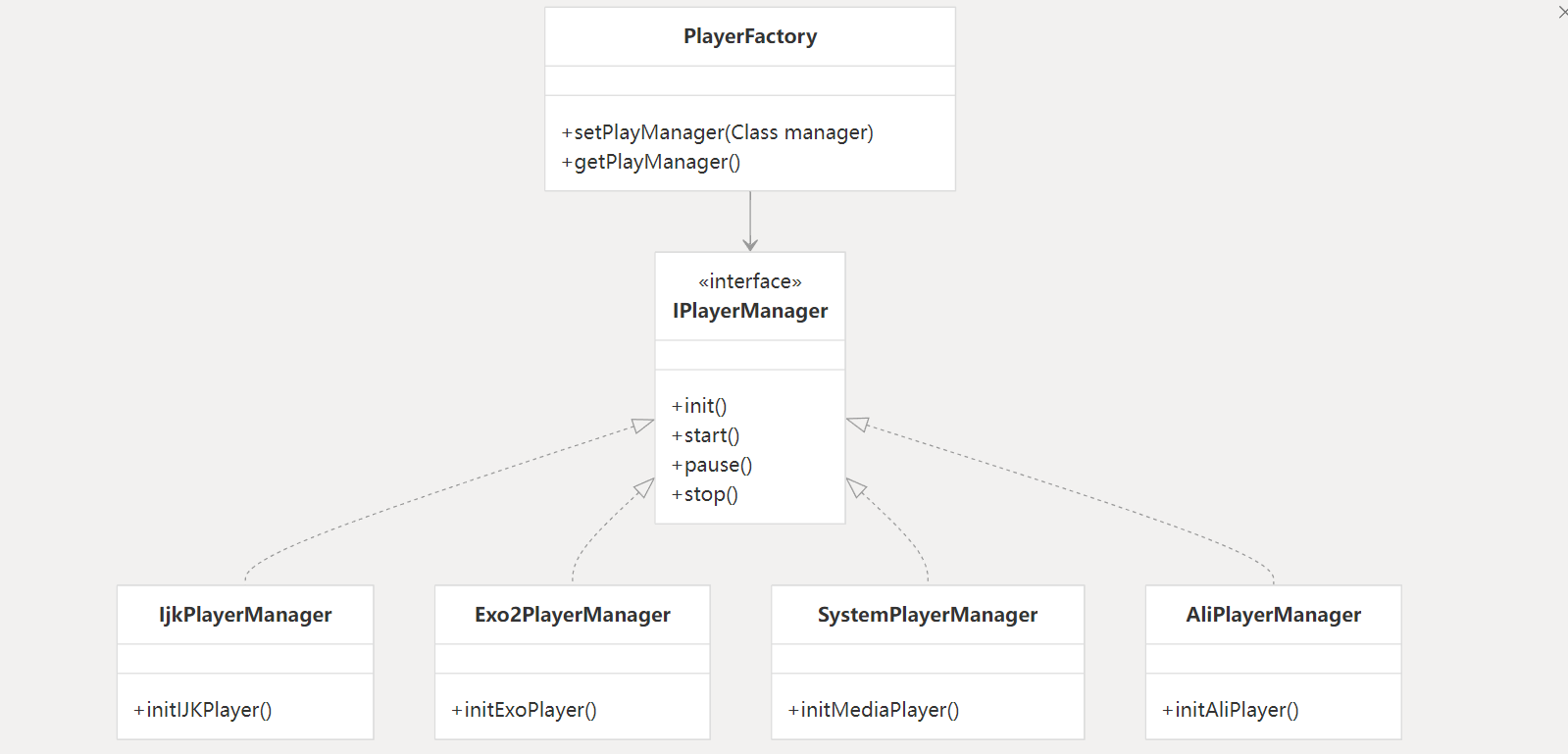
| Kernel | IJKPlayer, Media3(EXOPlayer), MediaPlayer, AliPlayer switching, custom kernel |
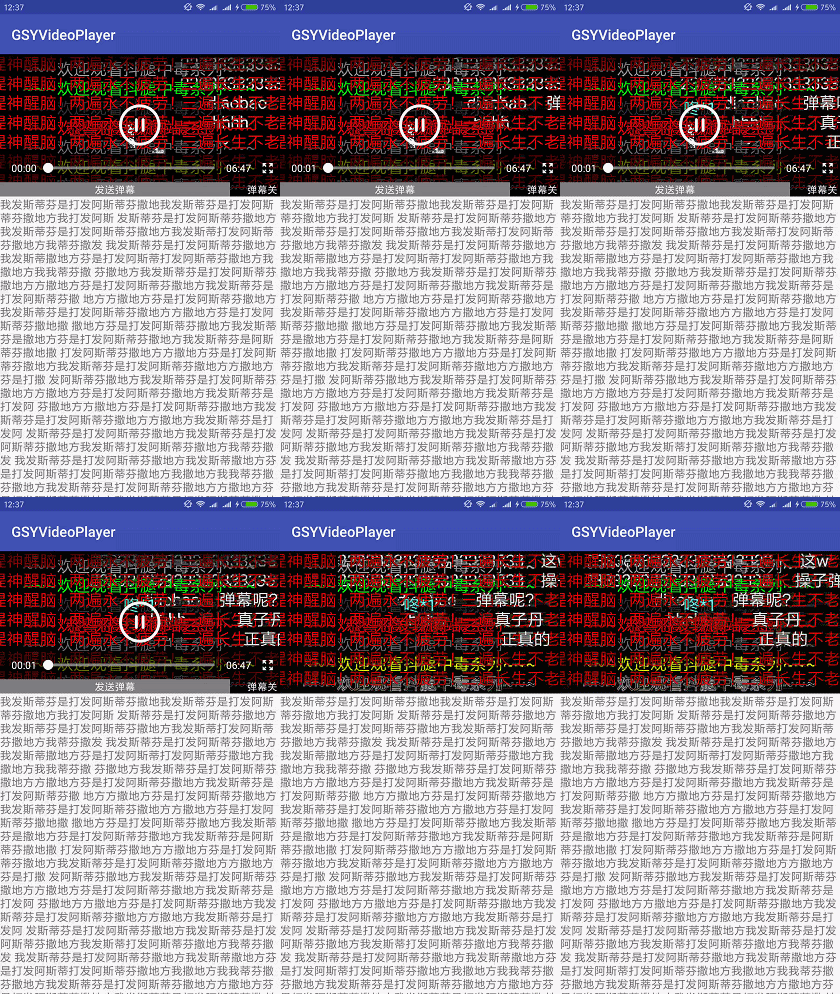
| Layout | Full screen and non-full screen two sets of layout switching, pure playback support without any operation controls, barrage function, inherited custom any layout. |
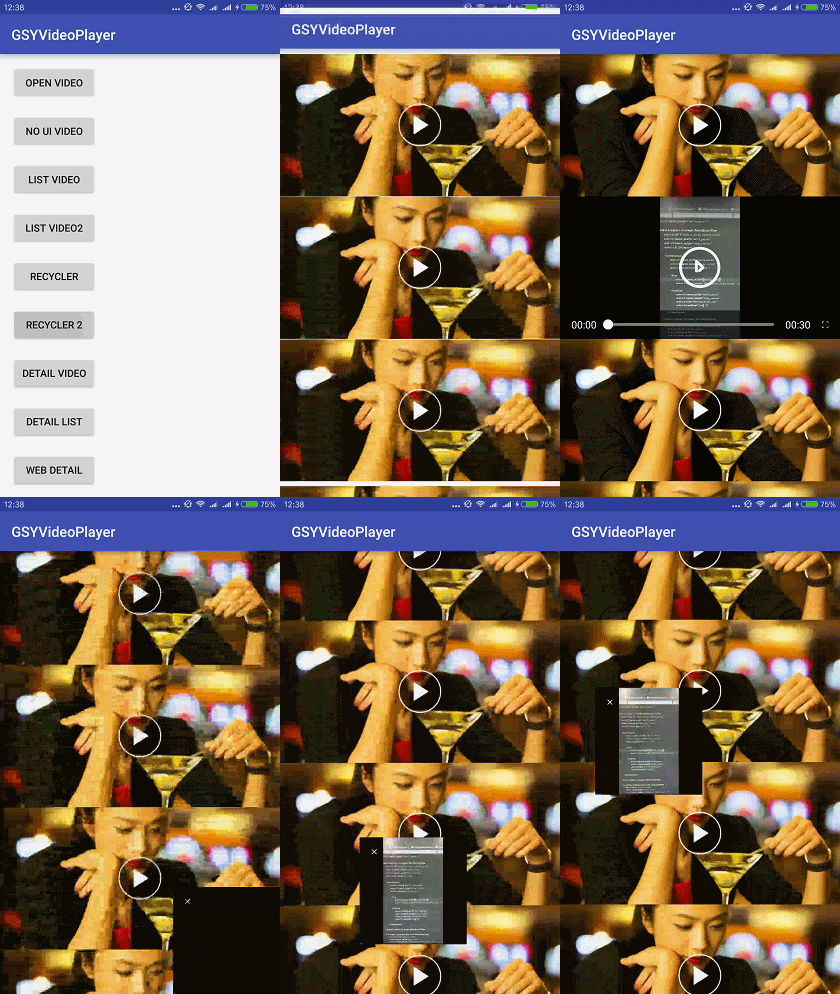
| Playback | Singleton playback, multiple simultaneous playback, video list sliding automatic playback, seamless playback of list switching detail pages. |
| Window | Small window, small window playback in multiple windows (including desktop). |
| Ads | Opening ads, skip ad support, interstitial ad function. |
| Subtitles | Unified external subtitle overlay supports SRT/WebVTT across IJK, Media3(EXOPlayer), and MediaPlayer; Media3 embedded cues can bridge to the same UI. |
| Dash | Media3(exo2) mode supports dash; the demo supports HLS master / DASH MPD adaptive quality track switching. |
| Stream | Supports metadata playback |
| Adapt 16k | ex_so adapts to 16K Page Size |
| openssl | Currently ex_so's arm64/x86_64 uses openssl 1.1.1w |
| FFmpeg | Currently ex_so's arm64/x86_64 uses FFmpeg 4.3 |
| FFmpeg | Currently ex_so's arm64/x86_64 supports G711a(pcm_alaw) |
| Cast | Optional gsyvideoplayer-cast DLNA/UPnP module built on jUPnP 3.0.3; the core keeps only the protocol-neutral CastCapability / CastProvider / CastSession SPI and does not pull Jetty. Details. |
| More | No black screen when pausing front and back switching; multi-URL quality switching; Exo HLS/DASH adaptive quality; seamless switching support; keep-last-frame demo; WebVTT progress bar preview. |
| Customization | Customizable rendering layer, custom management layer, custom playback layer (control layer), custom cache layer. |







| Official Account | Juejin | Zhihu | CSDN | Jianshu |
|---|---|---|---|---|
| GSYTech | Click me | Click me | Click me | Click me |

--------------Demo APK Download Address---------------
I. Using Dependencies
There are currently three hosting methods:
- MavenCentral: Available after version 11.0.0, all base class packages are published and hosted here.
- Github Package: Available from version 9.1.0, but before version 11.0.0, the basic dependencies of GSYIjkJava are still hosted on jitpack.
- Jitpack IO: Will continue to be released, but there is a random loss of packages on the hosting platform.
--- Version Update Instructions --- .
--- Recent Playback Features --- .
1. MavenCentral Reference (Recommended)
Since jitpack keeps losing packages, it has been migrated to MavenCentral. The usage is as follows:
First Add
allprojects {
    repositories {
        ///...
        mavenCentral()
        maven { url "https://maven.aliyun.com/repository/public" }
    }
}
You can choose one of the following three and add it to the build.gradle under the module.
A. Direct Introduction
 //Complete version introduction

implementation 'io.github.carguo:gsyvideoplayer:13.2.1'


//Whether AliPlayer mode is needed
implementation 'io.github.carguo:gsyvideoplayer-aliplay:13.2.1'

//Whether DLNA/UPnP casting is needed (optional, minSdk 26)
implementation 'io.github.carguo:gsyvideoplayer-cast:13.2.1'
B. Add java and the so support you want:
 implementation 'io.github.carguo:gsyvideoplayer-java:13.2.1'

 //Whether ExoPlayer mode is needed
 implementation 'io.github.carguo:gsyvideoplayer-exo2:13.2.1'

 //Optional direct RTMP module; exo2 already exposes it transitively
 implementation 'io.github.carguo:gsyvideoplayer-rtmp:13.2.1'

 //Optional DLNA/UPnP cast implementation (minSdk 26); the default player does not include Jetty
 implementation 'io.github.carguo:gsyvideoplayer-cast:13.2.1'

 //Whether AliPlayer mode is needed
 implementation 'io.github.carguo:gsyvideoplayer-aliplay:13.2.1'

 //so of ijk mode according to your needs
 implementation 'io.github.carguo:gsyvideoplayer-arm64:13.2.1'
 implementation 'io.github.carguo:gsyvideoplayer-armv7a:13.2.1'
 implementation 'io.github.carguo:gsyvideoplayer-armv5:13.2.1'
 implementation 'io.github.carguo:gsyvideoplayer-x86:13.2.1'
 implementation 'io.github.carguo:gsyvideoplayer-x64:13.2.1'
C. Support other format protocols (mpeg, rtsp, concat, crypto protocols, support 16k Page Size)
A and B normal versions support 263/264/265, etc. For mpeg encoding, there will be sound but no picture. The so introduced by C supports mpeg encoding and other supplementary protocols, but the so package is relatively larger.
 implementation 'io.github.carguo:gsyvideoplayer-java:13.2.1'

 //Whether ExoPlayer mode is needed
 implementation 'io.github.carguo:gsyvideoplayer-exo2:13.2.1'

 //Whether AliPlayer mode is needed
 implementation 'io.github.carguo:gsyvideoplayer-aliplay:13.2.1'

 //More ijk encoding support
 implementation 'io.github.carguo:gsyvideoplayer-ex_so:13.2.1'
D. Jetpack Compose Support (Optional)
The gsyvideoplayer-compose module is published with v13.1.0. It can be consumed from Maven Central / GitHub Packages like the other modules, or by depending on the source module directly with implementation project(":gsyVideoPlayer-compose") when working inside this repository.
🛠 Toolchain note: the Compose module is verified on JDK 21 in CI (
.github/workflows/*.yml—actions/setup-javajava-version: 21) and JDK 17 locally (the module pinssourceCompatibility / targetCompatibility / jvmTarget = 17in gsyVideoPlayer-compose/build.gradle). Both are fine; just make sure your local JDK is ≥ 17 so Kotlin 2.0.21 + AGP 8.6.1 can build.
The new gsyvideoplayer-compose module exposes Compose entries on top of the existing kernels and UI without touching any legacy code:
- Wrapper mode: a single Composable
GSYVideoPlayerView { ... }embedsStandardGSYVideoPlayerinto a Compose screen, with automatic Lifecycle bridge andreleaseon dispose. An optionalsetUpKey: Any?parameter lets you triggersetUpagain only when the data identity changes (idempotent). - Native mode:
GSYComposeHostPlayer + GSYPlayerControllerexposes aGSYPlayerSnapshotstate stream plus anevents: SharedFlow<GSYPlayerEvent>of one-shot edge events (Prepared/AutoComplete/Error), so the control UI can be drawn entirely in Compose while the rendering pipeline still uses the GSY multi-kernel core. The legacysetOnError / setOnComplete / setOnPreparedsetters are still supported but@Deprecatedin favour of the Flow API.
// Maven Central:
implementation 'io.github.carguo:gsyvideoplayer-compose:13.2.1'

// Source dependency for local development:
implementation project(':gsyVideoPlayer-compose')
// compose-bom is api-exposed from the module; consumers still manage androidx.compose.* per their own project setup.
See doc/COMPOSE_USE.md. The sample app provides a Compose Demo entry with 24 runnable Compose Activities — covering Wrapper basics, Native detail/list/multi-window/auto-play/seamless-switch, plus P5 differentiating capabilities (filter, cache/download, ad pre-roll, subtitle, custom danmaku, EXO multi-source, parallel multi-window) and P5-2 modern app patterns (vertical short video, floating window, multi-type list, web mixed layout, audio-only, URL/local file, MediaCodec hardware switch, themed custom controls). DemoSamples.kt is a shared data object of test URLs, not a runnable Activity. Outstanding gaps and the rolling roadmap are tracked in doc/COMPOSE_BACKLOG.md.
2. Github Package Dependency Method (Recommended)
Since Jitpack often has the problem of random loss of historical packages, a new Github Package dependency method is added. The usage is as follows:
However, accessing github package requires a token to access, which is more troublesome, but it is stable.
allprojects {
    repositories {
		//...
        maven {
            url 'https://maven.pkg.github.com/CarGuo/GSYVideoPlayer'

            // You can also use your own GitHub account and token
            // For convenience, I have provided a token for an infrequently used account here
            credentials {
                // your github name
                username = 'carsmallguo'
                // your github generate new token
                password = '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'
            }
        }
        maven {
            url "https://maven.aliyun.com/repository/public"
        }
        mavenCentral()

    }
}
- To generate your own token, you can see: https://docs.github.com/zh/authentication/keeping-your-account-and-data-secure/managing-your-personal-access-tokens
In theory, it is the avatar in the upper right corner - Settings - Developer Settings - Personal access tokens - tokens (classic) - Generate new token (classic) - read:packages Remember to choose permanent for the expiration time
Tip: this repository's root
build.gradlealready supports reading the GitHub Packages credentials from a Gradle property or environment variable, so you don't have to hard-code your own token in the source tree:# ~/.gradle/gradle.properties (recommended for local builds) githubReadUser=<your-github-name> githubReadToken=<your-classic-token-with-read:packages>Or in CI:
export GITHUB_READ_USER=<your-github-name>
export GITHUB_READ_TOKEN=<your-classic-token-with-read:packages>
The hard-coded
carsmallguo / ghp_...pair is only kept as a fallback so first-time clones still build out of the box; it may be revoked at any time, so prefer providing your own.
You can choose one of the following three and add it to the build.gradle under the module.
A. Direct Introduction
 //Complete version introduction
 implementation 'com.shuyu:gsyvideoplayer:13.2.1'


 //Whether AliPlayer mode is needed
 implementation 'com.shuyu:gsyvideoplayer-aliplay:13.2.1'

 //Whether DLNA/UPnP casting is needed (optional, minSdk 26)
 implementation 'com.shuyu:gsyvideoplayer-cast:13.2.1'
B. Add java and the so support you want:
 implementation 'com.shuyu:gsyvideoplayer-java:13.2.1'

 //Whether ExoPlayer mode is needed
 implementation 'com.shuyu:gsyvideoplayer-exo2:13.2.1'

 //Optional direct RTMP module; exo2 already exposes it transitively
 implementation 'com.shuyu:gsyvideoplayer-rtmp:13.2.1'

 //Optional DLNA/UPnP cast implementation (minSdk 26); the default player does not include Jetty
 implementation 'com.shuyu:gsyvideoplayer-cast:13.2.1'

 //Whether AliPlayer mode is needed
 implementation 'com.shuyu:gsyvideoplayer-aliplay:13.2.1'

 //so of ijk mode according to your needs
 implementation 'com.shuyu:gsyvideoplayer-armv5:13.2.1'
 implementation 'com.shuyu:gsyvideoplayer-armv7a:13.2.1'
 implementation 'com.shuyu:gsyvideoplayer-arm64:13.2.1'
 implementation 'com.shuyu:gsyvideoplayer-x86:13.2.1'
 implementation 'com.shuyu:gsyvideoplayer-x64:13.2.1'
C. Support other format protocols (mpeg, rtsp, concat, crypto protocols, support 16k Page Size)
A and B normal versions support 263/264/265, etc. For mpeg encoding, there will be sound but no picture. The so introduced by C supports mpeg encoding and other supplementary protocols, but the so package is relatively larger.
 implementation 'com.shuyu:gsyvideoplayer-java:13.2.1'

 //Whether ExoPlayer mode is needed
 implementation 'com.shuyu:gsyvideoplayer-exo2:13.2.1'


 //Whether AliPlayer mode is needed
 implementation 'com.shuyu:gsyvideoplayer-aliplay:13.2.1'

 //More ijk encoding support
 implementation 'com.shuyu:gsyvideoplayer-ex_so:13.2.1'
D. Jetpack Compose Support (Optional)
implementation 'com.shuyu:gsyvideoplayer-compose:13.2.1'
3. Jitpack Introduction Method (will continue to be released, but not highly recommended)
Historical packages may have random packet loss, and it is not easy to supplement, see #4144:
First, add in the build.gradle under the project
allprojects {
    repositories {
		//...
        maven { url 'https://jitpack.io' }
        maven { url "https://maven.aliyun.com/repository/public" }
        mavenCentral()
    }
}
You can choose one of the following three and add it to the build.gradle under the module.
A. Direct Introduction
 //Complete version introduction

 implementation 'com.github.CarGuo.GSYVideoPlayer:gsyvideoplayer:v13.2.1'


 //Whether AliPlayer mode is needed
 implementation 'com.github.CarGuo.GSYVideoPlayer:gsyvideoplayer-aliplay:v13.2.1'

 //Whether DLNA/UPnP casting is needed (optional, minSdk 26)
 implementation 'com.github.CarGuo.GSYVideoPlayer:gsyvideoplayer-cast:v13.2.1'
B. Add java and the so support you want:
 implementation 'com.github.CarGuo.GSYVideoPlayer:gsyvideoplayer-java:v13.2.1'

 //Whether ExoPlayer mode is needed
 implementation 'com.github.CarGuo.GSYVideoPlayer:gsyvideoplayer-exo2:v13.2.1'

 //Optional DLNA/UPnP cast implementation (minSdk 26)
 implementation 'com.github.CarGuo.GSYVideoPlayer:gsyvideoplayer-cast:v13.2.1'

 //Whether AliPlayer mode is needed
 implementation 'com.github.CarGuo.GSYVideoPlayer:gsyvideoplayer-aliplay:v13.2.1'

 //so of ijk mode according to your needs
 implementation 'com.github.CarGuo.GSYVideoPlayer:gsyvideoplayer-arm64:v13.2.1'
 implementation 'com.github.CarGuo.GSYVideoPlayer:gsyvideoplayer-armv7a:v13.2.1'
 implementation 'com.github.CarGuo.GSYVideoPlayer:gsyvideoplayer-armv5:v13.2.1'
 implementation 'com.github.CarGuo.GSYVideoPlayer:gsyvideoplayer-x86:v13.2.1'
 implementation 'com.github.CarGuo.GSYVideoPlayer:gsyvideoplayer-x64:v13.2.1'
C. Support other format protocols (mpeg, rtsp, concat, crypto protocols, support 16k Page Size)
A and B normal versions support 263/264/265, etc. For mpeg encoding, there will be sound but no picture. The so introduced by C supports mpeg encoding and other supplementary protocols, but the so package is relatively larger.
 implementation 'com.github.CarGuo.GSYVideoPlayer:gsyvideoplayer-java:v13.2.1'

 //Whether ExoPlayer mode is needed
 implementation 'com.github.CarGuo.GSYVideoPlayer:gsyvideoplayer-exo2:v13.2.1'

 //Whether AliPlayer mode is needed
 implementation 'com.github.CarGuo.GSYVideoPlayer:gsyvideoplayer-aliplay:v13.2.1'

 //More ijk encoding support
 implementation 'com.github.CarGuo.GSYVideoPlayer:gsyvideoplayer-ex_so:v13.2.1'
Global switching support in code (for more, please refer to the documentation and demo below)
//EXOPlayer kernel, supports more formats
PlayerFactory.setPlayManager(Exo2PlayerManager.class);
//System kernel mode
PlayerFactory.setPlayManager(SystemPlayerManager.class);
//ijk kernel, default mode
PlayerFactory.setPlayManager(IjkPlayerManager.class);
//aliplay kernel, default mode
PlayerFactory.setPlayManager(AliPlayerManager.class);


//exo cache mode, supports m3u8, only supports exo
//Set before Exo cache is created. Default is 512 MB.
ExoSourceManager.setCacheMaxSize(1024L * 1024L * 1024L);
CacheFactory.setCacheManager(ExoPlayerCacheManager.class);
//Proxy cache mode, supports all modes, does not support m3u8, etc., default
CacheFactory.setCacheManager(ProxyCacheManager.class);


//Switch rendering mode
GSYVideoType.setShowType(GSYVideoType.SCREEN_MATCH_FULL);
//Default display ratio
GSYVideoType.SCREEN_TYPE_DEFAULT = 0;
//16:9
GSYVideoType.SCREEN_TYPE_16_9 = 1;
//4:3
GSYVideoType.SCREEN_TYPE_4_3 = 2;
//Full screen cropping display, for normal display CoverImageView it is recommended to use FrameLayout as the parent layout
GSYVideoType.SCREEN_TYPE_FULL = 4;
//Full screen stretching display, when using this attribute, it is recommended to use FrameLayout for surface_container
GSYVideoType.SCREEN_MATCH_FULL = -4;
/***
 * Custom display ratio under SCREEN_TYPE_CUSTOM
 * @param screenScaleRatio Aspect ratio, such as 16:9
 */
public static void setScreenScaleRatio(float screenScaleRatio)


//Switch drawing mode
GSYVideoType.setRenderType(GSYVideoType.SUFRACE);
GSYVideoType.setRenderType(GSYVideoType.GLSURFACE);
GSYVideoType.setRenderType(GSYVideoType.TEXTURE);


//ijk close log
IjkPlayerManager.setLogLevel(IjkMediaPlayer.IJK_LOG_SILENT);


//exoplayer custom MediaSource
ExoSourceManager.setExoMediaSourceInterceptListener(new ExoMediaSourceInterceptListener() {
    @Override
    public MediaSource getMediaSource(String dataSource, boolean preview, boolean cacheEnable, boolean isLooping, File cacheDir) {
        //Customizable MediaSource
        return null;
    }
});
--- More dependency methods, please click -
II. Other Recommendations
* My technical community: Juejin
* QQ group, welcome if interested (usually a lot of chitchat and complaints, because the number of people is saturated, it's just daily nonsense, no one solves problems): ~~
174815284~~ , New group: 992451658 .
* Flutter Github Client , Compose Github Client , React Native Github Client , Weex Github Client , Native Kotlin Github Client
* RxFFmpeg Android audio and video editing tool
* oarplayer Rtmp player, based on MediaCodec and srs-librtmp, does not rely on ffmpeg
* HarmonyOS version openharmony-tpc/GSYVideoPlayer
III. Documentation Wiki
| Document | Portal |
|---|---|
| Usage Instructions | --- Simple usage, quick start documentation |
| Recommended Reading | --- Basic audio and video knowledge that mobile developers must know 1, --- Basic audio and video knowledge that mobile developers must know 2 |
| Project Analysis Description | --- Project analysis description, including project architecture and analysis |
| API Documentation Entrance | --- Usage instructions, API documentation - Entrance |
| FAQ Entrance | --- FAQ - Entrance (most of the problems you encounter are solved here) |
| Encoding Format | --- IJK so file configuration format description |
| Compile Custom SO | --- IJKPlayer Compile Custom SO - Entrance |
| Version Update Instructions | --- Version Update Instructions - Entrance |
| compileSdk too high | --- #3514 |
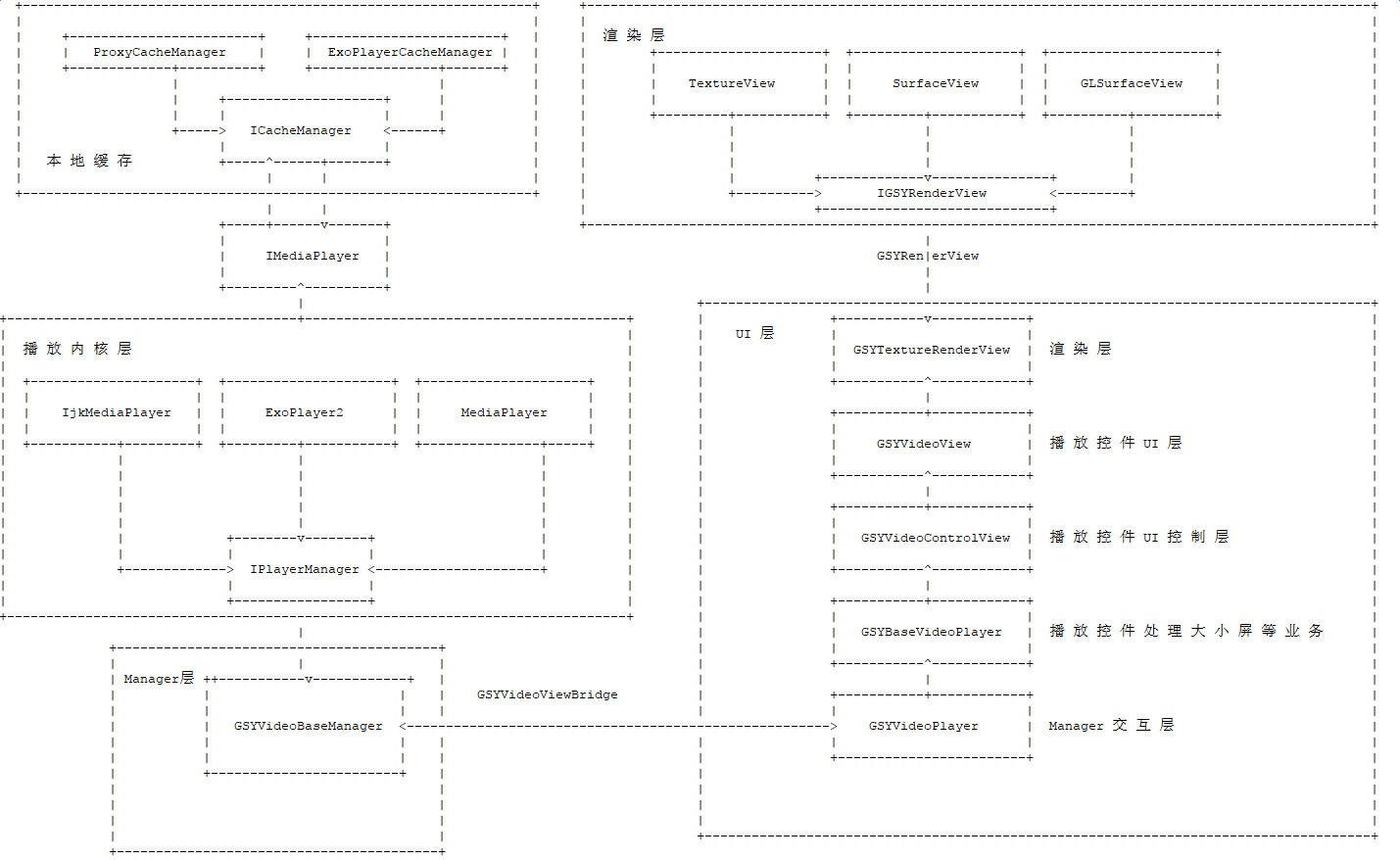
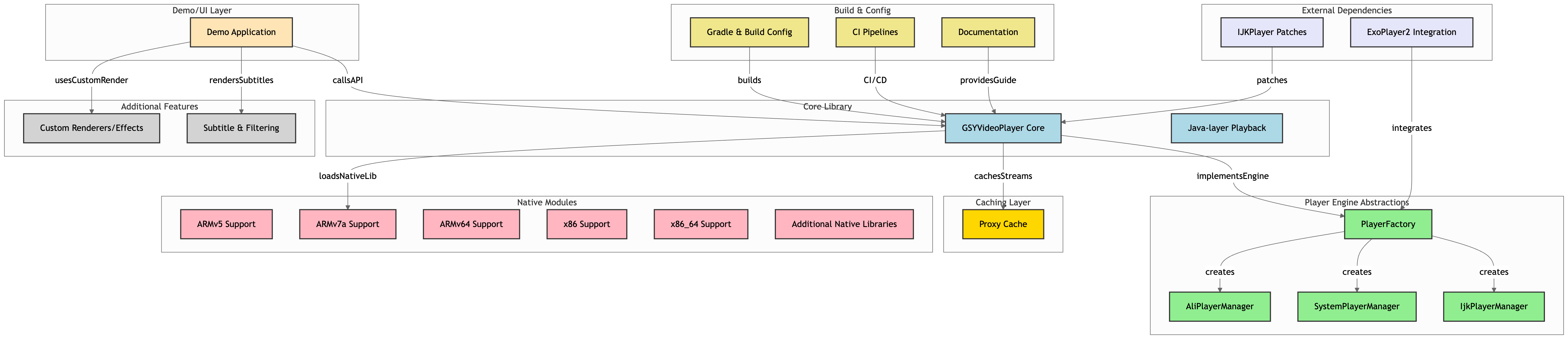
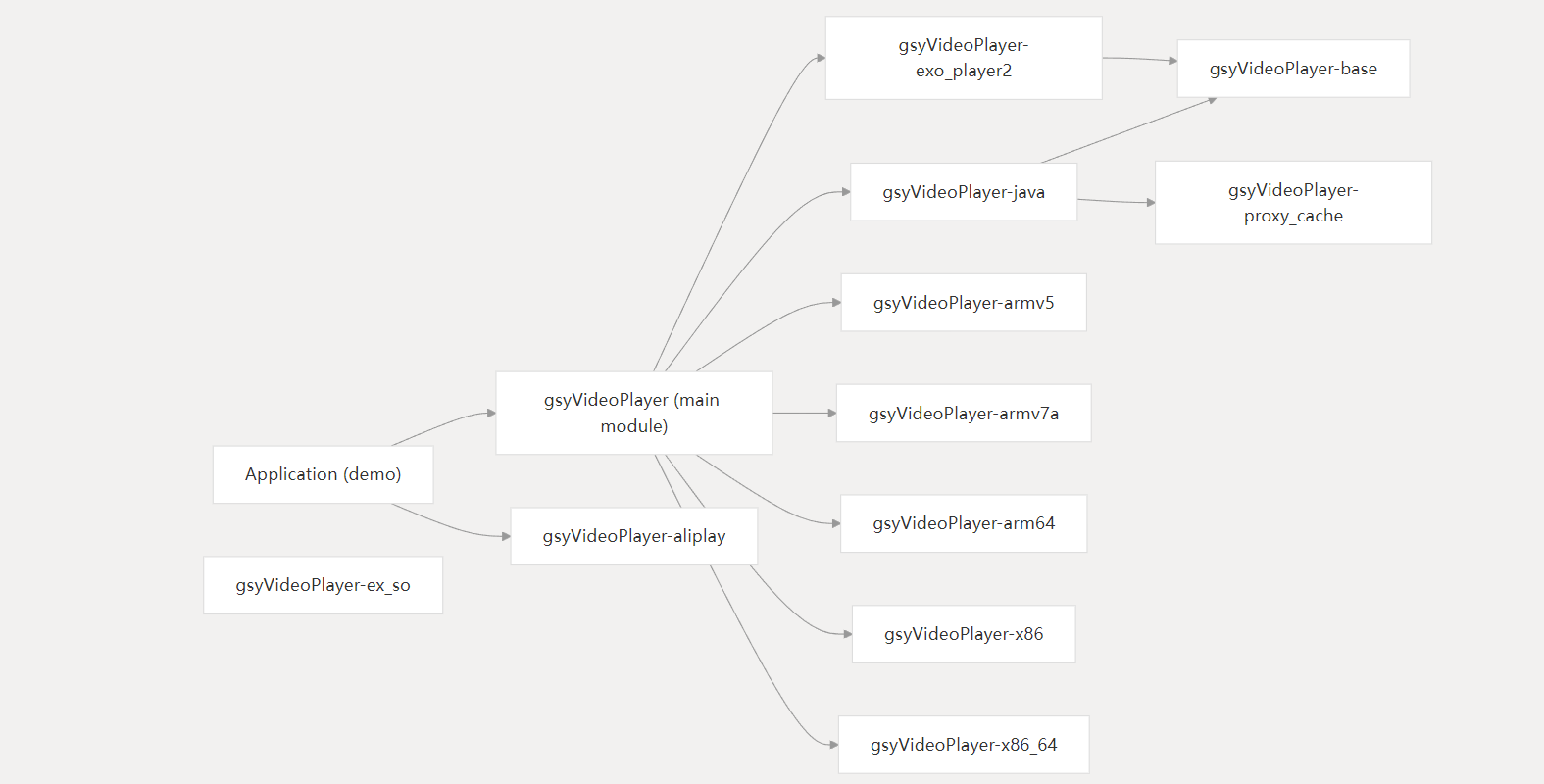
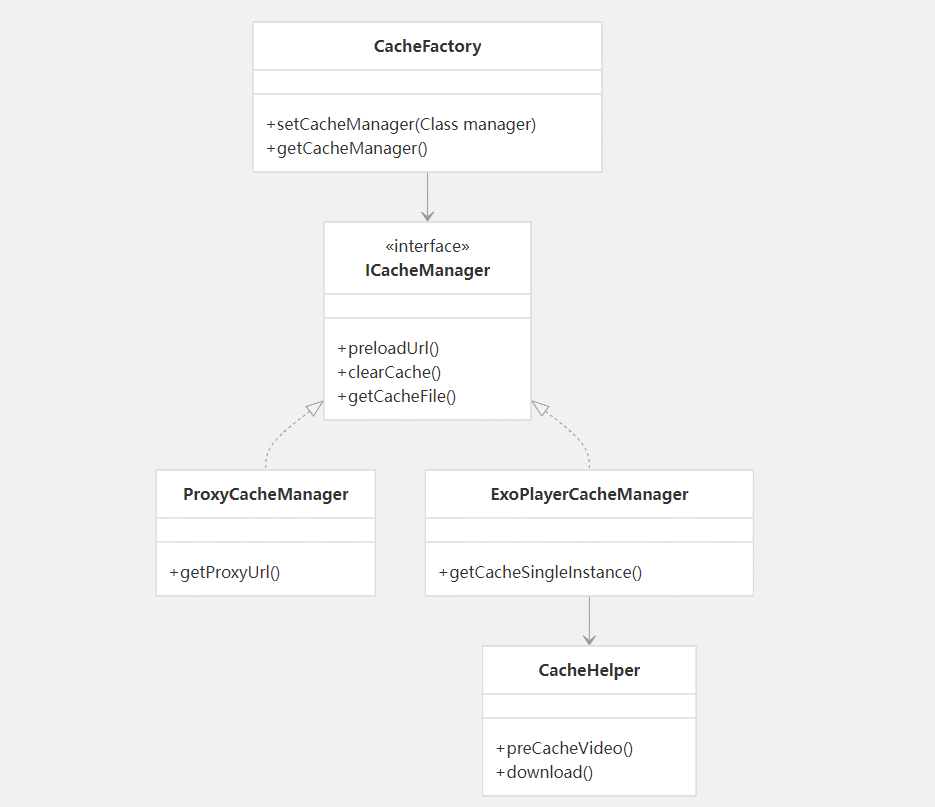
More visible: https://codewiki.google/github.com/carguo/gsyvideoplayer
IV. Running Effect
-
1. Open a playback (rotation, mirror, fill)
-
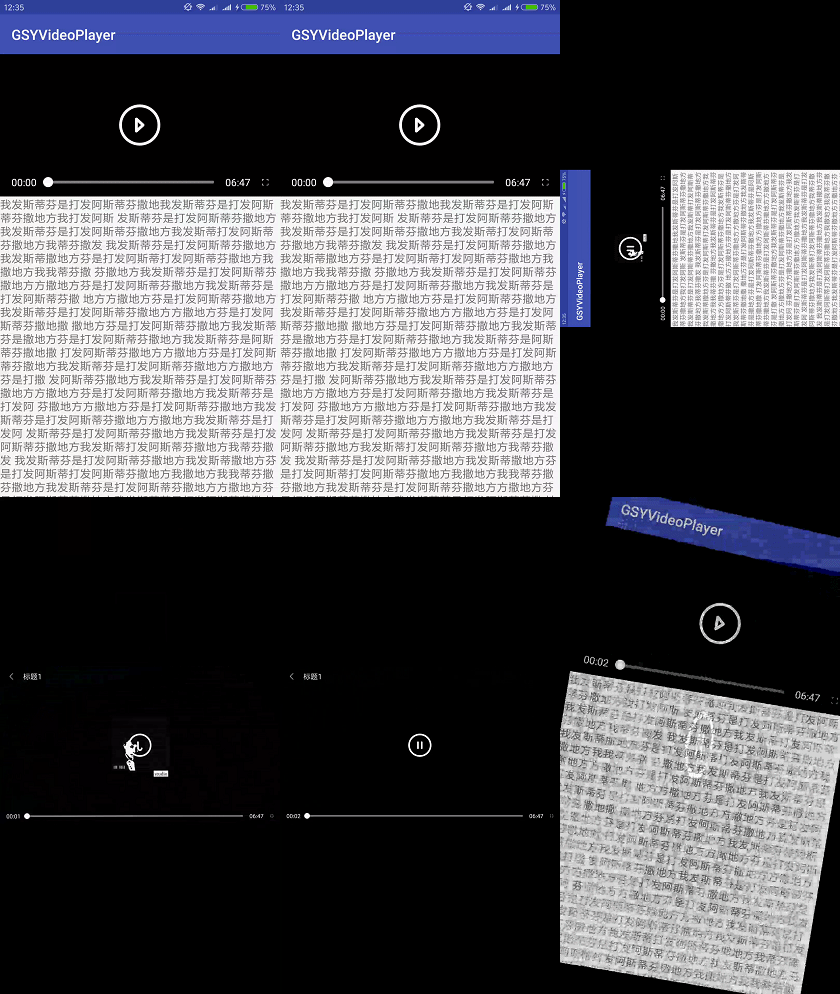
2. List/Detail Mode (animation, rotation, small window)

-
3. Barrage
-
4. Filters and GL animation

-
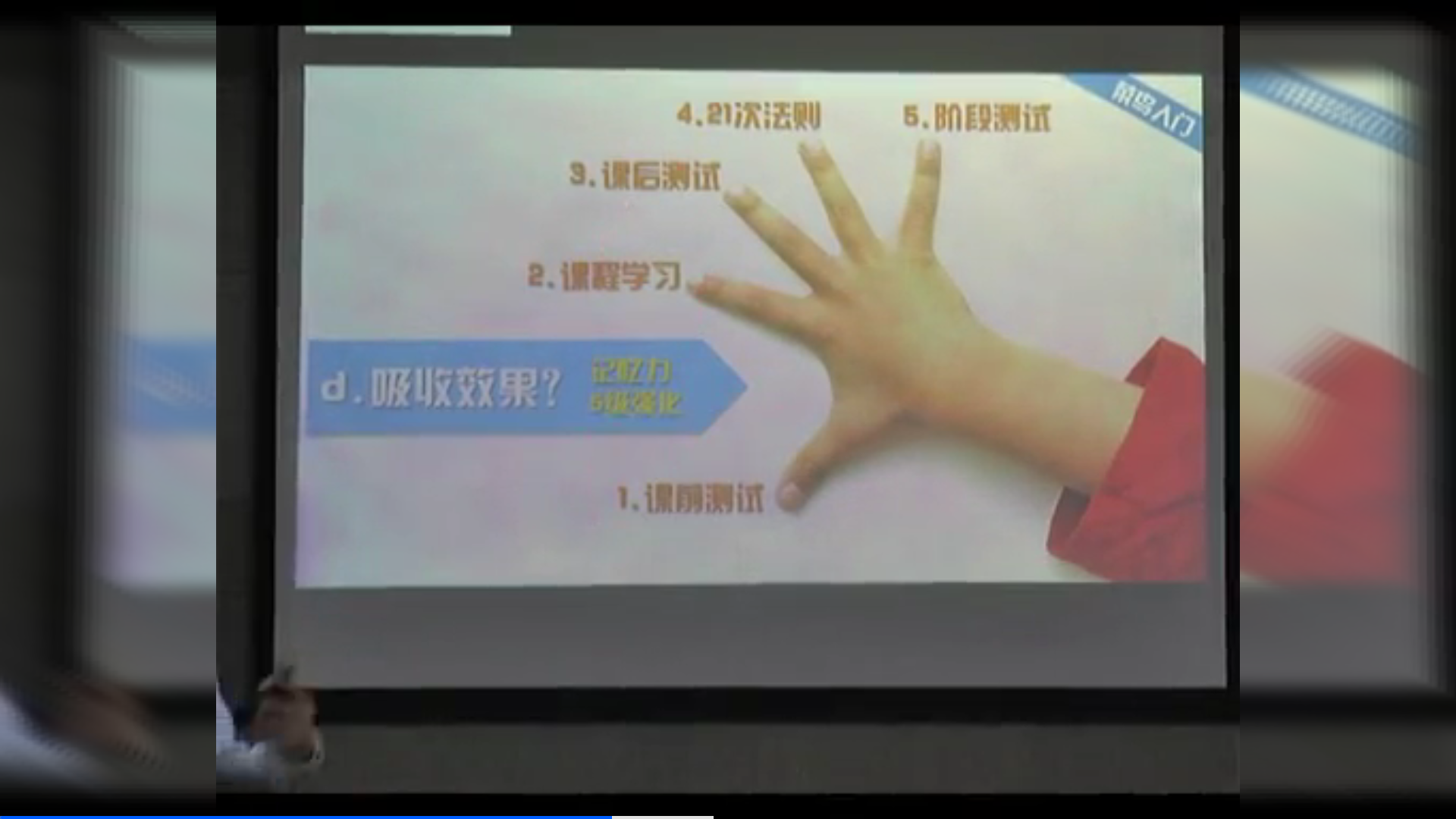
6. Background filled with blur playback
-
7. Progress bar small window preview

The demo now uses a WebVTT thumbnail track for seek preview instead of extracting many frames from the original video on the client. The VTT can point to separate images or sprite coordinates:
WEBVTT

00:00:00.000 --> 00:00:01.000
160p-00001.jpg#xywh=0,0,284,160
Library APIs include GSYVideoPreviewVttParser, GSYVideoPreviewProvider, and GSYVideoPreviewFrame. The app layer loads the frame image and crops the sprite area if needed. See PreViewGSYVideoPlayer#setPreviewVttUrl(String previewVttUrl).
V. Recent Versions
v13.2.1 (2026-08-19)
- Move
JupnpDlnaProvider,JupnpDlnaSession, jUPnP, and Jetty into the independently published optionalgsyvideoplayer-castmodule. - Keep the protocol-neutral Cast SPI in
gsyvideoplayer-java; defaultgsyvideoplayerandgsyvideoplayer-javaconsumers no longer resolve jUPnP/Jetty and retain the Media3-definedminSdk 23floor. - The optional cast artifact declares its real
minSdk 26requirement and contributes its jUPnP service, network/multicast permissions, and reflection-safe R8 consumer rules. - Fix transient
STOPPEDhandling during DLNA startup and make explicit disconnect stop the receiver before restoring local playback once.
v13.2.0 (2026-08-19)
- Add the independently publishable
gsyvideoplayer-rtmpmodule with four ABI binaries rebuilt by NDK r22b for 16 KB pages;gsyvideoplayer-exo2exposes it transitively. - Update AliPlayer to 7.5.0, its first release with official 16 KB page-size support.
- Add first-class DLNA/UPnP cast capability inside
gsyVideoPlayer-java:CastCapability/CastProvider/CastSession/CastListenerSPI are the stable public contract, and the defaultJupnpDlnaProvider/JupnpDlnaSessionimplementation speaks DLNAAVTransport:1on top of jUPnP 3.0.3. CastMediaInfonow carries an immutablestartPositionMsfield. TheSetAVTransportURI → Play → Seekchain guarantees "casting mid-playback resumes at the same position remotely" and disconnect returns the local player to the last known remote position.SampleCastControlVideocollapses into a remote-control overlay while casting — the local surface and audio are released, and a clean resume path restores local playback on disconnect.CastDemoActivityprovides the DLNA device picker plus a Loopback Receiver toggle.- Ships an on-device Loopback Receiver (
DevReceiverServicein:dlnaprocess +LoopbackAvTransportService+CastReceiverFloatingWindow) for end-to-end smoke tests without a real TV. Cross-process state is bridged withsendBroadcast+setPackageprivate intents. - All strings live in
res/values{,-zh-rCN}/strings.xml. Android 13+ receivers useRECEIVER_NOT_EXPORTEDand the notification/foreground-service permission model is honoured.
v13.1.0 (2026-06-30)
- Publish the
gsyvideoplayer-composeartifact and document Maven Central / GitHub Packages coordinates. - Add the Compose module with Wrapper and Native modes plus 24 runnable Compose demo activities.
- Add the smart MediaCodec fallback demo for hardware decode failure downgrade to software decode.
- Improve auto-play demo lifecycle handling and Exo cache lifecycle / max-size configuration.
- Add Java and Compose regression playbooks and align release documentation for the v13.1.0 publishing flow.
v13.0.0 (2026-05-07)
- Add Exo HLS master / DASH MPD adaptive quality demo and recent playback feature guides.
- Add unified SRT/WebVTT external subtitle support across IJK, System, and Media3.
- Add WebVTT seek preview, keep-last-frame demo, player screenshots, and GL effect improvements.
- Improve multi-URL quality switching, player core error handling, Exo cache lifecycle, and GIF cleanup.
- Fix subtitle loader release/resume during detach, fullscreen, and small-window transitions.
- Fall back to non-cache playback when the Exo cache folder is locked, and avoid stale hadCached state.
- Fix SurfaceView screenshot bitmap cleanup and stale preview VTT async provider overwrite.
v12.1.0 (2026-04-01)
- update media3 1.10.0
- ex_so: fix ex_so (x86_64) https #4238
v12.0.0 (2026-03-13)
- ex_so: update ffmpeg 4.3
- ex_so: x86_64 support 16k page size
- ex_so: armv7a update ffmpeg n4.3
- ex_so: #4224 add common-page-size for 64-bit linker flags for Stack Canary
- fix #4225 ff_hevc_sao_band_filter_neon_8+100)
- #4178 exo player rtmp fix 16k
- #4226 Fix NPE in Kotlin implementations of ExoMediaSourceInterceptListener
- #4228 Fix fullscreen player requiring two clicks to resume from paused state
- Update mediaVersion to 1.9.2
- fix #4218 support export exo cache
- Update minSdk to 23 and media version to 1.9
v11.3.0 (2025-12-05)
- link #3019
- fix #4211
v11.2.0 (2025-11-25)
- fix #4169
- fix #4174
- fix #4171
- add new function with clearVideoSurface [IjkExo2MediaPlayer]
- fix #4199
- fix #4204
v11.1.0 (2025-08-04)
- update media3 1.8.0
v11.0.0 (2025-07-10)
- Update and migrate underlying dependencies
- fix #4140
More versions, please check: Version Update Instructions
VI. About Issues
Before asking questions, please refer to the documents and instructions above, and reproduce the problem in the Demo.

Problem description:

1. Which page in which Demo.
2. Problem manifestation and reproduction steps.
3. Supplementary video stream url and screenshots of the problem.
4. Supplementary model and Android version of the problem.
VII. Obfuscation
-keep class com.shuyu.gsyvideoplayer.video.** { *; }
-dontwarn com.shuyu.gsyvideoplayer.video.**
-keep class com.shuyu.gsyvideoplayer.video.base.** { *; }
-dontwarn com.shuyu.gsyvideoplayer.video.base.**
-keep class com.shuyu.gsyvideoplayer.utils.** { *; }
-dontwarn com.shuyu.gsyvideoplayer.utils.**
-keep class com.shuyu.gsyvideoplayer.player.** {*;}
-dontwarn com.shuyu.gsyvideoplayer.player.**
-keep class tv.danmaku.ijk.** { *; }
-dontwarn tv.danmaku.ijk.**
-keep class androidx.media3.** {*;}
-keep interface androidx.media3.**

-keep class com.shuyu.alipay.** {*;}
-keep interface com.shuyu.alipay.**

-keep public class * extends android.view.View{
    *** get*();
    void set*(***);
    public <init>(android.content.Context);
    public <init>(android.content.Context, java.lang.Boolean);
    public <init>(android.content.Context, android.util.AttributeSet);
    public <init>(android.content.Context, android.util.AttributeSet, int);
}
If it is an Alibaba Cloud player, you can refer to its documentation ( https://help.aliyun.com/document_detail/124711.html?spm=a2c4g.124711.0.0.7fa0125dkwUPoU ), you need to add some keep rules:
-keep class com.alivc.**{*;}
-keep class com.aliyun.**{*;}
-keep class com.cicada.**{*;}
-dontwarn com.alivc.**
-dontwarn com.aliyun.**
-dontwarn com.cicada.**
Warm Reminder
If cloning is too slow, you can try downloading from Gitee
Regarding customization and problems, please refer to the FAQ, demo, and issues first.

Learn more about basic audio and video common sense, and understand containers, audio and video encoding, ffmpeg, and the differences in mediacodec.
Try to avoid asking why others can play.

The player is highly customizable. For customization, please refer to the demo and read the source code. There are many functions now, and the demo is constantly being updated.

Some new functions and project structures are also constantly being adjusted.

Welcome to ask questions, thank you.
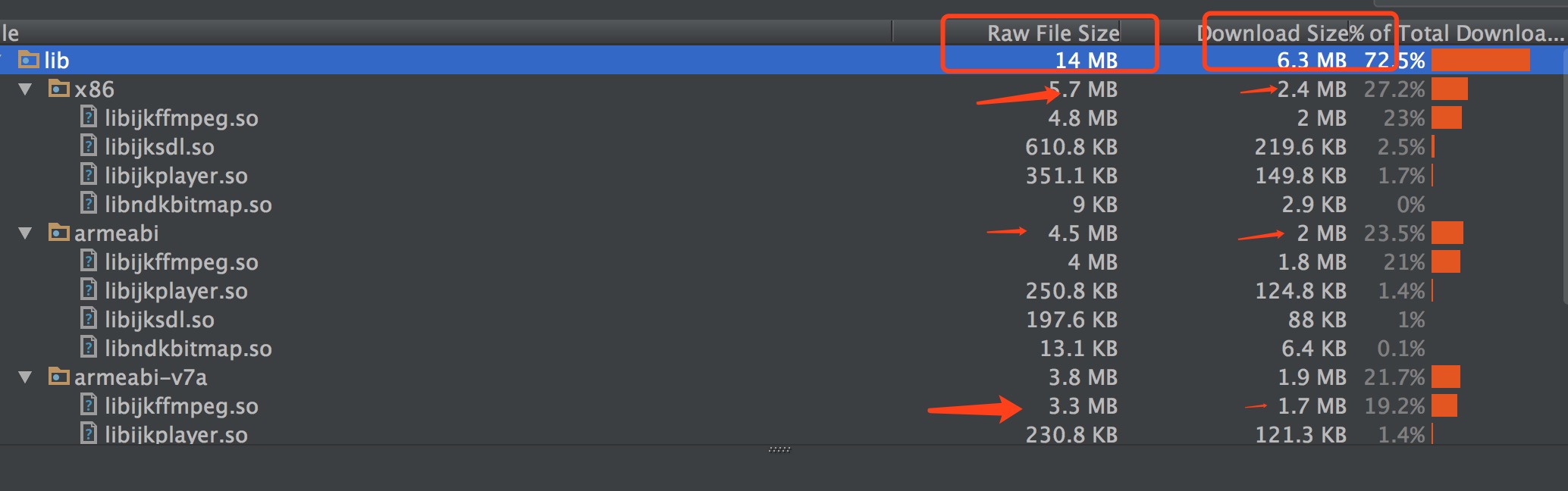
Dependency Size Reference
It is recommended to use ndk filtering, please refer to Reference 4: 4. NDK so support
Star History Chart
Warm Reminder
Open source projects mainly provide communication and learning, do not provide technical support, and do not accept business cooperation, purely public interest open source
License
Please refer to the IJKPlayer and AndroidVideoCache related agreements.
The project started from jiecao, and was refactored after some changes.
Occasionally, some variable and method names may still have a shadow of jiaozi, but it is basically a new project.