
About This Monorepo
This monorepo contains a set of dev-friendly, framework agnostic components offering 3 main capabilities:
- Instructor for PHP - structured data extraction in PHP - powered by LLMs, designed for simplicity, transparency, and control; supports custom LLM output processors (not just JSON),
- Polyglot for PHP - unified LLM API - write code once, deploy with any LLM provider: OpenAI chat completions API, OpenAI responses API, Anthropic, Gemini, Ollama, etc.; you can write own LLM drivers,
- Agent SDK for PHP - lightweight but powerful agent SDK, supports custom tools, lifecycle hooks, subagents, context management, custom stop / continuation criteria, observability via events, packaged capabilities, agent templates, session management, and more.
Framework integration packages:
- Laravel Package - first-party Laravel integration for facades, HTTP transport, native agents, telemetry, logging, and testing
- Symfony Package - first-party batteries-included Symfony integration package, currently being introduced under
packages/symfony
Read More
- Official website https://instructorphp.com
- Docs website (Mintlify) https://docs.instructorphp.com
- Docs (Github Pages) https://cognesy.github.io/instructor-php/
Overview of Capabilities
The library offers a set of small, focused building blocks.
Structured output
Purpose: turn messy model output into typed PHP data. Benefit: you stop hand-parsing JSON or text before using LLM results.
use Cognesy\Instructor\StructuredOutput;

final class Person {
    public string $name;
    public int $age;
}

$person = StructuredOutput::using('openai')
    ->with(messages: 'Jason is 28 years old.', responseModel: Person::class)
    ->get();
Detailed docs: packages/instructor/docs/
Unified inference
Purpose: call different LLM providers through one API. Benefit: switch providers without rewriting request code.
use Cognesy\Polyglot\Inference\Inference;

$text = Inference::using('openai')
    ->withMessages('Say hello in one sentence.')
    ->get();
Detailed docs: packages/polyglot/docs/
Embeddings
Purpose: generate vectors through the same provider layer. Benefit: keep retrieval and inference in one stack.
use Cognesy\Polyglot\Embeddings\Embeddings;

$vectors = Embeddings::using('openai')
    ->withInputs(['hello world'])
    ->vectors();
Detailed docs: packages/polyglot/docs/
Agents SDK
Purpose: build tool-using agents as a simple loop over state. Benefit: add tools and control flow without inventing your own agent runtime first.
use Cognesy\Agents\AgentLoop;
use Cognesy\Agents\Data\AgentState;

$result = AgentLoop::default()->execute(
    AgentState::empty()->withUserMessage('What is 2+2?')
);
Detailed docs: packages/agents/docs/
Code agent bridges
Purpose: drive external coding agents like Codex, Claude Code, and OpenCode from PHP. Benefit: automate reviews, summaries, and coding workflows through one interface.
use Cognesy\AgentCtrl\AgentCtrl;

$response = AgentCtrl::codex()->execute('Summarize this repository.');
Detailed docs: packages/agent-ctrl/docs/
Framework integration
Purpose: install framework-native runtime wiring instead of assembling your own glue. Benefit: get a supported bundle or package surface for container bindings, events, observability, and testing.
- Laravel package: packages/laravel/
- Symfony package: packages/symfony/
Symfony docs highlights:
- quickstart: packages/symfony/docs/quickstart.md
- configuration: packages/symfony/docs/configuration.md
- operations: packages/symfony/docs/operations.md
- migration: packages/symfony/docs/migration.md
What is Instructor?
Instructor is a library that allows you to extract structured, validated data from multiple types of inputs: text, images or OpenAI style chat sequence arrays. It is powered by Large Language Models (LLMs).
Instructor simplifies LLM integration in PHP projects. It handles the complexity of extracting structured data from LLM outputs, so you can focus on building your application logic and iterate faster.
Instructor for PHP is inspired by the Instructor library for Python created by Jason Liu.
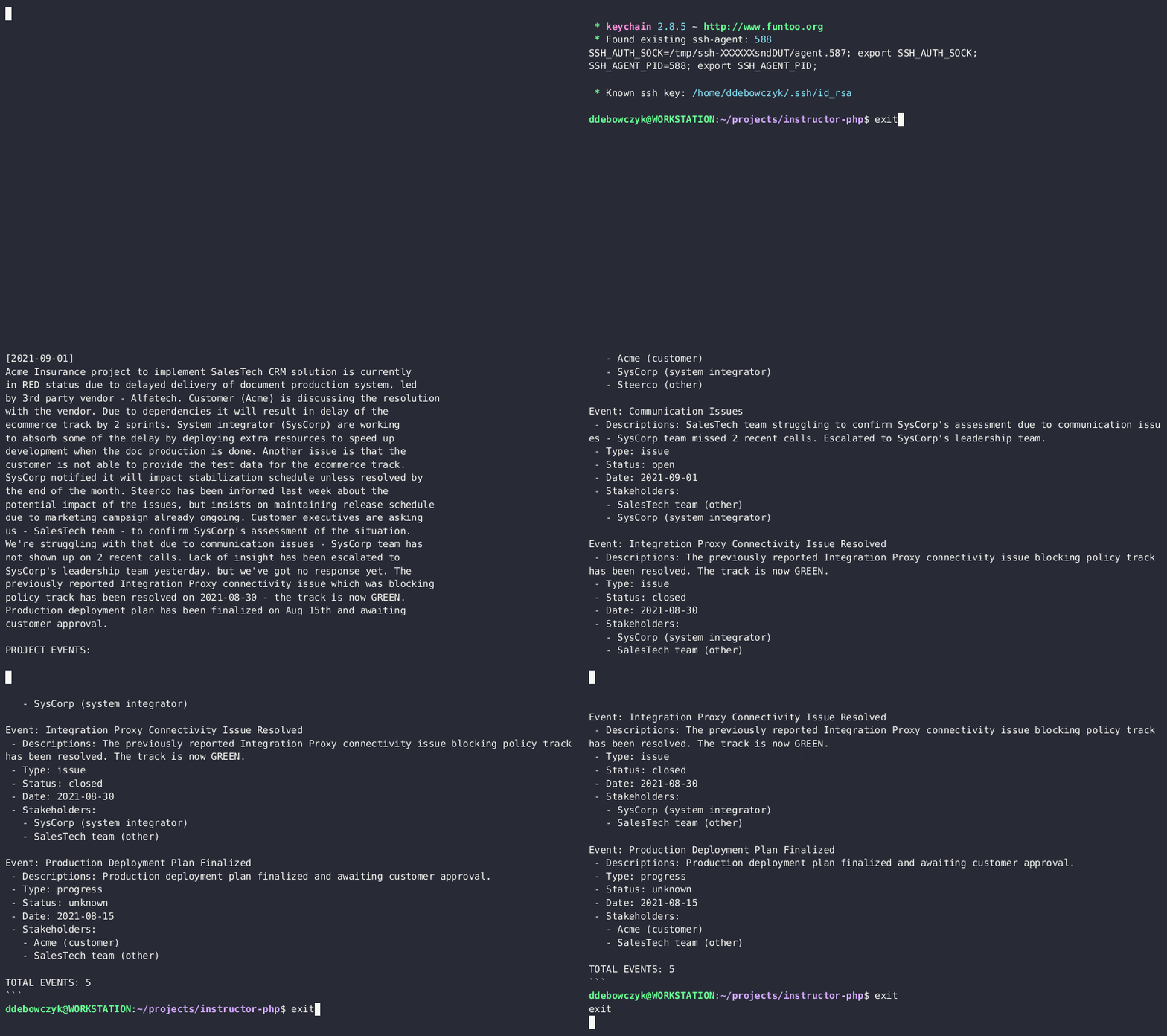
Here's a simple CLI demo app using Instructor to extract structured data from text:
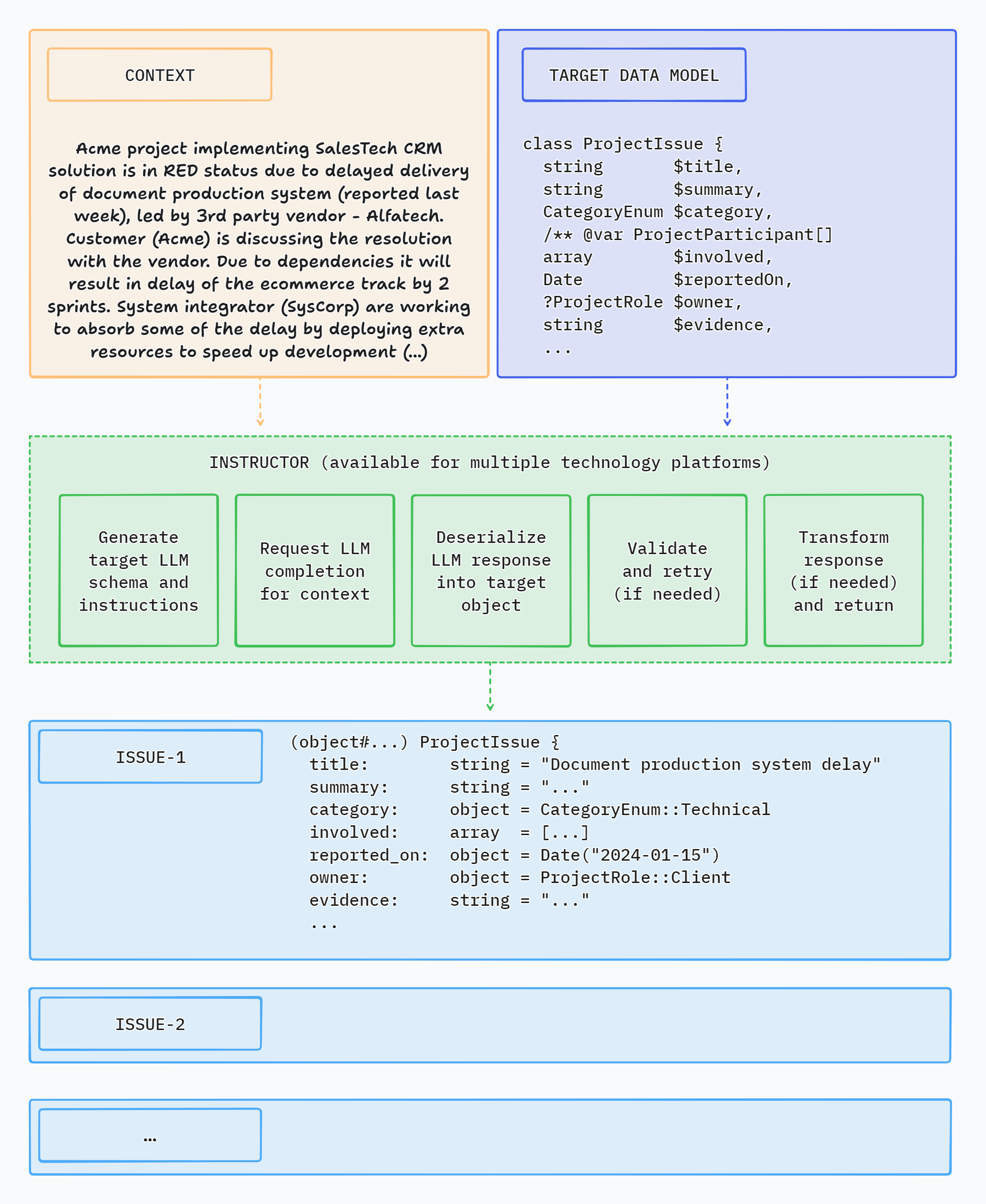
How Instructor Enhances Your Workflow
Instructor introduces three key enhancements compared to direct API usage.
Response Model
Specify a PHP class to extract data into via the 'magic' of LLM chat completion. And that's it.
Instructor reduces brittleness of the code extracting the information from textual data by leveraging structured LLM responses.
Instructor helps you write simpler, easier to understand code: you no longer have to define lengthy function call definitions or write code for assigning returned JSON into target data objects.
Validation
Response model generated by LLM can be automatically validated, following set of rules. Currently, Instructor supports only Symfony validation.
You can also provide a context object to use enhanced validator capabilities.
Max Retries
You can set the number of retry attempts for requests.
Instructor will repeat requests in case of validation or deserialization error up to the specified number of times, trying to get a valid response from LLM.
Support for LLM Providers
Instructor offers out-of-the-box support for the following LLM providers:
- A21 / Mamba
- Anthropic
- Azure OpenAI
- Cerebras
- Cohere (v2 OpenAI compatible)
- Deepseek
- Fireworks
- Google Gemini (native and OpenAI compatible)
- Groq
- HuggingFace
- Inception
- Minimaxi
- Mistral
- Moonshot / Kimi
- Ollama (on localhost)
- OpenAI
- OpenRouter
- Perplexity
- Qwen
- Sambanova
- xAI / Grok
For usage examples, check Hub section or examples directory in the code repository.
Usage
Installation
You can install Instructor via Composer:
composer require cognesy/instructor-php
Basic Example
This is a simple example demonstrating how Instructor retrieves structured information from provided text (or chat message sequence).
Response model class is a plain PHP class with typehints specifying the types of fields of the object.
use Cognesy\Instructor\StructuredOutput;

// Step 0: Create .env file in your project root:
// OPENAI_API_KEY=your_api_key

// Step 1: Define target data structure(s)
class Person {
    public string $name;
    public int $age;
}

// Step 2: Provide content to process
$text = "His name is Jason and he is 28 years old.";

// Step 3: Use Instructor to run LLM inference
$person = (new StructuredOutput)
    ->withResponseClass(Person::class)
    ->withMessages($text)
    ->get();

// Step 4: Work with structured response data
assert($person instanceof Person); // true
assert($person->name === 'Jason'); // true
assert($person->age === 28); // true

echo $person->name; // Jason
echo $person->age; // 28

var_dump($person);
// Person {
//     name: "Jason",
//     age: 28
// }
NOTE: Instructor supports classes / objects as response models. In case you want to extract simple types or enums, you need to wrap them in Scalar adapter - see section below: Extracting Scalar Values.
Validation
Instructor validates results of LLM response against validation rules specified in your data model.
For further details on available validation rules, check Symfony Validation constraints.
use Cognesy\Instructor\StructuredOutput;
use Symfony\Component\Validator\Constraints as Assert;

class Person {
    public string $name;
    #[Assert\PositiveOrZero]
    public int $age;
}

$text = "His name is Jason, he is -28 years old.";
$person = (new StructuredOutput)
    ->withResponseClass(Person::class)
    ->with(
        messages: [['role' => 'user', 'content' => $text]],
    )
    ->get();

// if the resulting object does not validate, Instructor throws an exception
Max Retries
In case maxRetries parameter is provided and LLM response does not meet validation criteria, Instructor will make subsequent inference attempts until results meet the requirements or maxRetries is reached.
Instructor uses validation errors to inform LLM on the problems identified in the response, so that LLM can try self-correcting in the next attempt.
use Cognesy\Instructor\StructuredOutput;
use Cognesy\Instructor\StructuredOutputRuntime;
use Cognesy\Polyglot\Inference\LLMProvider;
use Symfony\Component\Validator\Constraints as Assert;

class Person {
    #[Assert\Length(min: 3)]
    public string $name;
    #[Assert\PositiveOrZero]
    public int $age;
}

$text = "His name is JX, aka Jason, he is -28 years old.";
$runtime = StructuredOutputRuntime::fromProvider(LLMProvider::new())
    ->withMaxRetries(3);

$person = (new StructuredOutput($runtime))
    ->with(
        messages: [['role' => 'user', 'content' => $text]],
        responseModel: Person::class,
    )
    ->get();

// if all LLM's attempts to self-correct the results fail, Instructor throws an exception
Output Modes
Instructor supports multiple output modes through Cognesy\Instructor\Enums\OutputMode to allow working with various models depending on their capabilities.
OutputMode::Json- generate structured output via LLM's native JSON generationOutputMode::JsonSchema- use LLM's strict JSON Schema mode to enforce JSON SchemaOutputMode::Tools- use tool calling API to get LLM follow provided schemaOutputMode::MdJson- use prompting to generate structured output; fallback for the models that do not support JSON generation or tool calling
Additionally, you can use OutputMode::Text to get LLM to generate text output without any structured data extraction.
OutputMode::Text- generate text outputOutputMode::Unrestricted- generate unrestricted output based on inputs provided by the user (with no enforcement of specific output format)
Unified LLM API
Instructor ecosystem uses Polyglot as an unified inference API layer supporting 20+ LLM providers.
Polyglot takes care of translation of familiar OpenAI chat completion API conventions into LLM provider specific idioms / APIs, so you can easily switch between LLM providers without rewriting your LLM connectivity code.
Example (using sync API)
use Cognesy\Polyglot\Inference\Inference;

$message = Inference::using('openai') // specify LLM connection preset (defined in config)
    ->with(messages: 'What is capital of Germany')
    ->get();

echo $message->content()->toString();
Example (using streaming API)
use Cognesy\Polyglot\Inference\Inference;

$stream = Inference::using('anthropic') // specify LLM connection preset (defined in config)
    ->withMessages([['role' => 'user', 'content' => 'Describe capital of Brasil']])
    ->withOptions(['max_tokens' => 256])
    ->withStreaming()
    ->stream()
    ->deltas();

foreach ($stream as $delta) {
    echo $delta->messageChunks->textDelta();
}
Example (customize LLM connection)
use Cognesy\Polyglot\Inference\Config\LLMConfig;
use Cognesy\Polyglot\Inference\Inference;

$answer = Inference::fromConfig(LLMConfig::fromArray([
    'driver' => 'deepseek',
    'apiUrl' => 'https://api.deepseek.com',
    'endpoint' => '/chat/completions',
    'model' => 'deepseek-v4-flash',
]))
    ->withMessages([['role' => 'user', 'content' => 'What is the capital of France']])
    ->withOptions(['max_tokens' => 64])
    ->get();

echo $answer;
Documentation
Check out the documentation website for more details and examples of how to use Instructor for PHP.
Feature Highlights
Core features
- Get structured responses from LLMs without writing boilerplate code
- Validation of returned data
- Automated retries in case of errors when LLM responds with invalid data
- Integrate LLM support into your existing PHP code with minimal friction - no framework, no extensive code changes
- Framework agnostic - use it with Laravel, Symfony, your custom framework, or - with no framework at all
Various extraction modes
- Supports multiple extraction modes through
Cognesy\Instructor\Enums\OutputMode OutputMode::Json- use response_format to get LLM follow provided JSON SchemaOutputMode::JsonSchema- use strict JSON Schema mode to get LLM follow provided JSON SchemaOutputMode::Tools- use tool calling API to get LLM follow provided JSON SchemaOutputMode::MdJson- extract via prompting LLM to nudge it to generate provided JSON Schema
Flexible inputs
- Process various types of input data: text, series of chat messages or images using the same, simple API
- 'Structured-to-structured' processing - provide object or array as an input and get object with the results of inference back
- Demonstrate examples to improve the quality of inference
Customization
- Define response data model the way you want: type-hinted classes, JSON Schema arrays, or dynamic data shapes with
Structureclass - Customize prompts and retry prompts
- Use attributes or PHP DocBlocks to provide additional instructions for LLM
- Customize response model processing by providing your own implementation of schema, deserialization, validation and transformation interfaces
Sync and streaming support
- Supports both synchronous or streaming responses
- Get partial updates & stream completed sequence items
Observability
- Get detailed insight into internal processing via events
- Debug mode to see the details of LLM API requests and responses
Support for multiple LLMs / API providers
- Easily switch between LLM providers
- Support for most popular LLM APIs (incl. OpenAI, Gemini, Anthropic, Cohere, Azure, Groq, Mistral, Fireworks AI, Together AI)
- OpenRouter support - access to 100+ language models
- Use local models with Ollama
Other capabilities
- Developer friendly LLM context caching for reduced costs and faster inference (for Anthropic models)
- Developer friendly data extraction from images (for OpenAI, Anthropic and Gemini models)
- Generate vector embeddings using APIs of multiple supported LLM providers
Documentation and examples
- Learn more from growing documentation and 100+ cookbooks
Instructor in Other Languages
Check out implementations in other languages below:
- Python (original)
- Javascript (port)
- Elixir (port)
- Ruby (port)
If you want to port Instructor to another language, please reach out to us on Twitter we'd love to help you get started!
Instructor Packages
This repository is a monorepo containing all Instructor's components (required and optional). It hosts all that you need to work with LLMs via Instructor.
Individual components are also distributed as standalone packages that can be used independently.

Links to read-only repositories of the standalone package distributions:
- instructor-addons - extra capabilities and common LLM-related problem solutions
- instructor-aux - external tools and integrations, e.g. used by Instructor examples
- instructor-config - configuration management for Instructor
- instructor-evals - LLM output evaluation tools
- instructor-events - events and event listeners for Instructor
- instructor-http-client - easily switch between underlying HTTP client libraries (out-of-the-box support for Guzzle, Symfony, Laravel)
- instructor-http-pool - concurrent HTTP request execution for fan-out workloads
- instructor-hub - CLI tool for browsing and running Instructor examples
- instructor-messages - chat message sequence handling for Instructor
- instructor-polyglot - use single API for inference and embeddings across most of LLM providers, easily switch between them (e.g., develop on Ollama, switch to Groq in production)
- instructor-schema - object schema handling for Instructor
- instructor-setup - CLI tool for publishing Instructor config files in your app
- instructor-struct - get dev friendly structured outputs from LLMs
- instructor-tell - CLI tool for executing LLM prompts in your terminal
- instructor-templates - text and chat template tools used by Instructor, support Twig, Blade and ArrowPipe formats
- instructor-utils - common utility classes used by Instructor packages
NOTE: If you are just starting to use Instructor, I recommend using the
instructor-phppackage. It contains all the required components and is the easiest way to get started with the library.
License
This project is licensed under the terms of the MIT License.
Support
If you have any questions or need help, please reach out to me on Twitter or GitHub.
Contributing
If you want to help, check out some of the issues. All contributions are welcome - code improvements, documentation, bug reports, blog posts / articles, or new cookbooks and application examples.