


Visualize ownership and lifetimes in Rust for debugging and optimization
You can try out RustOwl on play.rustowl.rs







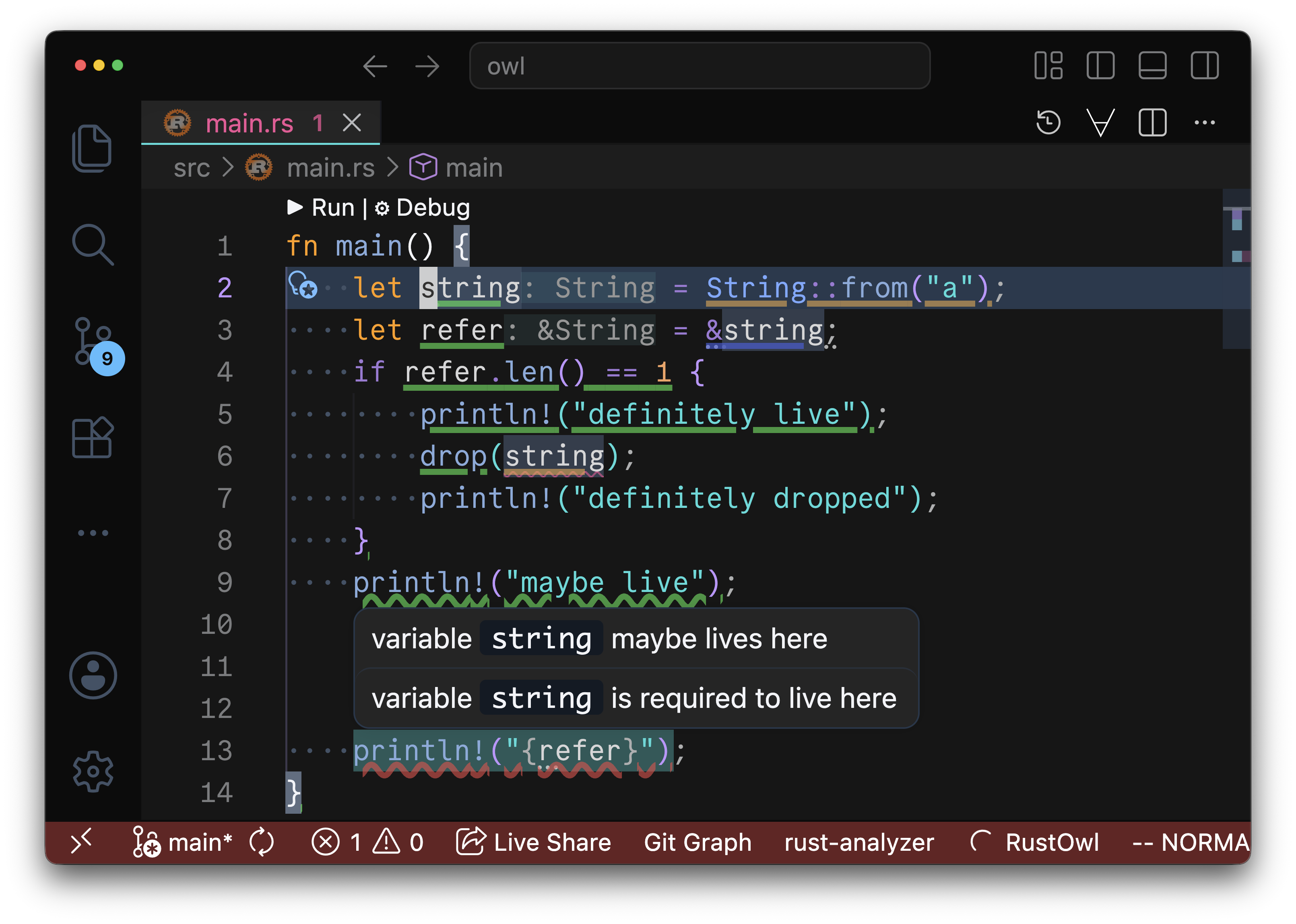
RustOwl visualizes ownership movement and lifetimes of variables. When you save Rust source code, it is analyzed, and the ownership and lifetimes of variables are visualized when you hover over a variable or function call.
RustOwl visualizes those by using underlines:
- 🟩 green: variable's lifetime
- definitely live: the variable is provably initialized on every path reaching this point
- maybe live (wavy): the variable is initialized on some paths but may have been moved, dropped, or be uninitialized on others
- 🟦 blue: immutable borrowing
- 🟪 purple: mutable borrowing
- 🟧 orange: value moved / function call
- 🟥 red: lifetime error
- Diff of lifetime between actual and expected, or
- Invalid overlapped lifetime of mutable and shared (immutable) references
Detailed usage is described here.
Currently, we offer VSCode extension, Neovim plugin and Emacs package. For these editors, move the text cursor over the variable or function call you want to inspect and wait for 2 seconds to visualize the information. We implemented LSP server with an extended protocol. So, RustOwl can be used easily from other editor.
Table Of Contents
Support
If you're looking for support, please consider checking all issues, existing discussions, and starting a discussion first!
Also, you can reach out to us on the Discord server provided above.
Quick Start
Here we describe how to start using RustOwl.
Prerequisite
cargoinstalled- You can install
cargousingrustupfrom this link.
- You can install
- Visual Studio Code (VS Code) installed
We tested this guide on macOS Sequoia 15.3.2 on arm64 architecture with VS Code 1.99.3 and cargo 1.90.0.
VS Code
You can install VS Code extension from this link. RustOwl will be installed automatically when the extension is activated.
For more detailed configuration options, see the VS Code Configuration Guide.
Vscodium
You can install Vscodium extension from this link. RustOwl will be installed automatically when the extension is activated.
After installation, the extension will automatically run RustOwl when you save any Rust program in cargo workspace. The initial analysis may take some time, but from the second run onward, compile caching is used to reduce the analysis time.
Same as VS Code, see the VS Code Configuration Guide for more detailed configuration options.
Other editor support
We support Neovim and Emacs. You have to install RustOwl before using RustOwl with other editors.
You can also create your own LSP client. If you would like to implement a client, please refer to the The RustOwl LSP specification.
Neovim
Minimal setup with lazy.nvim:
{
  'cordx56/rustowl',
  version = '*', -- Latest stable version
  build = 'cargo install rustowl',
  lazy = false, -- This plugin is already lazy
  opts = {},
}
For comprehensive configuration options including custom highlight colors, see the Neovim Configuration Guide.
Emacs
Elpaca example:
(elpaca
  (rustowl
    :host github
    :repo "cordx56/rustowl"))
Then use-package:
(use-package rustowl
  :after lsp-mode)
You have to install RustOwl LSP server manually.
For more detailed configuration options, see the Emacs Configuration Guide.
RustRover / IntelliJ IDEs
There is a third-party repository that supports IntelliJ IDEs. You have to install RustOwl LSP server manually.
Sublime Text
There is a third-party repository that supports Sublime Text.
Installation
Please see Installation for detailed installation instructions.
Usage
Please see Usage for detailed usage instructions.
Note
We support the 5 latest versions of Rust (best effort).
In this tool, due to the limitations of VS Code's decoration specifications, characters with descenders, such as g or parentheses, may occasionally not display underlines properly.
Additionally, we observed that the println! macro sometimes produces extra output, though this does not affect usability in any significant way.