



Basic Overview
Fluid is an open-source .NET template engine based on the Liquid template language. It is a secure template language that is also very accessible for non-programmer audiences.
This document describes Fluid 3.0, which is under development on
main. Preview packages are available from the preview feed; stable releases are available on NuGet.org. To see the corresponding content for v1.0, use this version
Tutorials
Deane Barker wrote a very comprehensive tutorial on how to write Liquid templates with Fluid. For a high-level overview, read The Four Levels of Fluid Development, which describes different stages of using Fluid.
Features
- Very fast Liquid parser and renderer (no-regexp), with few allocations. See benchmarks.
- Secure templates by allow-listing all available properties in the template. User templates can't break your application.
- Supports async filters. Templates can execute database queries more efficiently under load.
- Customize filters and tags with your own, even with complex grammar constructs. See Customizing tags and blocks.
- Parses templates into a concrete syntax tree that lets you cache, analyze, and alter the templates before they are rendered.
- Register any .NET types and properties, or define custom handlers to intercept when a named variable is accessed.
Contents
- Features
- Using Fluid in your project
- Preview packages
- Command line tool
- NativeAOT and trimming
- Source generator
- Allow-listing object members
- Handling undefined variables
- Execution limits
- Converting CLR types
- Encoding
- Localization
- Color filters
- Money filters
- Time zones
- Customizing tags and blocks
- ASP.NET MVC View Engine
- Whitespace control
- Custom filters
- Functions
- Visiting and altering a template
- Performance
- Used by
Source
<ul id="products">
  {% for product in products %}
    <li>
      <h2>{{product.name}}</h2>
      Only {{product.price | price }}

      {{product.description | prettyprint | paragraph }}
    </li>
  {% endfor %}
</ul>
Result
<ul id="products">
    <li>
      <h2>Apple</h2>
      $329

      Flat-out fun.
    </li>
    <li>
      <h2>Orange</h2>
      $25

      Colorful.
    </li>
    <li>
      <h2>Banana</h2>
      $99

      Peel it.
    </li>
</ul>
Notice
- The
<li>tags are at the same index as in the template, even though the{% for }tag had some leading spaces - The
<ul>and<li>tags are on contiguous lines even though the{% for }is taking a full line.
Command line tool
The Fluid.Core.Tool .NET tool installs a native AOT liquid command (win/linux/osx, x64/arm64; other platforms fall back to a framework-dependent build) that renders Liquid templates from any shell, including PowerShell.
dotnet tool install -g Fluid.Core.Tool
JSON read from stdin (or --data <file>) is the model: the properties of a root object become top-level variables, any other root value is exposed as data.
echo '{"name":"World"}' | liquid -e "Hello {{ name | upcase }}!"
liquid page.liquid --data model.json --output page.html
Get-Content model.json | liquid page.liquid -I ./partials        # PowerShell
liquid -e "{{ user }} on {{ env.HOME }}" --set user=Bob --env
liquid page.liquid --validate
Options: -t/--template, -e/--inline, -d/--data, -o/--output, -s/--set key=value, -I/--include-path (directories for include/render, defaults to the template directory), --culture, --timezone, --strict, --env, --validate, --max-steps, --max-recursion. Run liquid --help for details. Exit codes: 0 success, 1 template/data/render error, 2 usage error.
The tool only exposes JSON-derived values, so reflection-based member access on .NET types is not available.
Using Fluid in your project
You can directly reference the NuGet package.
The code samples in this document assume you have registered the Fluid namespace with using Fluid;.
Preview packages
After a successful build triggered by a push to main, preview packages are published to the
Fluid feed on feedz.io.
Versions follow 3.0.0-preview-<run number>, using the GitHub Actions build run number.
These packages contain the latest development changes and are intended for testing before release.
Tagged releases continue to be published to NuGet.org.
Add the preview feed alongside NuGet.org, then install the latest prerelease version:
dotnet nuget add source https://f.feedz.io/sebastienros/fluid/nuget/index.json --name fluid-preview
dotnet add package Fluid.Core --prerelease
Keep NuGet.org enabled so dependencies can be restored. If your NuGet.config uses package source
mapping, also map Fluid.* and MinimalApis.LiquidViews to the fluid-preview source.
Hello World
Source
var parser = new FluidParser();

var model = new { Firstname = "Bill", Lastname = "Gates" };
var source = "Hello {{ Firstname }} {{ Lastname }}";

if (parser.TryParse(source, out var template, out var error))
{
    var context = new TemplateContext(model);

    Console.WriteLine(template.Render(context));
}
else
{
    Console.WriteLine($"Error: {error}");
}
Result
Hello Bill Gates
Parsing errors
TryParse returns parsing diagnostics as a string. Use Parse when you need structured
error information:
try
{
    var template = parser.Parse(source);
}
catch (ParseException exception)
{
    if (exception.Position is { } position)
    {
        Console.WriteLine($"Error at line {position.Line}, column {position.Column} (offset {position.Offset})");
    }

    Console.WriteLine(exception.Message);
}
ParseException.TemplateSource contains the full original template, including when an
invalid template is loaded by an include or render tag or the view engine.
Position is a nullable Parlot.TextPosition: its offset is zero-based and its line
and column are one-based. Line numbers follow Parlot's LF-based counting (including CRLF,
but not standalone CR). Exceptions created without parsing metadata may have a
null source or position. The inherited Exception.Source property retains its standard
meaning and does not contain the template text.
Model security
Fluid templates can read public properties and fields from the model and from objects reachable through it. This is by design; a model passed to TemplateContext should be treated as the template's readable data boundary.
When rendering an untrusted template, pass a dedicated model that contains only the data the template is allowed to read. Do not pass domain entities, service objects, configuration objects, or other object graphs that may expose sensitive data through public members.
Thread-safety
A FluidParser instance is thread-safe and should be shared by the whole application. A common pattern is to declare the parser in a local static variable:
private static readonly FluidParser _parser = new FluidParser();
An IFluidTemplate instance is thread-safe and can be cached and reused by multiple threads concurrently.
A TemplateContext instance is not thread-safe, and a new instance should be created every time an IFluidTemplate instance is used.
A TemplateOptions instance is immutable and thread-safe, and is created once with a TemplateOptionsBuilder (see Reuse the TemplateOptions instance). Values registered with TemplateOptionsBuilder.WithGlobalValue are exposed by TemplateOptions.GlobalValues and are shared by every context created from those options. Values set directly on a TemplateContext belong to that rendering. Custom tags that need temporary values should use a scope lease:
using var scope = context.EnterScope(ScopeBehavior.Local);
context.SetValue("temporary", value);
Local scopes inherit values and keep assignments local. WriteThrough scopes keep values assigned with LocalScope.SetOwnValue temporary while normal assignments update the caller, which matches include and loop behavior. Isolated scopes can only read the context's initial values and GlobalValues, which matches the render tag.
NativeAOT and trimming
Fluid works when targeting NativeAOT and trimmed deployments.
- If dynamic code is not supported at runtime, Fluid automatically switches to reflection-based member accessors.
TemplateOptionsBuilder.ConfigureMemberAccessand theMemberAccessStrategy.Register<T...>APIs are available for custom mappings.- No interceptor setup is required.
Recommended usage when targeting NativeAOT
- Build
TemplateOptionsonce (for example, at app startup) and reuse the instance. - Register custom mappings with
TemplateOptionsBuilder.ConfigureMemberAccess(strategy => strategy.Register<T...>(...)). Built options reject further registrations. - Pass a statically typed model and custom options to
TemplateContext, or use[FluidRegister]for types that are not visible at a context construction site. - Validate your app with AOT/trim publish settings:
dotnet publish -c Release -r <RID> -p:PublishAot=true
Compatibility boundaries
NativeAOT compatibility and trimming compatibility are related but separate. Fluid's reflection fallback does not emit code and can run when dynamic code is unavailable. A trimmed application must also preserve every member that the fallback discovers at runtime.
| Usage | NativeAOT with trimming |
|---|---|
new TemplateContext(concreteModel, customOptions) with the source generator enabled and matching compile-time and runtime model types |
Compatible. Eligible public fields and properties are accessed directly by generated code. |
A model registered with [FluidRegister] |
Compatible. Use this for boxed models, nested model types, models created in another assembly, or types not visible at a TemplateContext construction site. |
An explicit MemberAccessStrategy.Register<T...> mapping or custom MemberAccessor that accesses members directly |
Compatible. The application supplies the access logic instead of relying on member discovery. |
The one-argument new TemplateContext(model) constructor or TemplateOptions.Default |
No accessor is inferred. Rendering uses an explicit registration if one exists; otherwise it falls back to reflection. |
A model passed as object, an interface or base type whose runtime type differs, or an unregistered nested model |
No accessor is inferred for the runtime type. Use [FluidRegister] for the concrete runtime type or register an accessor explicitly. |
| Reflection fallback for an unregistered type | NativeAOT-compatible only when the required public member metadata is preserved from trimming. Prefer source generation or explicit registration rather than relying on linker configuration. |
A reflection-discovered Task<T> member |
Avoid in trimmed NativeAOT applications because the reflection fallback uses runtime dynamic binding to read the result. A generated or custom accessor handles Task<T> without dynamic binding. |
Source generation covers public readable properties and public fields that can be referenced from generated code. Members that cannot be generated continue through the normal registration and reflection fallback paths. If any required member uses a fallback path, validate the published application rather than assuming that source generation preserved it.
Source generation (optional)
When the Fluid.SourceGenerator analyzer is enabled, Fluid can generate strongly-typed member accessors for model types discovered at compile time.
The model type is inferred automatically when its compile-time and runtime types match and it is passed with custom options:
var options = new TemplateOptionsBuilder().Build();
var context = new TemplateContext(person, options);
The generated accessor is activated on the DefaultMemberAccessStrategy of the options instance passed to that constructor. Explicit registrations made with TemplateOptionsBuilder.ConfigureMemberAccess still take precedence. The one-argument TemplateContext(model) constructor does not infer or activate a model accessor because it uses the shared TemplateOptions.Default instance.
Use FluidRegisterAttribute when a model is passed as object, is created outside the compilation using the source generator, or when nested model types also need generated accessors. The recommended explicit pattern is to declare a custom TemplateOptionsBuilder subclass and add one attribute per model type:
using Fluid;

[FluidRegister(typeof(Person))]
[FluidRegister(typeof(Address))]
public partial class PublicTemplateOptionsBuilder : TemplateOptionsBuilder
{
}
Use the generated builder type like any other TemplateOptionsBuilder:
var options = new PublicTemplateOptionsBuilder().Build();
The generated registrations are applied automatically to each PublicTemplateOptionsBuilder instance, before any registration made on it. Runtime registrations still work and can be added normally:
var options = new PublicTemplateOptionsBuilder()
    .ConfigureMemberAccess(strategy => strategy.Register<Product, object>((product, name) => product.Name))
    .Build();
Custom member accessors
Custom accessors derive from MemberAccessor and return a ValueTask<FluidValue> directly.
private sealed class ProductDisplayNameAccessor : MemberAccessor
{
    public override ValueTask<FluidValue> GetAsync(
        object obj,
        string name,
        TemplateContext context)
    {
        return CreateValueTask(((Product)obj).Name, context);
    }
}

var options = new TemplateOptionsBuilder()
    .ConfigureMemberAccess(strategy => strategy.Register<Product>(
        "display_name",
        new ProductDisplayNameAccessor()))
    .Build();
The protected CreateValueTask overloads convert synchronous, Task<T>, and ValueTask<T> results using the TemplateOptions.ValueConverters configured for the current context. Return NilValue.Instance for a Liquid nil value; a null FluidValue is reserved as the accessor's not-handled result.
Alternatively, explicit profile methods can apply generated registrations to any TemplateOptionsBuilder instance:
public static partial class FluidProfiles
{
    [FluidRegister(typeof(Person))]
    [FluidRegister(typeof(Address))]
    public static partial void ApplyPublic(TemplateOptionsBuilder builder);
}
Use it with any builder instance:
var builder = new TemplateOptionsBuilder();
FluidProfiles.ApplyPublic(builder);
var options = builder.Build();
Source generator
Fluid includes a Roslyn source generator (project: Fluid.SourceGenerator) that can compile Liquid templates at build time and expose them as strongly-typed static properties.
This is useful when you want:
- Parse errors to fail the build.
- Startup-time and runtime parsing eliminated.
- Easy access to templates via generated members.
MSBuild setup
- Reference the generator as an analyzer.
If you use a project reference:
<ItemGroup>
  <ProjectReference Include="../Fluid.SourceGenerator/Fluid.SourceGenerator.csproj"
                    OutputItemType="Analyzer"
                    ReferenceOutputAssembly="false" />
</ItemGroup>
- Provide templates to the generator using
AdditionalFiles.
<ItemGroup>
  <AdditionalFiles Include="Templates/**/*.liquid" />
</ItemGroup>
- (Optional) Set the templates root folder.
When set, the generator:
- Only considers
AdditionalFilesunder this folder. - Matches glob patterns relative to that folder.
<PropertyGroup>
  <FluidTemplatesFolder>Templates</FluidTemplatesFolder>
</PropertyGroup>
Usage
Annotate a partial class with FluidTemplates, using include and optional exclude glob patterns. Each matching file generates a dedicated static property returning an IFluidTemplate.
using Fluid.SourceGenerator;

namespace MyApp;

[FluidTemplates("**/*.liquid", Exclude = new[] { "_*.liquid" })]
public static partial class Templates
{
}
With templates like:
Templates/hello.liquidTemplates/_layout.liquid
The generator will create:
Templates.Hello(compiled fromhello.liquid)
Glob patterns
The generator supports a simple glob syntax:
*matches within a path segment.?matches a single character within a path segment.**matches across directories (e.g.**/*.liquid).
Multiple include patterns are supported via the attribute constructor:
[FluidTemplates("**/*.liquid", "**/*.txt")]
Notes
- Property names are derived from the file name (without extension) and converted to PascalCase. If multiple files would produce the same property name, a numeric suffix is appended.
{% render %}dependencies are resolved against the same set ofAdditionalFiles(the generator also registers.liquidtemplates without the extension for convenience).- Source-generated templates currently require
TemplateOptions.Trimmingto beTrimmingFlags.None.
Adding custom filters
Filters can be async or not. They are defined as a delegate that accepts an input, a set of arguments and the current context of the rendering process.
Here is the downcase filter as defined in Fluid.
Source
public static ValueTask<FluidValue> Downcase(FluidValue input, FilterArguments arguments, TemplateContext context)
{
    return StringValue.Create(input.ToStringValue().ToLower());
}
Registration
Filters are registered with a TemplateOptionsBuilder. The resulting immutable TemplateOptions object can be reused every time a template is rendered.
var options = new TemplateOptionsBuilder()
    .AddFilter('downcase', Downcase)
    .Build();

var context = new TemplateContext(options);
Altering exposed .NET properties
Converting object types
Use the ValueConverters property to return different values than those provided by the model classes and properties:
var options = new TemplateOptionsBuilder()
    .AddValueConverter(o => o is DateTime d ? StringValue.Create($"This is a date time: {d}") : null)
    .Build();
The previous example will return a custom value instead of the actual DateTime. When no conversion should be applied, null is returned.
Customizing object properties
A common scenario is to access named properties on an object that do not exist in the source class, or should return a different result.
In this case, the ValueConverters can be used to return a specific wrapper/proxy FluidValue instance.
In practice, you can inherit from ObjectValueBase as it implements how most objects should behave.
The following example shows how to provide a custom transformation for any Person object:
private class PersonValue : ObjectValueBase
{
    public PersonValue(Person value) : base(value)
    {
    }

    public override ValueTask<FluidValue> GetValueAsync(string name, TemplateContext context)
    {
        if (name == "Bingo")
        {
          return StringValue.Create("Hello, World!");
        }
    }
}
This custom type can be used with a converter so that any time a Person is used, it is wrapped as a PersonValue.
var options = new TemplateOptionsBuilder()
    .AddValueConverter(o => o is Person p ? new PersonValue(p) : null)
    .Build();
Invoking the member Bingo on a Person instance will then return the string "Hello, World!":
{{ myPerson.Bingo }}
Note: This technique can also be used to substitute existing properties with other values or even computed data.
Handling undefined values
Fluid evaluates members lazily, so undefined identifiers can be detected precisely when they are consumed. By default, undefined values render as empty strings without raising errors.
Tracking undefined values
To track missing values during template rendering, assign a delegate to TemplateOptions.Undefined or TemplateContext.Undefined. This delegate is called each time an undefined variable is accessed and receives the variable path and parent object type. The type argument is null when there is no target object (for example, when a global value is missing).
var missingVariables = new List<string>();

var context = new TemplateContext();
context.Undefined = (name, type) =>
    {
        missingVariables.Add(name);
        return ValueTask.FromResult<FluidValue>(NilValue.Instance);
    }
};

var template = FluidTemplate.Parse("Hello {{ user.name }} in {{ city }}!");

await template.RenderAsync(context);

### Strict variables

If you prefer templates to fail fast when they reference a variable that does not exist, enable strict variable mode by calling `TemplateOptionsBuilder.WithStrictVariables()`. When `StrictVariables` is `true`, any attempt to access an undefined variable throws a `FluidException` containing the variable name. This makes missing data issues visible immediately instead of silently rendering as an empty string.

```csharp
var options = new TemplateOptionsBuilder()
    .WithStrictVariables()
    .Build();
var context = new TemplateContext(options);

// Parsing a template that references an undefined variable
var template = FluidTemplate.Parse("Hello {{ user.name }}!");

// Throws FluidException: Undefined variable 'user'
await template.RenderAsync(context);
When StrictVariables is disabled (the default), you can still track missing variables using the Undefined delegate described above, or provide fallback values by returning a custom FluidValue.
// missingVariables now contains ["user.name", "city"]
### Strict filters

By default, applying an unknown filter simply returns the input value unchanged:

```liquid
{{ 'hello' | unknown }}  => hello
If you would rather fail fast when a template references a filter that has not been registered, enable strict filter mode by calling TemplateOptionsBuilder.WithStrictFilters():
var options = new TemplateOptionsBuilder()
    .WithStrictFilters()
    .Build();
var context = new TemplateContext(options);

var template = FluidTemplate.Parse("{{ 'hello' | unknown }}");
// Throws FluidException: Undefined filter 'unknown'
await template.RenderAsync(context);
Known filters continue to work normally when StrictFilters is enabled:
{{ 'hello' | upcase }} => HELLO
Use StrictFilters together with StrictVariables to enforce both variable and filter correctness during authoring.
Returning custom values for undefined values
The Undefined delegate can return a custom FluidValue to provide fallback values or error messages for missing values:
var options = new TemplateOptionsBuilder()
    .WithUndefined((name, type) =>
    {
        // Return a custom default value for undefined variables
        return ValueTask.FromResult<FluidValue>(StringValue.Create($"[{name} not found]"));
    })
    .Build();

var template = FluidTemplate.Parse("Hello {{ user.name }} in {{ city }}!");
var context = new TemplateContext(options);

var result = await template.RenderAsync(context);
// Outputs: "Hello [user.name not found] in [city not found]!"
Logging undefined accesses
You can use the Undefined delegate to log missing values for debugging or monitoring:
var options = new TemplateOptionsBuilder()
    .WithUndefined((path, type) =>
    {
        Console.WriteLine($"Missing variable: {path}, parent type: {type?.Name ?? "<none>"}");
        return ValueTask.FromResult<FluidValue>(NilValue.Instance);
    })
    .Build();

var template = FluidTemplate.Parse("{{ first }} {{ second }}");
var context = new TemplateContext(options);
await template.RenderAsync(context);
// Logs: "Missing variable: first"
// Logs: "Missing variable: second"
Object members casing
By default, the properties of a registered object are case-sensitive and registered as they are in their source code. For instance,
the property FirstName would be accessed using the {{ p.FirstName }} tag.
However, you can register these properties with different cases, like camelCase (firstName), snake_case (first_name), or even make them case-insensitive. The WithModelNamesComparer option accepts an instance of System.StringComparer.
The following example configures the templates to use camel casing.
var options = new TemplateOptionsBuilder()
    .WithModelNamesComparer(StringComparers.CamelCase)
    .Build();
With this setting, both model properties and context properties are accessible using camel-casing:
{{ firstName }} {{ lastName }}
Loading templates asynchronously
TemplateOptions.FileProvider uses the asynchronous ITemplateFileProvider contract. Templates stored in a remote service can be loaded without blocking:
var options = new TemplateOptionsBuilder()
    .WithFileProvider(new DelegateTemplateFileProvider(async (path, context, cancellationToken) =>
    {
        var metadata = await templateStore.GetMetadataAsync(path, cancellationToken);
        if (metadata is null)
        {
            return null;
        }

        return new TemplateSourceInfo(
            metadata.LastModified,
            async cancellationToken => await templateStore.OpenReadAsync(path, cancellationToken),
            cacheKey: $"{tenantId}:{path}");
    }))
    .Build();

var context = new TemplateContext(options)
{
    CancellationToken = requestAborted
};
var result = await template.RenderAsync(context);
The provider returns null when a path does not exist. Fluid tries the requested path first, then appends DefaultFileExtension when necessary.
Fluid calls the provider to obtain the source version before checking its parsed-template cache. The stream is opened only on a cache miss. LastModified must advance whenever the content changes; remote implementations can cache metadata themselves if checking it requires a network request. When a provider can return different content for the same path in different contexts, set TemplateSourceInfo.CacheKey to a stable value that includes the tenant or other source identity.
Existing Microsoft.Extensions.FileProviders.IFileProvider implementations can be adapted:
var options = new TemplateOptionsBuilder()
    .WithFileProvider(new FileProviderTemplateFileProvider(existingFileProvider))
    .Build();
FluidViewEngineOptions.ViewsFileProvider and PartialsFileProvider use the same asynchronous contract for views, layouts, _ViewStart files, and partials. ASP.NET Core MVC view-name discovery remains synchronous because IViewEngine.FindView has no asynchronous contract; configure FluidMvcViewOptions.ViewLocationFileProvider with an IFileProvider for that lookup.
Always use RenderAsync with an asynchronous provider. The synchronous Render APIs must block if the provider suspends.
TemplateContext.CancellationToken is also checked at render entry, between statements, on loop iterations and built-in array enumeration, and before buffered output is flushed. Custom filters and FluidValue implementations receive the context and should check the token during long-running work.
Execution limits
Limiting template recursion
When invoking {% include 'sub-template' %} statements, it is possible that some templates create an infinite recursion that could block the server.
To prevent this, the TemplateOptions class defines a default MaxRecursion = 100 that prevents templates from having a depth greater than 100.
Limiting template execution
A template can inadvertently perform enough work to block the server. MaxSteps limits statements, loop iterations, range construction, and built-in collection enumeration. MaxOutputSize limits cumulative rendered output, captured blocks, macro results, and amplified string operations. MaxCollectionSize limits ranges and collections materialized by built-in operations.
MaxSteps, MaxOutputSize, and MaxCollectionSize are unlimited by default to preserve compatibility. Set all of them when rendering untrusted templates. TemplateContext.CancellationToken complements these limits and should also be set.
Rendering user-provided templates safely
Fluid is a template engine, not a security sandbox. An application that accepts templates from users should apply all of the following controls:
- Limit the template source length before parsing. Render limits do not limit parsing.
- Pass a dedicated model containing only data the user is allowed to read. Templates can read public properties and fields from every object reachable through the model. Do not pass domain entities, services, dependency-injection containers, configuration, or secrets.
- Configure recursion, work, output, and collection limits. The appropriate values depend on the templates and capacity of the application; start conservatively and adjust using representative load tests.
- Set a per-render cancellation deadline in addition to the request cancellation token.
- Keep the default null file provider unless user templates need
include,render, orfrom. If they do, use a tenant-scoped or allow-listed provider that cannot access application files or another tenant's templates. - Expose only trusted custom filters, tags, values, and file providers. Extension code executes with the permissions of the application and must honor cancellation and equivalent resource limits.
- Apply normal service protections such as request-size limits, authentication, rate limits, bounded concurrency, and memory or process isolation where the threat model requires it.
The following is an example starting point. The numerical limits are illustrative and should be tuned for the application:
private const int MaxTemplateLength = 100_000;

private static readonly FluidParser Parser = new FluidParser();

// The file provider retains its default NullFileProvider.
private static readonly TemplateOptions UserTemplateOptions = new TemplateOptionsBuilder()
    .WithMaxRecursion(20)
    .WithMaxSteps(10_000)
    .WithMaxOutputSize(1_000_000)
    .WithMaxCollectionSize(10_000)
    .Build();

public static async ValueTask<string> RenderUserTemplateAsync(
    string source,
    SafeTemplateModel model,
    CancellationToken requestAborted)
{
    if (source.Length > MaxTemplateLength)
    {
        throw new ArgumentException("The template is too large.", nameof(source));
    }

    if (!Parser.TryParse(source, out var template, out var error))
    {
        throw new ArgumentException(error, nameof(source));
    }

    using var timeout = CancellationTokenSource.CreateLinkedTokenSource(requestAborted);
    timeout.CancelAfter(TimeSpan.FromSeconds(2));

    var context = new TemplateContext(model, UserTemplateOptions)
    {
        CancellationToken = timeout.Token
    };

    return await template.RenderAsync(context);
}
TemplateOptions, FluidParser, and parsed templates can be shared. Create a new TemplateContext for every render because it is not thread-safe and owns the execution counters and cancellation token.
When a file provider can return different content for the same path in different tenants or security scopes, set TemplateSourceInfo.CacheKey to a stable value that includes that scope. This prevents a cached parsed template from crossing the same boundary enforced by the provider.
MaxOutputSize counts UTF-16 characters written through Fluid's output abstraction. If the rendered result is encoded to a response with a separate byte limit, enforce that transport limit as well. Custom filters, values, tags, and output implementations are responsible for enforcing equivalent limits for work they perform outside Fluid's built-in operations.
Converting CLR types
Whenever an object is manipulated in a template, it is converted to a specific FluidValue instance that provides a dynamic type system somewhat similar to the one in JavaScript.
In Liquid, they can be Number, String, Boolean, Array, Dictionary, or Object. Fluid will automatically convert the CLR types to the corresponding Liquid ones, and also provides specialized ones.
To customize this conversion, you can add value converters.
Creating Fluid values
Use FluidValue.Create(value, options) to convert CLR values with the configured value converters,
culture, and time zone. To create a specific built-in value directly, use its factory, such as
StringValue.Create("hello"), ArrayValue.Create(values), or FunctionValue.Create(action).
Factories can reuse cached instances; use NilValue.Instance, BooleanValue.True, and the other
predefined values where appropriate.
Built-in value constructors are private. When migrating constructor calls, note that
StringValue.Create(null) returns NilValue.Instance, not an empty string; use StringValue.Empty
when an empty string is intended. StringValue.Encode is read-only: select encoding with
StringValue.Create(text, encode: false) instead of changing an existing value. The default is
encode: true, which honors the encoder supplied when rendering.
Custom FluidValue and ObjectValueBase subclasses can still define their own constructors.
Adding a value converter
When the conversion logic is not directly inferred from the type of an object, a value converter can be used.
Value converters can return:
nullto indicate that the value couldn't be converted- a
FluidValueinstance to stop any further conversion and use this value - another object instance to continue the conversion using custom and internal type mappings
The following example shows how to convert any instance implementing an interface to a custom string value:
var options = new TemplateOptionsBuilder()
    .AddValueConverter((value) => value is IUser user ? user.Name : null)
    .Build();
Note: Type mappings are defined globally for the application.
System.Text.Json.Nodes values are supported by default: JsonObject and JsonArray map to Liquid dictionaries and arrays, and scalar JsonValue nodes map to the corresponding Liquid values. Configured value converters run before these built-in mappings, so they can override the default behavior; return null to continue with the built-in conversion.
JSON date strings can be used directly with date, format_date, and time_zone, without first applying a string filter such as strip:
var model = System.Text.Json.Nodes.JsonNode.Parse("""
    { "published": "2020-05-18T02:13:09+00:00" }
    """).AsObject();
var template = new FluidParser().Parse("{{ published | date: '%Y-%m-%d' }}");
var result = await template.RenderAsync(new TemplateContext(model)); // 2020-05-18
Encoding
By default, Fluid doesn't encode the output. Encoders can be specified when calling Render() or RenderAsync() on the template.
HTML encoding
To render a template with HTML encoding, use the System.Text.Encodings.Web.HtmlEncoder.Default instance.
This encoder is used by default for the MVC View engine.
Disabling encoding contextually
When an encoder is defined, you can use a special raw filter or {% raw %} ... {% endraw %} tag to prevent a value from being encoded, for instance if you know that the content is HTML and is safe.
Source
{% assign html = '<em>This is some html</em>' %}

Encoded: {{ html }}
Not encoded: {{ html | raw }
Result
<em%gt;This is some html</em%gt;
<em>This is some html</em>
Captured blocks are not double-encoded
When using capture blocks, the inner content is flagged as
pre-encoded and won't be double-encoded if used in a {{ }} tag.
Customizing JSON output
The json filter uses System.Text.Json.JsonSerializerOptions to control the JSON output format. You can customize these options through TemplateOptionsBuilder.WithJsonSerializerOptions or TemplateContext.JsonSerializerOptions.
Example: Indented JSON output
var options = new TemplateOptionsBuilder()
    .WithJsonSerializerOptions(new JsonSerializerOptions
    {
        WriteIndented = true
    })
    .Build();

var context = new TemplateContext(options);
context.SetValue("data", new { name = "John", age = 30 });
{{ data | json }}
Result
{
  "name": "John",
  "age": 30
}
You can also set JsonSerializerOptions per TemplateContext, but it is recommended to reuse JsonSerializerOptions instances and define them in a TemplateOptions instance that can be reused across TemplateContext instances.
JSON encoding
By default, all JSON strings are encoded using the default JavaScriptEncoder instance. This can be changed by setting the JsonSerializerOptions.JavaScriptEncoder property to JavaScriptEncoder.UnsafeRelaxedJsonEscaping.
{{ "你好,这是一条短信" | json" }}
With the default JSON encoder:
"\u4F60\u597D\uFF0C\u8FD9\u662F\u4E00\u6761\u77ED\u4FE1"
Using the relaxed JSON encoding:
// This variable should be static and reused for all template contexts
var options = new TemplateOptionsBuilder()
    .WithJsonSerializerOptions(new JsonSerializerOptions
    {
        JavaScriptEncoder = JavaScriptEncoder.UnsafeRelaxedJsonEscaping
    })
    .Build();

var context = new TemplateContext(options);
Result:
"你好,这是一条短信"
Localization
By default, templates are rendered using an invariant culture so that the results are consistent across systems. This is important, for instance, when rendering dates, times, and numbers.
However, you can define a specific culture to use when rendering a template using the TemplateContext.CultureInfo property.
Source
var options = new TemplateOptionsBuilder()
    .WithCultureInfo(new CultureInfo("en-US"))
    .Build();
var context = new TemplateContext(options);
var result = template.Render(context);
{{ 1234.56 }}
{{ "now" | date: "%v" }}
Result
1234.56
Tuesday, August 1, 2017
Color filters
Color filters are opt-in. Register them with TemplateOptionsBuilder.WithColorFilters():
var options = new TemplateOptionsBuilder()
    .WithColorFilters()
    .Build();
The filters accept three- and six-digit hexadecimal colors and rgb/rgba and hsl/hsla functions with the existing comma-delimited syntax and optional alpha:
| Component | Supported input |
|---|---|
| RGB channels | Numbers (including fractions such as 10.1) or percentages; all three channels must use the same type |
| Hue | Degrees without a unit, or an angle in deg, rad, grad, or turn |
| Saturation and lightness | Percentages |
| Alpha | A number or percentage, including leading-dot numbers such as .4 |
Numbers use invariant decimal-point syntax and can use signs and exponent notation. RGB channels, saturation, lightness, and alpha are clamped to their valid ranges. Hue wraps around a full revolution. RGB channels are stored as integers: percentages map 100% to 255, and fractional channel values round to the nearest integer, with half-way values rounded upward. Output formatting is unchanged; RGB/HSL alpha is rounded to one decimal place, while color_extract: 'alpha' returns the parsed alpha without that output rounding. Conversion to hex omits alpha.
| Source | Result |
|---|---|
{{ 'rgb(10%, 10%, 20%, 40%)' | color_to_hex }} |
#1a1a33 |
{{ 'hsla(.25turn, 100%, 50%, 50%)' | color_to_rgb }} |
rgba(128, 255, 0, 0.5) |
{{ 'rgb(10.1, 11.2, 11.3, .4)' | color_extract: 'alpha' }} |
0.4 |
Malformed or non-finite components produce an empty filter result. This is not a complete CSS color parser: modern space-separated/slash-alpha syntax, named colors, other color spaces, and CSS expressions are not supported.
Money filters
Fluid implements the Shopify money filters. They are not registered by default, register them with TemplateOptionsBuilder.WithMoneyFilters().
var options = new TemplateOptionsBuilder()
    .WithMoneyFilters()
    .Build();
| Filter | Source | Result |
|---|---|---|
money |
{{ 1134.65 | money }} |
$1,134.65 |
money_with_currency |
{{ 1134.65 | money_with_currency }} |
$1,134.65 USD |
money_without_currency |
{{ 1134.65 | money_without_currency }} |
1,134.65 |
money_without_trailing_zeros |
{{ 10.00 | money_without_trailing_zeros }} |
$10 |
Amounts are rounded away from zero, so 10.005 is rendered as $10.01.
Cultures and currencies
By default, the currency and the way amounts are formatted are derived from TemplateOptions.CultureInfo, which is set with TemplateOptionsBuilder.WithCultureInfo(). The default culture is the invariant one, which has no currency, in which case USD is used.
var options = new TemplateOptionsBuilder()
    .WithMoneyFilters()
    .WithCultureInfo(new CultureInfo("de-DE"))
    .Build();
{{ 1134.65 | money_with_currency }}
1.134,65 € EUR
A specific currency can be set with MoneyOptions.Currency, using its ISO 4217 code. It is also accepted as an argument of every money filter, which is useful when a single template renders multiple currencies.
var options = new TemplateOptionsBuilder()
    .WithMoneyFilters()
    .WithMoneyOptions(new MoneyOptions { Currency = "EUR" })
    .Build();
{{ 10 | money }}
{{ 10 | money: 'GBP' }}
{{ 10 | money: currency: 'JPY' }}
€10.00
£10.00
¥10
The symbol and the number of decimal digits of the most common currencies are known to Fluid. Others can be added, or replaced, with MoneyOptions.WithCurrency(), which returns a new instance. A currency that is not registered is rendered using its code as the symbol.
var moneyOptions = new MoneyOptions()
    .WithCurrency(new MoneyCurrency("BTC", "₿", decimalDigits: 8));

var options = new TemplateOptionsBuilder()
    .WithMoneyFilters()
    .WithMoneyOptions(moneyOptions)
    .Build();
Amounts stored in cents
Shopify stores prices as integers representing cents. Set MoneyOptions.AmountsInCents to divide the input of the money filters by 100, which makes it possible to reuse Shopify templates as-is.
var options = new TemplateOptionsBuilder()
    .WithMoneyFilters()
    .WithMoneyOptions(new MoneyOptions { AmountsInCents = true })
    .Build();
{{ 1450 | money }}
$14.50
Custom formats
MoneyOptions.MoneyFormat and MoneyOptions.MoneyWithCurrencyFormat override the culture based formatting, using the same placeholders as the Shopify currency formatting settings. These placeholders are culture independent.
| Placeholder | Result for 1134.65 |
|---|---|
{{amount}} |
1,134.65 |
{{amount_no_decimals}} |
1,135 |
{{amount_with_comma_separator}} |
1.134,65 |
{{amount_no_decimals_with_comma_separator}} |
1.135 |
{{amount_with_apostrophe_separator}} |
1'134.65 |
{{amount_no_decimals_with_space_separator}} |
1 135 |
{{amount_with_space_separator}} |
1 134,65 |
{{amount_with_period_and_space_separator}} |
1 134.65 |
{{currency}} |
the ISO 4217 code of the currency, e.g. USD |
{{currency_symbol}} |
the symbol of the currency, e.g. $ |
{{currency}} and {{currency_symbol}} are specific to Fluid, and let a single format be used with the currency that is resolved when the template is rendered. Unknown placeholders are rendered verbatim.
var options = new TemplateOptionsBuilder()
    .WithMoneyFilters()
    .WithMoneyOptions(new MoneyOptions { MoneyFormat = "{{amount_with_comma_separator}} kr" })
    .Build();
{{ 1134.65 | money }}
1.134,65 kr
money_without_currency always renders the amount on its own and ignores these formats. When MoneyWithCurrencyFormat is not set, money_with_currency uses MoneyFormat followed by the currency code.
Rendering a different currency per request
MoneyOptions is immutable application-wide configuration, set with TemplateOptionsBuilder.WithMoneyOptions(). To use a different currency for a single rendering, assign a MoneyOptions instance on the TemplateContext.
var context = new TemplateContext(options)
{
    MoneyOptions = new MoneyOptions { Currency = "EUR" }
};
Time zones
📖 For a comprehensive guide on working with time zones in Fluid, see TimeZones.md
System time zone
TemplateOptions and TemplateContext provide a property to define a default time zone to use when parsing dates and times. The default value is the current system's time zone. Setting a custom one can also prevent different environments (data centers) from generating different results.
- When dates and times are parsed and don't specify a time zone, the configured one is assumed.
- When a time zone is provided in the source string, the resulting date time uses it.
Important: The
TimeZoneproperty is used for parsing date strings, not for automatically converting dates during rendering. To convert dates to a specific timezone for display, use thetime_zonefilter.
Note: The
datefilter conforms to the Ruby date and time formats https://ruby-doc.org/core-3.0.0/Time.html#method-i-strftime. To use the .NET standard date formats, use theformat_datefilter.
Source
var context = new TemplateContext { TimeZone = TimeZoneInfo.FindSystemTimeZoneById("Pacific Standard Time") } ;
var result = template.Render(context);
{{ '1970-01-01 00:00:00' | date: '%c' }}
Result
Wed Dec 31 19:00:00 -08:00 1969
Converting time zones
Dates and times can be converted to specific time zones using the time_zone filter. On .NET 6 and later, identifiers are resolved with TimeZoneInfo.FindSystemTimeZoneById. The netstandard2.0 asset uses TimeZoneConverter by default.
Example
var context = new TemplateContext();
context.SetValue("published", DateTime.UtcNow);
{{ published | time_zone: 'America/New_York' | date: '%+' }}
On Windows, IANA identifiers require ICU globalization data. Resolution can fail on Windows versions that do not include ICU unless the application deploys it app-locally with the Microsoft.ICU.ICU4C.Runtime package. IANA identifiers are also unavailable when globalization invariant mode is enabled (System.Globalization.Invariant) or Windows NLS is forced (System.Globalization.UseNls). In these configurations, configure a custom resolver. For example, with the TimeZoneConverter package:
var options = new TemplateOptionsBuilder()
    .WithTimeZoneResolver(id => TimeZoneConverter.TZConvert.GetTimeZoneInfo(id))
    .Build();
var context = new TemplateContext(options);
Result
Tue Aug 1 17:04:36 -05:00 2017
Customizing tags and blocks
Fluid's grammar can be modified to accept any new tags and blocks with any custom parameters. The parser is based on Parlot which makes it completely extensible.
Unlike blocks, tags don't have a closing element (e.g., cycle, increment).
A closing element will match the name of the opening tag with an end suffix, like endfor.
Blocks are useful when manipulating a section of a template as a set of statements.
Fluid provides helper methods to register common tags and blocks. All tags and blocks always start with an identifier that is the tag name.
Each custom tag needs to provide a delegate that is evaluated when the tag is matched. Each delegate will be able to use these properties:
writer, aTextWriterinstance that is used to render some text.encode, aTextEncoderinstance, likeHtmlEncoderorNullEncoder. It's defined by the caller of the template.context, aTemplateContextinstance.
Registering a custom tag
- Empty: Tag with no parameter, like
{% renderbody %} - Identifier: Tag taking an identifier as parameter, like
{% increment my_variable %} - Expression: Tag taking an expression as parameter, like
{% layout 'home' | append: '.liquid' %}
Here are some examples:
Source
parser.RegisterIdentifierTag("hello", (identifier, writer, encoder, context) =>
{
    writer.Write("Hello ");
    writer.Write(identifier);
});
{% hello you %}
Result
Hello you
Registering a custom block
Blocks are created the same way as tags, and the lambda expression can then access the list of statements inside the block.
Source
parser.RegisterExpressionBlock("repeat", async (value, statements, writer, encoder, context) =>
{
    var fluidValue = await value.EvaluateAsync(context);

    for (var i = 0; i < fluidValue.ToNumberValue(); i++)
    {
        await statements.RenderStatementsAsync(writer, encoder, context);
    }

    return Completion.Normal;
});
{% repeat 1 | plus: 2 %}Hi! {% endrepeat %}
Result
Hi! Hi! Hi!
Custom parsers
If identifier, empty and expression parsers are not sufficient, the methods RegisterParserBlock and RegisterParserTag accept
any custom parser construct. These can be the standard ones defined in the FluidParser class, like Primary, or any other composition of them.
For instance, RegisterParseTag(Primary.AndSkip(Comma).And(Primary), ...) will expect two Primary elements separated by a comma. The delegate will then
be invoked with a ValueTuple<Expression, Expression> representing the two Primary expressions.
Registering a custom operator
Operators are used to compare values, like > or contains. Custom operators can be defined if special comparisons need to be provided.
Source
The following example creates a custom xor operator that will evaluate to true if only one of the left and right expressions is true when converted to booleans.
XorBinaryExpression.cs
using Fluid.Ast;
using Fluid.Values;
using System.Threading.Tasks;

namespace Fluid.Tests.Extensibility
{
    public class XorBinaryExpression : BinaryExpression
    {
        public XorBinaryExpression(Expression left, Expression right) : base(left, right)
        {
        }

        public override async ValueTask<FluidValue> EvaluateAsync(TemplateContext context)
        {
            var leftValue = await Left.EvaluateAsync(context);
            var rightValue = await Right.EvaluateAsync(context);

            return BooleanValue.Create(leftValue.ToBooleanValue() ^ rightValue.ToBooleanValue());
        }
    }
}
Parser configuration
parser.RegisteredOperators["xor"] = (a, b) => new XorBinaryExpression(a, b);
Usage
{% if true xor false %}Hello{% endif %}
Result
Hello
Accessing the concrete syntax tree
The syntax tree is accessible by casting the template to its concrete FluidTemplate type and using the Statements property.
Source
var template = (FluidTemplate)iTemplate;
var statements = template.Statements;
ASP.NET MVC View Engine
The package Fluid.MvcViewEngine provides a convenient way to use Liquid as a replacement for, or in combination with, Razor in ASP.NET MVC.
Configuration
Registering the view engine
- Reference the
Fluid.MvcViewEngineNuGet package - Add a
usingstatement onFluid.MvcViewEngine - Call
AddFluid()in yourStartup.cs.
Sample
using Fluid.MvcViewEngine;

public class Startup
{
    public void ConfigureServices(IServiceCollection services)
    {
        services.AddMvc().AddFluid();
    }
}
Registering view models
Because the Liquid language only allows known members to be accessed, the View Model classes need to be registered in Fluid, usually from a static constructor so that the code is run only once for the application.
View Model registration
View models are automatically registered and available as the root object in liquid templates.
Custom model registrations can be added when calling AddFluid().
public class Startup
{
    public void ConfigureServices(IServiceCollection services)
    {
        services.AddMvc().AddFluid(o => o.TemplateOptionsBuilder.ConfigureMemberAccess(
            strategy => strategy.Register<Person, object>((person, name) => person.Firstname)));
    }
}
More ways to register types and members can be found in the Allow-listing object members section.
Registering custom tags
When using the MVC View engine, custom tags can still be added to the parser. Refer to this section on how to create custom tags.
It is recommended to create a custom class inheriting from FluidViewParser, and to customize the tags in the constructor of this new class.
This class can then be registered as the default parser for the MVC view engine.
using Fluid.Ast;
using Fluid.MvcViewEngine;

namespace Fluid.MvcSample
{
    public class CustomFluidViewParser : FluidViewParser
    {
        public CustomFluidViewParser()
        {
            RegisterEmptyTag("mytag", static async (s, w, e, c) =>
            {
                await w.WriteAsync("Hello from MyTag");

                return Completion.Normal;
            });
        }
    }
}
public class Startup
{
    public void ConfigureServices(IServiceCollection services)
    {
        services.Configure<MvcViewOptions>(options =>
        {
            options.Parser = new CustomFluidViewParser();
        });

        services.AddMvc().AddFluid();
    }
}
Layouts
Index.liquid
{% layout '_layout.liquid' %}

This is the home page
The {% layout [template] %} tag accepts one argument which can be any expression that returns the relative location of a Liquid template that will be used as the master template.
The layout tag is optional in a view. It can also be defined multiple times or conditionally.
From a layout template, the {% renderbody %} tag is used to depict the location of the view's content inside the layout itself.
Layout.liquid
<html>
  <body>
    <div class="menu"></div>

    <div class="content">
      {% renderbody %}
    </div>

    <div class="footer"></div>
  </body>
</html>
Sections
Sections are defined in a layout for views to render content in specific locations. For instance, a view can render some content in a menu or a footer section.
Rendering content in a section
{% layout '_layout.liquid' %}

This is the home page

{% section menu %}
  <a href="h#">This link goes in the menu</a>
{% endsection %}

{% section footer %}
  This text will go in the footer
{% endsection %}
Rendering the content of a section
<html>
  <body>
    <div class="menu">
      {% rendersection menu %}
    </div>

    <div class="content">
      {% renderbody %}
    </div>

    <div class="footer">
      {% rendersection footer %}
    </div>
  </body>
</html>
ViewStart files
Defining the layout template in each view might be cumbersome and make it difficult to change it globally. To prevent that, it can be defined in a _ViewStart.liquid file.
When a view is rendered, all _ViewStart.liquid files from its current and parent directories are executed beforehand. This means multiple files can be defined to set settings for a group of views.
_ViewStart.liquid
{% layout '_layout.liquid' %}
{% assign background = 'ffffff' }
You can also define other variables or render some content.
Custom views locations
It is possible to add custom file locations containing views by adding them to FluidMvcViewOptions.ViewsLocationFormats.
The default ones are:
Views/{1}/{0}.liquidViews/Shared/{0}.liquid
Where {0} is the view name, and {1} is the controller name.
For partials, the list is defined in FluidMvcViewOptions.PartialsLocationFormats:
Views/{0}.liquidViews/Partials/{0}.liquidViews/Partials/{1}/{0}.liquidViews/Shared/Partials/{0}.liquid
Layouts will be searched in the same locations as Views.
Execution
The content of a view is parsed once and kept in memory until the file or one of its dependencies changes. Once parsed, the tags are executed every time the view is called. In comparison, Razor views are first compiled and then instantiated every time they are rendered. This means that on startup or when the view is changed, views with Fluid will run faster than those in Razor, unless you are using precompiled Razor views. In all cases, Razor views will be faster on subsequent calls as they are compiled directly to C#.
This difference makes Fluid very suitable for rapid development cycles where the views can be deployed and updated frequently. And because the Liquid language is secure, developers can give access to them with more confidence.
View Engine
The Fluid ASP.NET MVC View Engine is based on an MVC-agnostic view engine provided in the Fluid.ViewEngine package. The same options and features are available, but without
requiring ASP.NET MVC. This is useful to provide the same experience when building templates using layouts and sections.
Usage
Use the class FluidViewRenderer : IFluidViewRenderer and FluidViewEngineOptions.
Whitespace control
Liquid follows strict rules with regard to whitespace support. By default, all spaces and new lines are preserved from the template. The Liquid syntax and some Fluid options allow you to customize this behavior.
Hyphens
For example:
{%  assign name = "Bill" %}
{{ name }}
There is a new line after the assign tag which will be preserved.
Outputs:
Bill
Tags and values can use hyphens to strip whitespace.
Example:
{%  assign name = "Bill" -%}
{{ name }}
Outputs:
Bill
The -%} strips the whitespace from the right side of the assign tag.
Template Options
Fluid provides the TemplateOptionsBuilder.WithTrimming() method that can be used with predefined preferences for when whitespace should be stripped automatically, even if hyphens are not
present in tags and output values.
Greedy Mode
When greedy mode is disabled with TemplateOptionsBuilder.WithGreedy(false), only the spaces before the first new line are stripped.
Greedy mode is enabled by default since this is the standard behavior of the Liquid language.
Custom filters
Some non-standard filters are provided by default:
format_date
Formats dates and times using standard .NET date and time formats. It uses the current culture of the system.
Input
"now" | format_date: "G"
Output
6/15/2009 1:45:30 PM
Documentation: https://docs.microsoft.com/en-us/dotnet/standard/base-types/standard-date-and-time-format-strings
format_number
Formats numbers using standard .NET number formats.
Input
123 | format_number: "N"
Output
123.00
Documentation: https://docs.microsoft.com/en-us/dotnet/standard/base-types/standard-numeric-format-strings
format_string
Formats custom strings using standard .NET format strings.
Input
"hello {0} {1:C}" | format_string: "world" 123
Output
hello world $123.00
Documentation: https://docs.microsoft.com/en-us/dotnet/api/system.string.format
Functions
Fluid provides optional support for functions, which is not part of the standard Liquid templating language. As such, it is not enabled by default.
Enabling functions
When instantiating a FluidParser, set the FluidParserOptions.AllowFunctions property to true.
var parser = new FluidParser(new FluidParserOptions { AllowFunctions = true });
When functions are used while the feature is not enabled, a parse error will be returned.
Declaring local functions with the macro tag
macro allows you to define reusable chunks of content to invoke with a local function.
{% macro field(name, value='', type='text') %}
<div class="field">
  <input type="{{ type }}" name="{{ name }}"
         value="{{ value }}" />
</div>
{% endmacro %}
Now field is available as a local property of the template and can be invoked as a function.
{{ field('user') }}
{{ field('pass', type='password') }}
Macros need to be defined before they are used, as they are discovered as the template is executed.
Importing functions from external templates
Macros defined in an external template must be imported before they can be invoked.
Omit the import list to import every macro defined by the template:
{% from 'forms' %}

{{ field('user') }}
{{ field('pass', type='password') }}
Use an explicit import list to import only selected macros:
{% from 'forms' import field %}

{{ field('user') }}
{{ field('pass', type='password') }}
The import-all form is the equivalent of a wildcard import; no wildcard token is required. Both forms evaluate the external template without rendering its output and copy only macros, not its assigned variables. An imported macro replaces a same-named value in the current scope, so prefer selective imports when name collisions are possible. Use include to render external template content and from to load its macros.
Extensibility
Functions are FluidValue instances implementing the InvokeAsync method. This allows any template to be provided custom function values as part of the model, the TemplateContext, or globally with options.
A FunctionValue type is also available to provide out-of-the-box functions. It takes a delegate that returns a ValueTask<FluidValue> as the result.
var lowercase = FunctionValue.Create((args, context) =>
{
  var firstArg = args.At(0).ToStringValue();
  var lower = firstArg.ToLowerCase();
  return StringValue.Create(lower);
});

var context = new TemplateContext();
context.SetValue("tolower", lowercase);

var parser = new FluidParser(new FluidParserOptions { AllowFunctions = true });
parser.TryParse("{{ tolower('HELLO') }}", out var template, out var error);
template.Render(context);
Order of execution
With tags containing more than one and or or operator, operators are evaluated in order from right to left. You cannot change the order of operations using parentheses. This is the same for filters, which are executed from left to right.
However, Fluid provides an option to support grouping expressions with parentheses.
Enabling parentheses
When instantiating a FluidParser, set the FluidParserOptions.AllowParentheses property to true.
var parser = new FluidParser(new FluidParserOptions { AllowParentheses = true });
When parentheses are used while the feature is not enabled, a parse error will be returned (except for ranges like (1..4)).
At that point a template like the following will work:
{{ 1 | plus : (2 | times: 3) }}
Visiting and altering a template
Fluid provides a Visitor pattern that allows you to analyze what a template is made of, and also to alter it. This can be used, for instance, to check if a specific identifier is used, replace some filters with others, or remove any expression that might not be authorized.
Tracking statement source locations (experimental)
#pragma warning disable FLUID001

var parser = new FluidParser(new FluidParserOptions
{
    TrackStatementLocations = true
});
var template = parser.Parse(source);
var statements = ((Fluid.Parser.FluidTemplate)template).Statements;

foreach (var statement in statements)
{
    if (statement.SourceOffset >= 0)
    {
        var originalText = source.Substring(statement.SourceOffset, statement.SourceLength);
    }
}

#pragma warning restore FLUID001
Visiting a template
The Fluid.Ast.AstVisitor class can be used to create a custom visitor.
Here is an example of a visitor class that records if an identifier is accessed anywhere in a template:
  public class IdentifierIsAccessedVisitor : AstVisitor
  {
      private readonly string _identifier;

      public IdentifierIsAccessedVisitor(string identifier)
      {
          _identifier = identifier;
      }

      public bool IsAccessed { get; private set; }

      public override IFluidTemplate VisitTemplate(IFluidTemplate template)
      {
          // Initialize the result each time a template is visited with the same visitor instance

          IsAccessed = false;
          return base.VisitTemplate(template);
      }

      protected override Expression VisitMemberExpression(MemberExpression memberExpression)
      {
          var firstSegment = memberExpression.Segments.FirstOrDefault() as IdentifierSegment;

          if (firstSegment != null)
          {
              IsAccessed |= firstSegment.Identifier == _identifier;
          }

          return base.VisitMemberExpression(memberExpression);
      }
  }
And its usage:
var template = new FluidParser().Parse("{{ a.b | plus: 1}}");

var visitor = new IdentifierIsAccessedVisitor("a");
visitor.VisitTemplate(template);

Console.WriteLine(visitor.IsAccessed); // writes True
Rewriting a template
The Fluid.Ast.AstRewriter class can be used to create a custom rewriter.
Here is an example of a visitor class that replaces any plus filter with a minus one:
  public class ReplacePlusFiltersVisitor : AstRewriter
  {
      protected override Expression VisitFilterExpression(FilterExpression filterExpression)
      {
          if (filterExpression.Name == "plus")
          {
              return new FilterExpression(filterExpression.Input, "minus", filterExpression.Parameters);
          }

          return filterExpression;
      }
  }
And its usage:
var template = new FluidParser().Parse("{{ 1 | plus: 2 }}");

var visitor = new ReplacePlusFiltersVisitor();
var changed = visitor.VisitTemplate(template);

var result = changed.Render();

Console.WriteLine(result); // writes -1
Visiting templates parsed during rendering
You can apply visitors and rewriters to templates that are parsed before they are cached by using the TemplateParsed callback of the TemplateOptionsBuilder. This works for all template parsing scenarios including the ViewEngine, include and render statements.
var options = new TemplateOptionsBuilder()
    .WithFileProvider(new FileProviderTemplateFileProvider(fileProvider))
    .WithTemplateParsed((path, template) =>
    {
        var visitor = new MyCustomVisitor();
        return visitor.VisitTemplate(template);
    })
    .Build();
The TemplateParsed callback is invoked after a template is parsed but before it is cached. This means:
- The modified template is cached, improving performance
- The callback applies to all templates including partials, includes, and ViewStarts
- Each template is processed only once (when first parsed, not when retrieved from cache)
Custom parsers
The custom statements and expressions can also be visited by using one of these methods:
VisitParserTagStatement<T>(ParserTagStatement<T>)VisitParserBlockStatement<T>(ParserBlockStatement<T>)VisitEmptyTagStatement(EmptyTagStatement)VisitEmptyBlockStatement(EmptyBlockStatement)
They all expose a TagName property and, optionally, Statements and Value properties when applicable.
Performance
Fluid is fast, but only if you follow these best practices:
Cache IFluidTemplate instances
It is common for the same templates to be rendered over time. In this case, it is beneficial to cache the resulting IFluidTemplate instance from the FluidParser.Parse() method. You can use the template name with a timestamp or its content as the cache key. If your templates can evolve, ensure that the cache is not unbounded and entries eventually get evicted. The recommended approach is to use a singleton IMemoryCache that can be configured with size limits and eviction time.
IFluidTemplate instances are thread-safe for read access and can be shared by multiple concurrent threads.
Reuse the TemplateOptions instance
These instances are meant to be reused. This is why there is a separation between TemplateContext, which is per rendering, and TemplateOptions, which contains state that is shared across all renderings, such as property resolutions and lambdas. A convenient approach is to declare them as static, though you should adapt this to your needs.
TemplateOptions instances are immutable: they are created with a TemplateOptionsBuilder and can't be modified afterwards, so they can be shared by multiple concurrent threads without any precaution. The filters, global values, value converters and member access registrations are copied when Build() is called, so changing the builder later doesn't affect options that are already in use. Call ToBuilder() on an existing instance to create a variation, for instance one per tenant.
private static readonly TemplateOptions _options = new TemplateOptionsBuilder()
    .WithCultureInfo(new CultureInfo("en-US"))
    .AddFilter("downcase", Downcase)
    .ConfigureMemberAccess(strategy => strategy.Register<Person, object>((person, name) => person.Firstname))
    .Build();

private static readonly TemplateOptions _tenantOptions = _options.ToBuilder()
    .WithMaxSteps(10_000)
    .Build();
TemplateOptions.Default is also immutable, so a TemplateContext created without options can't alter configuration shared with other renderings. Use TemplateContext properties such as CultureInfo, TimeZone or MoneyOptions for overrides that apply to a single rendering.
Objects that are provided to the builder, like the ITemplateFileProvider, the ITemplateCache, the delegates, or the JsonSerializerOptions, are used as-is, and remain responsible for their own thread-safety. A custom MemberAccessStrategy is created by a factory passed to WithMemberAccessStrategy(), which is invoked by every Build() call so that options never share a strategy that can be modified.
Reuse the FluidParser instance
Instantiating a FluidParser instance is expensive, do it once and reuse the instance. This can be registered as a singleton if you use dependency injection, but in most cases a static instance makes sense since it's rare to customize these.
Render directly to UTF-8
On .NET 8 and later, Utf8FluidOutput writes directly to an IBufferWriter<byte> without accumulating the rendered response as UTF-16 or adding an ASP.NET Core dependency to Fluid:
await template.RenderAsync(response.BodyWriter, HtmlEncoder.Default, context);

// The destination remains caller-owned.
await response.BodyWriter.FlushAsync(requestAborted);
The RenderAsync overload creates and disposes Utf8FluidOutput, ensuring its UTF-8 encoder state is finalized. The destination remains caller-owned and is not flushed or completed. Create Utf8FluidOutput directly when multiple templates need to share one character stream. Its FlushAsync method transcodes buffered characters while preserving encoder state so surrogate pairs remain valid across intermediate template flushes. Because IFluidOutput writes synchronously, transport flushing is not attempted in the middle of a render. MaxOutputSize continues to count UTF-16 characters, not encoded bytes.
Benchmarks
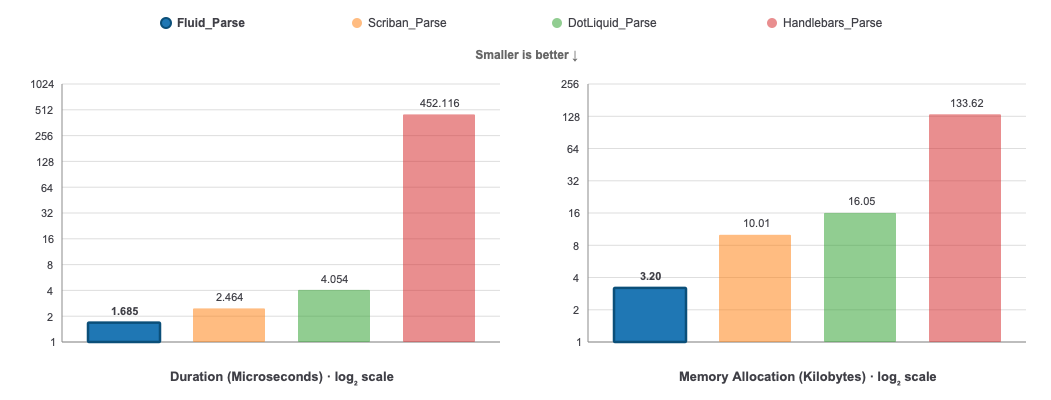
A benchmark application is provided in the source code to compare Fluid, Scriban, DotLiquid, Liquid.NET, and Handlebars.NET. Run it locally to analyze the time it takes to execute specific templates.
TL;DR — Fluid is faster and allocates less memory than all other well-known .NET Liquid parsers.
Results
Parse: Parses a simple HTML template containing filters and properties
Scriban takes 46% longer to parse and allocates over 3 times as much memory as Fluid.
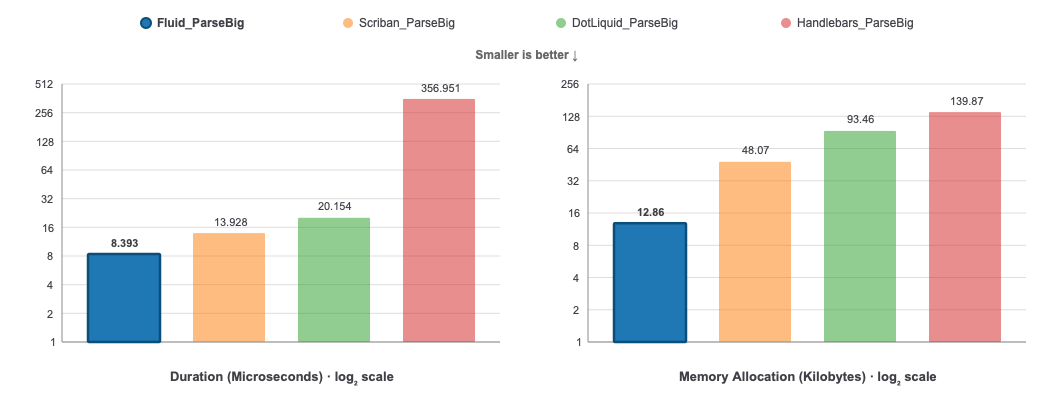
ParseBig: Parses a Blog Post template
Scriban takes 66% longer to parse and allocates almost 4 times as much memory as Fluid.
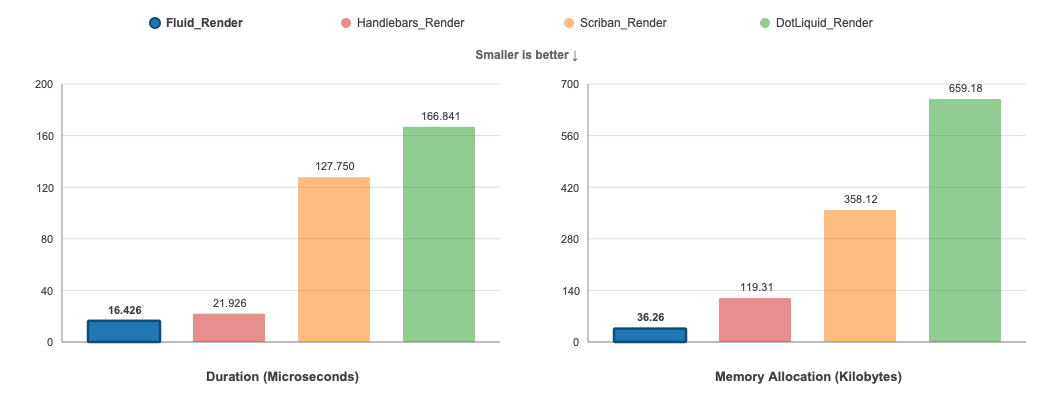
Render: Renders a simple HTML template containing filters and properties, with 100 elements
DotLiquid takes over 10 times as long to render and allocates 18 times as much memory as Fluid. The second best, Handlebars (Mustache), takes 33% longer and allocates over 3 times as much memory.
Tested on 8/18/2026 with
-
Parlot 1.5.8
-
Scriban 7.2.6
-
DotLiquid 2.3.197
-
Handlebars.Net 2.4.3
-
Liquid.NET 0.10.0 (Ignored since much slower and not in active development for a long time)
Benchmark.NET data
BenchmarkDotNet v0.15.8, macOS Sequoia 15.7.9 (24G830) [Darwin 24.6.0]
Apple M4 Pro, 1 CPU, 14 logical and 14 physical cores
.NET SDK 10.0.400
  [Host]   : .NET 10.0.11 (10.0.11, 10.0.1126.37416), Arm64 RyuJIT armv8.0-a
  ShortRun : .NET 10.0.11 (10.0.11, 10.0.1126.37416), Arm64 RyuJIT armv8.0-a

Job=ShortRun  IterationCount=3  LaunchCount=1
WarmupCount=3

| Method                       | Mean       | Error         | StdDev     | Ratio | RatioSD | Gen0    | Gen1    | Allocated | Alloc Ratio |
|----------------------------- |-----------:|--------------:|-----------:|------:|--------:|--------:|--------:|----------:|------------:|
| Fluid_Parse                  |   1.685 us |     0.1182 us |  0.0065 us |  1.00 |    0.00 |  0.3910 |  0.0019 |    3.2 KB |        1.00 |
| Scriban_Parse                |   2.464 us |     0.2919 us |  0.0160 us |  1.46 |    0.01 |  1.2245 |  0.0648 |  10.01 KB |        3.13 |
| DotLiquid_Parse              |   4.054 us |     0.3527 us |  0.0193 us |  2.41 |    0.01 |  1.9608 |  0.0229 |  16.05 KB |        5.02 |
| Handlebars_Parse             | 452.116 us |   433.5420 us | 23.7639 us | 268.40 |   12.25 | 15.6250 |  7.8125 | 133.62 KB |       41.82 |
|                              |            |               |            |       |         |         |         |           |             |
| Fluid_ParseBig               |   8.393 us |     0.5638 us |  0.0309 us |  1.00 |    0.00 |  1.5717 |  0.0458 |  12.86 KB |        1.00 |
| Scriban_ParseBig             |  13.928 us |     1.0365 us |  0.0568 us |  1.66 |    0.01 |  5.8746 |  1.1749 |  48.07 KB |        3.74 |
| DotLiquid_ParseBig           |  20.154 us |     2.4570 us |  0.1347 us |  2.40 |    0.02 | 11.4136 |  0.5188 |  93.46 KB |        7.27 |
| Handlebars_ParseBig          | 356.951 us | 1,331.1202 us | 72.9632 us | 42.53 |    7.53 | 16.6016 |  7.8125 | 139.87 KB |       10.88 |
|                              |            |               |            |       |         |         |         |           |             |
| Fluid_Render                 |  16.426 us |     1.5309 us |  0.0839 us |  1.00 |    0.01 |  4.4250 |  0.0610 |  36.26 KB |        1.00 |
| Fluid_SourceGenerated_Render |  30.694 us |     6.0248 us |  0.3302 us |  1.87 |    0.02 |  5.8594 |  0.0610 |  47.98 KB |        1.32 |
| Scriban_Render               | 127.750 us |     7.0525 us |  0.3866 us |  7.78 |    0.04 | 43.7012 |  8.0566 | 358.12 KB |        9.88 |
| DotLiquid_Render             | 166.841 us |     6.6613 us |  0.3651 us | 10.16 |    0.05 | 80.5664 | 15.3809 | 659.18 KB |       18.18 |
| Handlebars_Render            |  21.926 us |     1.8049 us |  0.0989 us |  1.33 |    0.01 | 14.5874 |       - | 119.31 KB |        3.29 |
Used by
Fluid is known to be used in the following projects:
- Orchard Core CMS Open Source .NET modular framework and CMS
- MaltReport OpenDocument/OfficeOpenXML powered reporting engine for .NET and Mono
- Elsa Workflows .NET Workflows Library
- FluentEmail All in one email sender for .NET
- NJsonSchema Library to read, generate and validate JSON Schema draft v4+ schemas
- NSwag Swagger/OpenAPI 2.0 and 3.0 toolchain for .NET
- Optimizely An enterprise .NET CMS
- Rock Relationship Management System
- TemplateTo Powerful Template Based Document Generation
- Weavo Liquid Loom A Liquid Template generator/editor + corresponding Azure Logic Apps Connector / Microsoft Power Automate Connector
- Semantic Kernel Integrate cutting-edge LLM technology quickly and easily into your apps
- Mailgen A .NET package that generates clean, responsive HTML e-mails for sending transactional mail
- LiquidPages Middleware that can be used with any web server to render liquid templates.
Please create a pull request to be listed here.